Media routing
My Claude Code routes media requests -- image generation and editing, speech, transcription and video -- over media rails on Model Config, the way it routes chat over tiers. A client that speaks the OpenAI media API points its base URL at the proxy and keeps its own code.
What ships
| Endpoint | Since | Rail | Settings |
|---|---|---|---|
POST /v1/images/generations |
7.60.0 | Image | MODEL_IMAGE, MODEL_IMAGE_FALLBACKS, MODEL_IMAGE_PAUSED |
POST /v1/images/edits |
7.61.0 | Image | the same rail |
POST /v1/audio/speech |
7.62.0 | Speech | MODEL_TTS, MODEL_TTS_FALLBACKS, MODEL_TTS_PAUSED |
POST /v1/audio/transcriptions, POST /v1/audio/translations |
7.63.0 | Transcription | MODEL_ASR, MODEL_ASR_FALLBACKS, MODEL_ASR_PAUSED |
POST /v1/videos, GET /v1/videos/{id}, GET /v1/videos/{id}/content, GET /v1/videos, DELETE /v1/videos/{id} |
7.64.0 | Video | MODEL_VIDEO, MODEL_VIDEO_FALLBACKS, MODEL_VIDEO_PAUSED |
Gemini :generateContent / :streamGenerateContent with image or audio output, :predictLongRunning, GET /v1beta/operations/{id} |
7.65.0 | Image, Speech, Video | the same rails |
GET /v1/media/models: every media rail model and the request fields it takes (Request fields per model) |
7.98.0 | every rail | none (read only) |
mcc-mcp: the rails as tools for a coding agent, over MCP, added per agent (Coding agents: the media server); since 7.100.0 also into your own app files from the Desktop apps cards (In your own app files) |
7.99.0 | every rail | MCP_MEDIA_APPS (the Add / Remove MCP server buttons); the Desktop apps cards write your file, not a setting |
from openai import OpenAI

client = OpenAI(base_url="http://127.0.0.1:8082/v1", api_key="your-proxy-token")
image = client.images.generate(model="gpt-image-2", prompt="a red cube on a white table")
edited = client.images.edit(
    model="gpt-image-2",
    image=[open("scene.png", "rb")],
    mask=open("mask.png", "rb"),
    prompt="make the cube blue",
)
The proxy token is the same one every other client uses (Authorization: Bearer,
x-api-key or x-goog-api-key).
Tutorial: set up the Image rail and see the result
- Model Config → Image rail. Pick the model that should answer image requests (the picker offers only image models, plus Kind not known), and Add fallback for the next one to try. Only a provider that declares an image endpoint can serve it (see the table below); a custom provider declares one with its Media endpoints checkboxes. Save.
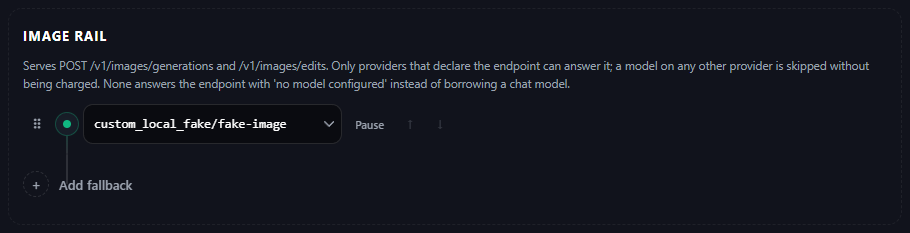
Model Config → Image rail: one model, with room for fallbacks. (Screenshot from a test install whose model is a local stand-in provider.)
- Send a request from any OpenAI-shaped client, or with curl (every rail's curl is in the next section):
curl http://127.0.0.1:8082/v1/images/generations \
  -H "Authorization: Bearer $ANTHROPIC_AUTH_TOKEN" -H "Content-Type: application/json" \
  -d '{"prompt": "a red cube on a white table", "response_format": "b64_json"}'
- Analytics → Media (near the bottom of the page) counts it per rail and
per provider and model: requests, succeeded, failed, cancelled, images out,
bytes, durations and cost. In the requests table the row is an ordinary one
whose Endpoint is
/v1/images/generations; filter by that endpoint (or Harness = Script or curl) to find it, and press View for its detail and, with Store generated media on, a preview.
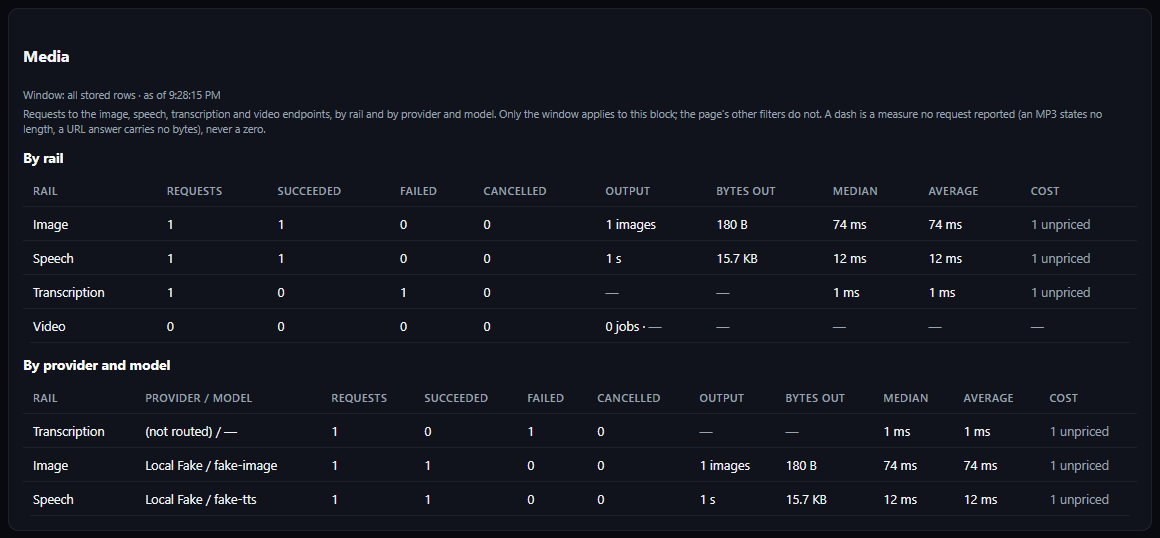
Analytics → Media: per rail, then per provider and model. The failed Transcription row is a request sent while that rail was empty (not routed).
Every rail with curl
$ANTHROPIC_AUTH_TOKEN is your proxy token (Providers → Runtime). Model names
that are not provider/model use the rail; a provider/model that is on the rail
pins that model, and one that is not is refused with 400 (7.95.0).
The image and speech requests and the empty-rail answer below were run against a
test install; the others follow the same OpenAI request shapes.
# Image: generate (Image rail)
curl http://127.0.0.1:8082/v1/images/generations -H "Authorization: Bearer $ANTHROPIC_AUTH_TOKEN" \
  -H "Content-Type: application/json" -d '{"prompt": "a red cube", "response_format": "b64_json"}'

# Image: edit, multipart (Image rail; served only by a provider that declares edits)
curl http://127.0.0.1:8082/v1/images/edits -H "Authorization: Bearer $ANTHROPIC_AUTH_TOKEN" \
  -F prompt="make the cube blue" -F image=@scene.png -F mask=@mask.png

# Speech (Speech rail): the answer is the audio file itself
curl http://127.0.0.1:8082/v1/audio/speech -H "Authorization: Bearer $ANTHROPIC_AUTH_TOKEN" \
  -H "Content-Type: application/json" -d '{"model": "tts", "input": "Hello there", "voice": "alloy", "response_format": "wav"}' -o hello.wav

# Transcription and translation (Transcription rail)
curl http://127.0.0.1:8082/v1/audio/transcriptions -H "Authorization: Bearer $ANTHROPIC_AUTH_TOKEN" \
  -F model=whisper-1 -F file=@clip.wav
curl http://127.0.0.1:8082/v1/audio/translations -H "Authorization: Bearer $ANTHROPIC_AUTH_TOKEN" \
  -F model=whisper-1 -F file=@clip.wav

# Video (Video rail): submit, poll, download
curl http://127.0.0.1:8082/v1/videos -H "Authorization: Bearer $ANTHROPIC_AUTH_TOKEN" \
  -H "Content-Type: application/json" -d '{"prompt": "a paper boat on a pond"}'
curl http://127.0.0.1:8082/v1/videos/video_abc123 -H "Authorization: Bearer $ANTHROPIC_AUTH_TOKEN"
curl http://127.0.0.1:8082/v1/videos/video_abc123/content -H "Authorization: Bearer $ANTHROPIC_AUTH_TOKEN" -o boat.mp4
An empty rail answers 404, on purpose, with the OpenAI error shape:
{"error":{"message":"No model is configured for the Transcription rail. Set MODEL_ASR (and optionally MODEL_ASR_FALLBACKS) on Model Config; a media request is never sent to a chat model.","type":"not_found_error","param":null,"code":null}}
It stays a 404 rather than a 503 because the OpenAI SDKs retry a 503
twice for nothing; the fix is a model on the rail, not a retry.
How a request finds its model
- The endpoint picks the rail:
images/generationsandimages/editsare the Image rail,audio/speechthe Speech rail,audio/transcriptionsandaudio/translationsthe Transcription rail,videosthe Video rail. - A
modelwritten asprovider/model(for examplexai/grok-2-image) pins that one model -- only if it is on that request's rail (7.95.0). Aprovider/modelthat is not on the rail is refused with400and nothing is sent, so spend stays where you configured it:
{"error":{"message":"'together/flux' is not on the Image rail. Models on it: xai/grok-2-image, together/black-forest-labs/FLUX.1-schnell. Name one of them, or no provider/model at all to use the rail's chain; set the rail's models on Model Config (MODEL_IMAGE, MODEL_IMAGE_FALLBACKS).","type":"invalid_request_error","param":null,"code":null}}
The refusal is logged (error / invalid_request) with no attempt and no cost. The same rule
holds on the Gemini door (a provider/model in the URL) and for :predictLongRunning. Before
7.95.0 any keyed provider's model could be named this way, on the rail or not.
- Any other model -- a vendor name such as gpt-image-2, or none -- uses the rail:
MODEL_IMAGE first, then MODEL_IMAGE_FALLBACKS in order, skipping anything in
MODEL_IMAGE_PAUSED.
- An empty rail answers 404 with an OpenAI error naming MODEL_IMAGE. A media request is
never sent to a chat model.
A media rail is not a chat tier: /v1/messages cannot reach it, and a model saved on a
media rail (and on no chat rail) is not offered as a chat model.
Which lists offer a model (7.78.2)
Every model has a kind: chat, or the media rail it belongs on (Image, Speech, Transcription, Video). The kind comes from declared data only, never from a model's name, and walks the same ladder as every other capability -- the provider's own model list first, then the catalogues, each rung filling only what the one above left unsaid (7.80.0):
- what the provider's own model list says the model accepts and produces (OpenRouter, Nous Portal, Kilo, Novita and Vercel publish this on every row) -- a model that reads and writes text is chat, one that writes an image is Image, writes audio is Speech, hears audio and writes text is Transcription, writes video is Video; a model can be several;
- otherwise what models.dev catalogues it as accepting and producing (its
modalities), down its own rungs: the provider's bucket, the OpenRouter reference, the cross-provider vote. OpenRouter's own live model list (7.84.0,MODEL_METADATA_OPENROUTER_LIVE) is a rung here too, matched by name: for a provider models.dev has no bucket for it answers before models.dev's OpenRouter reference and the vote; for one it describes, only where the bucket is silent -- it never overrides a bucket, and the Models page shows both where they differ. A pair with a word no kind rule reads (OpenRouter'sdecisions) states nothing. LiteLLM's model map (7.85.0) answers here too, only while LiteLLM pricing is on (COST_SOURCE_LITELLM_ENABLED): itssupported_modalities/supported_output_modalitiespair, where nothing above the cross-provider vote stated one, ahead of the vote -- the slot it holds for prices. A pair with a word no rule reads (LiteLLM'scode) states nothing; - otherwise the provider's model type or endpoint names -- Novita's
model_type, the endpoints Command Code or a new-api gateway says serve the model (/chat/completions,/images/generations,openai-video, ...). These are coarser than a modality list, so they only fill a gap; a word MCC does not know (Anthropic'smodel) says nothing. With LiteLLM pricing on, LiteLLM'smodeandsupported_endpointsfollow the provider's own words; - otherwise, the media rail you saved it on, when it is on no chat rail.
A model whose kind is stated and is not chat is left out of /v1/models, /v1beta/models,
every coding agent's generated catalogue and every chat picker on Model Config. Each media rail's
picker offers only models of its own kind. A model nobody has described stays everywhere it
was: listed for chat, and selectable on every media rail under Kind not known -- unknown is
not unsupported. Nothing you saved changes: a model of another kind already on a rail stays
there, marked in its picker and on the Models page, and routes exactly as before. This is a
listing change only; no request is routed or sent differently.
The Models page shows a chip on every row whose kind is not chat, and one filter chip per kind (plus Kind not known) with its count. Each model's capability panel has a kind row naming the rung that stated it -- the provider's model list, models.dev modalities, the provider's model type or endpoints or your media rail -- and how the id was matched.
Which providers can serve it
A provider serves a media operation only when it declares that endpoint; MCC never guesses
from a model name. A model on a provider that declares nothing for the operation is skipped
and not charged a failure -- the request log shows it as unsupported.
| Provider | Generation | Edits (relative to the provider's base URL) |
|---|---|---|
| Gemini | images/generations on its OpenAI-compatible base URL |
-- |
| xAI | images/generations |
images/edits |
| Together | images/generations |
-- |
| DeepInfra | images/generations on its OpenAI-compatible base URL |
-- |
| Agnes AI | images/generations |
-- |
| SiliconFlow | images/generations |
-- |
| ZenMux | images/generations |
-- |
| Mistral Studio | chat/completions carrying the image_generation built-in tool, then files/{id}/content |
-- |
An edit on the Image rail therefore skips every model whose provider declares no edit endpoint, uncharged, and is served by the first one that does.
Most of these are passed through; three surfaces across the media rails are translated, and the
difference is worth knowing before you pick a model. For the OpenAI-shaped providers above, the
body the client sent is forwarded field for field, with model replaced by the rail's model id, so
a parameter only one host understands still reaches it, and what the host answers is what the
client receives -- b64_json or url, exactly as the host returned it.
Gemini's native speech and transcription surfaces (7.66.0) and Mistral's image surface (8.14.0)
are not that, in either direction. MCC builds their request itself, so a field it has no place
for is not sent and is listed under not_forwarded on the request row rather than translated
by guess; and MCC turns the host's answer back into what an OpenAI client reads, so the bytes the
client gets are MCC's, not the host's. On speech Gemini answers raw 24 kHz PCM or WAV and MCC
answers the format the client named -- a WAV header on the raw samples when it asked for wav,
the samples untouched when it asked for pcm (framing, never transcoding); on transcription
Gemini's candidates are answered as the OpenAI transcript object or as plain text. A Mistral
image forwards only your prompt -- n, size, quality, response_format, style and the
rest are recorded as not forwarded, because a chat call carrying a built-in tool has nowhere to put
them -- and the picture is fetched by a second call and answered as {created, data:[{b64_json}]}.
The Models page says the same thing per model, field by field.
Mistral images (8.14.0) are worth one more sentence, because the wire is unusual: Mistral
does not document POST /v1/images/generations at all. MCC asks for the picture on
chat/completions with the image_generation built-in tool, and then fetches the result with a
second call, GET {base}/files/{file_id}/content, made on the same key and through the same
proxy exit that answered the first. If that fetch fails the attempt fails -- the model is
charged and the chain moves to the next one -- because the host has usually billed the picture by
then. A mistral_vibe model is not offered on this rail: the image charge's pool is not
established as the Vibe subscription's, so a Vibe ref is skipped uncharged. The image itself is
recorded unpriced: neither models.dev nor LiteLLM publishes a per-image rate for Mistral, and
MCC never invents a price.
Edits are forwarded in the client's own encoding. A multipart upload (image, image[],
mask and the text fields) goes out as multipart, streamed from the server's spooled copy of
each file -- in memory below the multipart library's own threshold, on disk above it -- and
re-read from the start if the rail falls back to the next model; nothing is ever read whole on
the server's event loop. The JSON variant (images: [{"image_url": ...}]) goes out as JSON.
Upload size: MEDIA_UPLOAD_MAX_MB (7.95.0, default 0, 0 to 10,000,000; Model Config →
Media uploads, under the four rails). 0 sets no limit of MCC's own and the provider's applies,
as before. Above 0, a media request carrying a file larger than that many megabytes -- an image
to edit, audio to transcribe, a video's reference image, an inline image on the Gemini door -- is
refused with 413 before any provider is asked, so nothing is spent on it:
{"error":{"message":"The file uploaded as 'image' is 30.0 MB, over MEDIA_UPLOAD_MAX_MB (20 MB). Nothing was sent to a provider. Send a smaller file, or raise MEDIA_UPLOAD_MAX_MB on Model Config (0 = no limit).","type":"request_too_large","param":null,"code":null}}
The refusal is logged (error / invalid_request). Each file is measured on its own.
Streaming ("stream": true, partial images as server-sent events) is routed to a surface
documented to stream it when the rail has one. None of the providers above documents it yet, so
since 7.95.0 such a request is served whole and answered as one event: the request goes to
the rail as an ordinary one with stream and partial_images not forwarded (they are listed in
the row's media.not_forwarded), and the answer is a text/event-stream with one
image_generation.completed event per picture (image_edit.completed for an edit), carrying
the provider's b64_json (or url), created_at, the size/quality/format fields it sent and
its usage. There are no partial images, because there were none. Before 7.95.0 such a request
answered 400. A rail where a model does declare streaming keeps routing the stream to it.
Speech (text to speech)
POST /v1/audio/speech routes on the Speech rail (MODEL_TTS, MODEL_TTS_FALLBACKS,
MODEL_TTS_PAUSED) under the same rules as the Image rail. The answer is the audio itself,
returned with the provider's own Content-Type.
| Provider | Speech endpoint (relative to its base URL) | Formats it documents |
|---|---|---|
| Together | audio/speech |
mp3, wav, raw |
| OpenRouter | audio/speech |
mp3, pcm |
| Groq | audio/speech |
not listed (the host judges) |
| SiliconFlow | audio/speech |
not listed (the host judges) |
| ZenMux | audio/speech |
not listed (the host judges) |
| Gemini | native generateContent (see below) |
wav, pcm |
Formats are never converted. A client that names a response_format a provider does not
document skips that provider without charging it, and the rail moves on; a client that names
none gets the provider's own container. MCC ships no audio encoder.
stream_format: "sse" is routed to a surface that declares it when the rail has one. None
does yet, so since 7.95.0 the request is served whole and answered as SSE: stream_format
is not forwarded, and the answer is one speech.audio.delta event carrying the whole audio
(base64, exactly as the provider sent it) followed by speech.audio.done (with the provider's
token usage when it reported one). Before 7.95.0 it answered 400. A plain request is
answered once the whole audio has arrived -- a failure before that falls back invisibly -- and
the OpenAI SDK's streaming helpers still work, they simply receive the complete file.
Transcription and translation (speech to text)
POST /v1/audio/transcriptions and POST /v1/audio/translations route on the
Transcription rail (MODEL_ASR, MODEL_ASR_FALLBACKS, MODEL_ASR_PAUSED). The upload
(file, plus language, prompt, response_format and the rest) is forwarded as multipart,
streamed from the server's spooled copy and re-sent whole to each model tried. The answer --
JSON, text, SRT, VTT -- comes back exactly as the provider wrote it.
| Provider | Transcription | Translation |
|---|---|---|
| Groq | audio/transcriptions |
audio/translations |
| DeepInfra | audio/transcriptions |
audio/translations |
| Together | audio/transcriptions |
-- |
| SiliconFlow | audio/transcriptions |
-- |
| Mistral | audio/transcriptions (streams) |
-- |
| OpenRouter | audio/transcriptions |
-- |
| Gemini | native generateContent with a built-in instruction (see below) |
-- |
A translation skips every model whose provider declares transcription only, uncharged.
stream=true is routed only to a surface that streams (Mistral); its transcript.text.delta
events are forwarded as they arrive.
Video (a job: submit, then poll)
POST /v1/videos routes on the Video rail (MODEL_VIDEO, MODEL_VIDEO_FALLBACKS,
MODEL_VIDEO_PAUSED). A video is not one answer but a job: the provider accepts it, works
for seconds to minutes, and the client asks for its status until it is done.
video = client.videos.create(model="veo-3.1-generate-preview", prompt="a paper boat on a pond")
video = client.videos.retrieve(video.id)  # ask again until status is "completed" or "failed"
client.videos.download_content(video.id).write_to_file("boat.mp4")
- The rail is walked only until a provider accepts the job. A refusal, an error or an
answer without a job id moves to the next model under the usual rules. The first provider
that answers with a job id wins, and the client gets MCC's own id for it (
video_...). - After that the job never moves. Every status check, the download and a delete go to the
same provider, with the same key and through the same proxy address. A job the provider
accepted and that later fails is reported as
failedwith the provider's reason; it is never resubmitted to the next model, so it is never billed twice. Submit again to start from the rail's primary. - Polling is yours. Each
GET /v1/videos/{id}makes exactly one status call upstream; MCC runs no background poller. Statuses are reported in OpenAI's four words (queued,in_progress,completed,failed) because the OpenAI SDK stops polling on any other word; a host'sprocessingorpendingis translated, and a word MCC does not know is passed through as the host wrote it. GET /v1/videos/{id}/contentstreams the video from the provider through the same key. After the provider has dropped it (Gemini documents two days for Veo), the answer is404with the codevideo_expired-- unlessMEDIA_STORE_ENABLEDkept a copy, which is then served from disk.GET /v1/videoslists the jobs submitted through MCC (not the provider's own list: jobs span providers and keys).DELETE /v1/videos/{id}forgets MCC's record; none of the providers below documents a delete, so the provider keeps the file until it expires.- Jobs live in the request log, so with
REQUEST_LOG_ENABLEDoffPOST /v1/videosanswers503before calling any provider (a job MCC could never read back would still be billed). - If the key that created a job is removed from the configuration, the job answers
409naming the provider: a job can only be read with the key that created it. - A status check follows the chat rules for key health: a
401/403or a429on that key is charged to it exactly as a chat request on that key would be. It is never rotated to another key, because the job belongs to this one.
| Provider | Submit | Status | Download |
|---|---|---|---|
| Gemini | videos on its OpenAI-compatible base URL (multipart, as the OpenAI SDK sends it) |
videos/{id} |
the url in the status answer |
| OpenRouter | videos (JSON: the SDK's form is re-encoded; seconds is sent as duration) |
videos/{id} |
videos/{id}/content |
| DeepInfra | videos on its OpenAI-compatible base URL (JSON, re-encoded) |
videos/{id} |
videos/{id}/content?variant= |
| A custom provider with its Video box ticked | videos |
videos/{id} |
the url in the status answer; when it carries none, videos/{id}/content (7.95.0) |
A custom provider's video with no download URL (7.95.0). A custom provider's Video box
declares OpenAI's /videos shape, and many such hosts serve the finished file only at
videos/{id}/content, never naming a URL. GET /v1/videos/{id}/content therefore asks for a
fresh status first, uses its URL if it has one -- exactly as before -- and otherwise downloads
from videos/{id}/content with the job's own key. A host that does not serve that path answers
the same 409 as before ("gave no address for the file yet"), never video_expired. Before
7.95.0 such a video answered 409 forever. The built-in providers keep their documented
addresses.
The body is otherwise forwarded field for field with model replaced by the rail's model, so a
host's own options (aspect_ratio, resolution, ... sent with the SDK's extra_body) reach
it. A provider that documents JSON only cannot take an uploaded input_reference file; such a
request skips it, uncharged. A download URL on another host than the provider's own is fetched
without the API key.
Gemini-shaped requests (7.65.0)
A client that speaks Google's Gemini API (the google-genai SDK, or REST on /v1beta) reaches the
same rails:
| Request | Rail | Answer |
|---|---|---|
models/{model}:generateContent or :streamGenerateContent with generationConfig.responseModalities containing IMAGE |
Image | candidates[0].content.parts[].inlineData (base64 image) |
the same with AUDIO |
Speech | one inlineData part with the audio and the provider's own MIME type |
models/{model}:predictLongRunning (the Veo shape) |
Video | an operation {"name": "operations/..."} |
GET /v1beta/operations/{id} |
-- | Google's operation shape: done, then response.generateVideoResponse.generatedSamples[0].video.uri, or error |
GET /v1beta/files/{id}:download?alt=media |
-- | the video bytes (what client.files.download(file=video) fetches) |
from google import genai
from google.genai import types

client = genai.Client(api_key="your-proxy-token",
                      http_options=types.HttpOptions(base_url="http://127.0.0.1:8082"))
image = client.models.generate_content(
    model="gemini-3.1-flash-image", contents="a red cube",
    config=types.GenerateContentConfig(response_modalities=["IMAGE"]))
operation = client.models.generate_videos(model="veo-3.1-generate-preview", prompt="a paper boat")
operation = client.operations.get(operation)  # ask again until operation.done
- A request without
IMAGEorAUDIOinresponseModalitiesis an ordinary chat request and takes the chat path exactly as before. Asking for bothIMAGEandAUDIOanswers400. - The request is translated to the rail's OpenAI-shaped endpoints: the user's text parts become the
prompt(or the text to speak),candidateCountbecomesn, a voice named inspeechConfigbecomesvoice, and inline images in the contents make it an edit with those images as the uploads. What has no exact equivalent there (imageConfig,temperature, ...) is not forwarded -- never guessed -- and is listed undermedia.not_forwardedin the request log row. - Images are asked for as base64. A provider that answers with a URL only is downloaded through the same key (the key is sent only to the provider's own host) and inlined.
:streamGenerateContentanswers with one server-sent event carrying the whole answer, sent when the answer is complete.:predictLongRunningfollows the video rules above: the rail is walked until a provider accepts the job; the operation is then pinned to it.durationSecondsbecomesseconds;aspectRatio,resolution,negativePromptandseedare sent under the OpenAI-compatible names Gemini's layer documents; a first-frameimageis sent asinput_reference(a provider that takes JSON only is skipped for it, uncharged). A failed job answersdone: truewitherror.code13 and the provider's message.- Errors use Google's error envelope.
:predict(the Imagen shape) is not served. MEDIA_FALLBACK_ON_UNDOWNLOADABLE(7.68.0, default off; Limits & Resilience). A provider that answers an image request with a URL has already generated -- and usually billed -- the image. Off: if MCC cannot download it, the client gets the error, as before. On: the download happens inside the attempt, so a download failure counts as that model's failure and the Image rail moves on to the next model (the first image may still be billed). It applies to Gemini-shaped image requests, the only answers MCC must download itself; OpenAI clients get the URL as the provider sent it, and an accepted video job is never resubmitted.
Gemini on the Speech and Transcription rails (7.66.0). Gemini's OpenAI-compatible layer has no
speech or transcription endpoint, so a Gemini model on these rails is called through Gemini's own
models/{model}:generateContent (with the API key in x-goog-api-key):
- Speech: the text is sent with
responseModalities: ["AUDIO"];voiceis forwarded as the prebuilt voice only when it is one of the 30 voices Google's speech page lists (Zephyr ... Sulafat) -- any other voice,instructionsandspeedare not forwarded (Gemini's default voice speaks) and are listed in the row'smedia.not_forwarded. Gemini returns WAV or raw 24 kHz PCM. A client that namedwavgets a WAV (raw PCM is given a WAV header -- framing, not transcoding); one that namedpcmgets raw PCM; one that named nothing gets what Gemini sent, with its own content type.mp3,opus,aacandflacskip Gemini, uncharged. - Transcription: the uploaded audio is sent inline (base64) with this instruction, verbatim:
"Transcribe the speech in this audio exactly as spoken. Answer with the transcript only, with no
introduction or commentary." -- plus "The speech is in <language>." when the client sent
language.prompt,temperatureand timestamps are not forwarded. The answer isjson({"text": ..., "usage": {tokens}}) ortext;srt,vttandverbose_jsonskip Gemini, uncharged. Translation is not declared for Gemini. - An answer with no audio (or no text) counts as a failure of that model and the rail moves on.
Token usage from Gemini's
usageMetadatafills the row's tokens.
Retry, fallback, keys, 429s and proxies
Every media rail follows the same rules as a chat chain, applied by a separate copy of the chat
engine that is held to it by a contract test (tests/contracts/test_media_chat_parity.py):
FALLBACK_SKIP_KINDSdecides which failures end the route (default: a malformed request). Anything else moves to the next model.FALLBACK_RETRY_FIRST=retry_onceretries the primary once on a transient failure.- Key rotation, lockouts and credits benching follow
{KEY}_ROTATION,CREDENTIAL_LOCKOUT_TIERSand the rest of Limits & Resilience. - With
RATE_LIMIT_ROUTES_AROUND_MODELon, a 429 benches the (key, model) pair and the rail moves on; the same diagnostic probe the chat engine uses -- a 16-token chat question to a chat model you configured on that provider, never an image -- decides whether the key or the model was limited. - Proxy chains,
PROXY_MAX_LIVE_FAILURES, trigger chips and the direct fallback apply to each key as they do for chat. - The deadlines (
FALLBACK_FIRST_TOKEN_TIMEOUT,FALLBACK_TOTAL_TIMEOUT, ...) apply with "the first token" meaning "the answer arrived". They ship at0(off).
Media keeps its own health records. A key locked out, a (key, model) pair benched or a proxy address benched by a media request is benched for media only; the chat engine never sees it, and the other way round. A non-streaming request is answered only once a model has produced the whole answer, so a failure before that falls back without the client noticing.
Request fields per model (7.98.0)
A media model's host can refuse a request for a field no catalogue mentions. On this
install's own log, 50 of 54 Agnes video creates came back
400 {"code":"invalid_request","message":"mode is required ...","data":{"param":"mode"}}
and six image requests 400 image_config is not supported by text image queue. models.dev
lists no request field for any of its 369 media models, so nothing MCC read could have told a
client either thing.
Since 7.98.0 every model on a media rail publishes, per operation it serves, a JSON Schema
(2020-12) of its request, with an x-mcc record on every field saying what is known about
it and who said so:
x-mcc.state |
meaning |
|---|---|
stated |
a source says this model takes the field |
required (stated) / refused (stated) |
you said so on the Models page -- or, for required, MCC's own door will not take the request without it (prompt, input, file) |
required (learned) / refused (learned) |
this host said so in a refusal (below) |
not forwarded by MCC |
MCC does not send it to this host (a native Gemini body has no field for it; a stream flag to a host that documents no stream) |
forwarded, not known |
MCC sends it and nobody has said whether this model takes it. Not known is never "unsupported". |
x-mcc.source names the rung that answered, highest first -- the same provider-first,
gap-filling ladder every other model field is read from, never a model's name:
operator-- your own statement, typed on the Models page (~/.mcc/media_request_fields.json);learned-- a refusal this host gave for this model and operation;provider_declared/mcc_adapter-- the provider's declared endpoint (formats, voices, stream, renamed fields, JSON-only bodies) and what MCC's own adapter sends;provider_list-- the provider's own/modelsrow (supported_parameters; a name it leaves out stays not known);- OpenRouter's live list and LiteLLM's map -- declared and inert: the recorded copy of OpenRouter's list gives its media models only chat sampling names, and no LiteLLM entry MCC has recorded carries a media request field. Each is wired only after a measurement shows it does. models.dev is not a rung (measured empty).
Below them is the endpoint's own contract (door): every field of the OpenAI request type for
that operation, plus the fields the Gemini door maps a Veo body onto. x-mcc.since is the day a
source said it (none for declared data); x-mcc.values is the list a source gave, also the
field's enum; x-mcc.also lists what lower rungs said about the same field. A refused field
is {"not": {}} -- JSON Schema for "leave it out".
Learned refusals. When a host answers a media request with a 4xx that names a field --
OpenAI's error.param, a top-level param, Agnes' data.param, a validator's detail[].loc,
or a message that starts with the field (image_config is not supported ...) -- MCC writes it
down as required (learned) (a field the request did not carry) or refused (learned) (one it
did), per provider, model and operation, in ~/.mcc/learned_facts.json. Only on hosts whose
body is the client's own fields (the OpenAI shapes); never model; never a 401, 403, 404, 429 or
5xx. It is kept for STATED_FACT_TTL_SECONDS (30 days) and then shown as stale and not used;
Forget on its row removes that one field's fact. Recording is all it does: nothing MCC
sends changes -- the request is routed, retried, charged, logged and answered exactly as
before, MCC skips no model and drops no field because of it (user decision 6 of 2026-10-16:
publish first).
Where to read it.
- Models page -> Media models: Request fields under each row -- the known fields with their state, source, values and date, the rest summarised as forwarded, not known, Forget on a learned row, Remove on yours, and a small editor to state a field yourself (operation, field, accepted / required / refused, optional values and type).
- Models page -> a model's Everything known: a media request fields row for a model on a media rail, with what your statement, the host's refusals and the provider's list each said.
GET /v1/media/models(same proxy token as every other route): every media rail model, its schema per operation and the endpoint to send it to, and, per rail and operation, which models accept, require, refuse, do not receive, or say nothing about each field -- every model, never only the primary and never only what they share.
Run on a scratch server whose fake Agnes had answered the two refusals above (abridged):
{"object": "list",
 "data": [{"id": "custom_agnes/agnes-video-2.5", "object": "media.model",
           "rails": [{"rail": "video", "position": "primary", "paused": false}],
           "operations": {"video_create": {"endpoint": "/v1/videos",
             "request_schema": {"$schema": "https://json-schema.org/draft/2020-12/schema",
               "type": "object", "required": ["prompt", "mode"],
               "properties": {"mode": {"x-mcc": {"state": "required (learned)", "source": "learned",
                 "since": "2026-10-18", "evidence": "mode is required (request id: ...)"}}, "...": {}}}}}},
          "..."],
 "rails": [{"rail": "video", "models": ["custom_agnes/agnes-video-2.5", "custom_agnes/agnes-video-lite"],
            "operations": {"video_create": {"endpoint": "/v1/videos",
              "fields": {"mode": {"accepted_by": ["custom_agnes/agnes-video-2.5"],
                                  "required_by": ["custom_agnes/agnes-video-2.5"], "refused_by": [],
                                  "not_forwarded_by": [],
                                  "not_known_for": ["custom_agnes/agnes-video-lite"]}}}}}]}
A media model still never appears in /v1/models or a coding agent's catalogue.
Coding agents: the media server (MCP) (7.99.0)
A coding agent does not know MCC serves pictures, speech, transcripts and video unless
something tells it. mcc-mcp, installed with MCC, is that something: a small program an
agent starts over MCP (stdio) that offers the rails you
filled in as tools. MCC never adds a tool to a request on its own; an agent gets these
only when you add the server to it.
Add it per agent. On the dashboard's Coding agents page, each agent card has an
Add MCP server button; Remove MCP server takes it out again and puts back exactly
what was there. The buttons write one setting, MCP_MEDIA_APPS (a comma list of app ids;
empty = nowhere), which is also on that page. The server is written only into what MCC
already owns:
| Agent | Where MCC puts it | Asks before a tool that spends money |
|---|---|---|
Claude Code (mcc-claude) |
MCC's own file, passed as --mcp-config=<file> (the = form: the option takes several files, so --mcp-config <file> mcp list would eat your own arguments) |
yes, Claude Code's own prompt |
Codex (mcc-codex) |
-c mcp_servers.mcc_media.command=... -c mcp_servers.mcc_media.args=[...] -c mcp_servers.mcc_media.required=true, for that launch only; while the button is on, MCC's Codex model list also says its models have no tool search, so the tools reach the model (7.107.0; every start waits up to about 3 s for the server: Known limits) |
yes: no tool that spends is marked read-only |
| OpenCode, OpenCode 2, Kilo | MCC's config layer (OPENCODE_CONFIG / KILO_CONFIG) under mcp, plus permission set to ask for the paid tools, because these apps do not ask by default |
yes, set by MCC's layer |
| Crush | MCC's CRUSH_GLOBAL_CONFIG document under mcp |
yes, Crush's own prompt |
| Qwen Code, Gemini CLI | MCC's system settings file under mcpServers (never trust) |
yes; Gemini CLI starts MCP servers only in a folder you trusted |
| Claude Desktop | MCC's own Claude Desktop document as managedMcpServers (absolute command; no tool policy) when that card is configured; relaunch once |
yes, Claude Desktop's own prompt |
These buttons never write your own files -- ~/.claude.json, Codex's config.toml,
opencode.json, Command Code's mcp.json. Since 7.100.0 the Desktop apps cards on the
same page can add the server to the last three (and to Claude Desktop's own file, as a
fallback), each with the change shown first, a one-time backup and Undo: see
In your own app files. Kimi Code, Goose, Cline and Droid
speak MCP but have not been measured on an installed copy yet; Pi has no MCP client (MCC's
Pi extension will offer the tools later); Aider has none at all. For any other MCP app, the
MCC media server card on that page has the line to add as a local (stdio) server:
In your own app files (7.100.0)
An app started from its own icon -- Codex desktop, OpenCode desktop, plain codex,
opencode or Command Code (commandcode) -- reads its MCP servers from your configuration
file, which MCC's launchers never touch. Each of these has a card under Desktop apps
on the Coding agents page with the same Add MCP server / Remove MCP server button,
writing one entry, mcc_media, into that file:
| Desktop apps card | File, and what MCC adds | Asks before a tool that spends money |
|---|---|---|
Codex desktop (and plain codex) |
~/.codex/config.toml: a [mcp_servers.mcc_media] table (command, args, and env only when MCC runs with a config folder of its own), appended after your tables -- no table or comment of yours is re-written |
yes: no tool that spends is marked read-only (see Known limits for Codex on MCC's models) |
OpenCode desktop (and plain opencode) |
~/.config/opencode/opencode.json: mcp.mcc_media (type: "local"), plus permission.mcc_media_<tool>: "ask" for the six tools that spend money where you have set nothing for that tool; a permission that is one word for every tool is left as it is |
yes, through OpenCode's own ask |
| Command Code | ~/.commandcode/mcp.json (not the providers.json Configure writes): mcpServers.mcc_media (transport: "stdio") |
yes, unless you run it in yolo mode or allowed the tool |
| Claude Desktop, fallback | %LOCALAPPDATA%\Claude-3p\claude_desktop_config.json (macOS and Linux: Claude-3p beside the app's usual folder): mcpServers.mcc_media, with --out for results |
yes; but Claude Desktop gives a server added here 60 seconds per tool call unless mcpToolTimeoutSec is set (MCC sets no timeout), so use it only if, after a relaunch, the tools from MCC's own document (above) did not show up |
How the button behaves:
- Nothing is written until you press it twice. The first press shows the change as a diff -- only the entry, and OpenCode's asks -- and a Write it button; Cancel writes nothing.
- A one-time backup. The first write copies the file to
<file>.mcc-backupbeside it (the same copy Configure takes, never overwritten). A file that did not exist is created with only the entry, and Remove deletes it again, with any folder MCC created for it. - Remove MCP server, and Undo on the same card (either mode, which also takes out Configure's keys), give the file back byte for byte: MCC records the exact text it inserted and takes that out, then checks the result is your file minus MCC's keys. A file you edited around the entry since comes back with your edits and without MCC's keys. Line endings are the file's own (a CRLF file stays CRLF).
- An
mcc_mediaentry MCC did not add -- one you pasted from the MCC media server card, or another program under the same name -- is yours: the card says so and offers neither button. So is MCC's own entry once you have changed it. - No token goes into any of these files:
mcc-mcpreads it from MCC's settings when the app starts it. Restart the app after adding or removing it. - VS Code and Roo Code speak MCP, but where each keeps its MCP servers has not been measured on an installed copy, so their cards say "not measured yet" and write nothing.
What the agent sees. media_status (free: what is configured, where MCC is, and this
session's results) and one tool per job whose rail has a model: generate_image,
edit_image, speak, transcribe, translate_audio, create_video with get_video. The
tools are built from /v1/media/models once, when the
agent starts the server: the rail's models are an optional model choice (left out, the
rail runs in order), and every field any of them takes is offered, labelled with which
models take, need or refuse it -- in plain JSON Schema (type, enum, items,
description), never x-mcc, not or const. Files are passed as local paths
(image_paths, mask_path, audio_path, input_reference_path) and uploaded by the
server.
What it costs. An agent with the server sends its tool list with every request: about 10 KB (10,374 bytes) for eight tools on a test install with one model on each of the four rails; more models on a rail add a little; the MCC media server card shows the figure for your rails. It is built once per session from one read of the catalogue, in a fixed order, with no date or counter in it, so it is byte for byte the same from turn to turn and the prompt cache keeps its prefix. A rail change reaches the agent at its next session.
Where results go. In the folder the agent works in (Claude Desktop, which has none:
mcp-media in MCC's configuration folder), never over an existing file -- a taken name gets
-1, -2; the agent may name another folder with save_to. Pictures also come back to
the model as images; speech and video come back as paths. create_video answers at once
with the job id and get_video saves the video when it is done. A call the agent stops
waiting for keeps running, saves its file and is listed by media_status as finished after
the app stopped waiting -- the provider bills it either way.
Where MCC is, and the token. mcc-mcp reads MCC's address and token from MCC's own
settings, the way the mcc-* launchers do, with one difference: a PORT or HOST in
MCC's .env wins over the same name in the agent's environment (an app may pass a PORT
of its own, such as a web project's dev server). No app file, prompt or shell ever holds
the token. It talks to MCC on loopback only and ignores proxy variables for it; a picture a
provider answers with only a link is downloaded by MCC through that provider's client and
proxy (the request header x-mcc-inline-images: 1 on the image doors asks for it, with the
same MEDIA_FALLBACK_ON_UNDOWNLOADABLE meaning the Gemini image door has). When MCC is not
running, a call says so and names the address; when MCC is older than 7.98.0,
media_status says to update it.
Spending. The gate is each agent's own "allow this tool?" prompt. MCC adds no limit and no confirm step of its own, and never writes an app's "trust" or "always allow" setting.
Where to see it on the dashboard (7.67.0)
- Models page -> Media models. One row per model on a media rail: which rail(s), its place (primary or fallback N) and whether it is paused, the operations its provider declares, a warning when the provider declares nothing for that rail (such a model is skipped, uncharged), the output modalities models.dev lists for it (advisory; "unknown" when models.dev has no entry), whether the media engine has benched it (media's own records, never chat's) and whether its provider has a key. Under each row, Request fields (7.98.0) lists what its request takes and who said so (above). A second table lists every provider -- built-in or custom -- that declares media endpoints.
- Analytics -> Media. A card of its own for the selected time window, per rail and then per provider and model: requests, succeeded, failed, cancelled, images out, audio seconds in and out, video jobs and video seconds, bytes out and durations, plus the video jobs' current states. A total no row measured shows as a dash ("not measured"), never 0. Media rows are ordinary request-log rows, so the existing chat totals and charts on Analytics count them too, as they have since 7.60.0; the Media card is the media-only view.
- Custom providers can declare media endpoints: the Media endpoints checkboxes on the custom
provider form (image generation, image edits, speech, transcription, translation, video). Each
ticked operation is served at the OpenAI path relative to the provider's base URL
(
images/generations,images/edits,audio/speech,audio/transcriptions,audio/translations,videos). Nothing ticked means none, as before.
What it costs (7.69.0)
A media request is priced the way a chat request is, from published sources only -- never a price typed into MCC -- in the same order:
- The provider's own figure when the answer reports one (OpenRouter's
usage.cost). - models.dev token prices, when the host reported token usage (the gpt-image family, token-billed
speech and transcription, Gemini's
usageMetadata), including models.dev's audio-token prices (input_audio,output_audio) for the audio tokens a host reports. - LiteLLM, only if you turned it on (
COST_SOURCE_LITELLM_ENABLED), in the unit it publishes for that operation:output_cost_per_imagex images,input_cost_per_characterx characters spoken (elseoutput_cost_per_secondx seconds of speech),input_cost_per_secondx seconds of audio transcribed,output_cost_per_secondx seconds of video, plus the audio-token prices. - Otherwise the row is unpriced -- shown as "unpriced", never as $0. models.dev publishes no per-image, per-second or per-character prices, so without a provider figure or LiteLLM most image, speech and video requests stay unpriced. A computed $0 is treated as unpriced; a $0 the provider itself reported is kept.
A video is priced when a status check first sees the finished job with its length. The cost shows in the request list and detail, in a Cost column of the Analytics Media card (priced amounts, plus a count of unpriced requests -- they are never added as zero) and, when you tick them, in the Cost and Media fields of an export. Media costs are part of the Analytics cost totals, like their request counts. Requests logged before 7.69.0 are not priced retroactively.
What is recorded
Every request writes an ordinary request-log row (its endpoint, e.g. /v1/images/generations)
with the chain's attempts, plus:
| Column | Meaning |
|---|---|
media_operation |
image_generate, image_edit, speech, transcribe, translate or video_create |
input_image_count |
images uploaded to an edit |
output_image_count |
items the host returned |
media_bytes_out |
decoded size of the base64 images (empty for a URL-only answer: not measured) |
media_sha_out |
SHA-256 of the first image, or of the audio |
input_audio_seconds |
audio a transcription heard: the provider's own figure, else a WAV upload's header; empty otherwise |
output_audio_seconds |
length of the audio, when its container states it (WAV); empty for MP3/Opus/AAC: not measured |
media_job_id |
the video job's MCC id (video_...) on the row of the request that submitted it |
output_video_seconds |
the video's length as the provider reports it, written once a status check sees the job completed; empty until then |
The row's protocol is the API the client spoke. Since 7.95.0 an OpenAI-door row says
which one: openai_images (generation and edits), openai_speech, openai_transcriptions
(transcription and translation) or openai_videos; a Gemini-door row says gemini. Rows written
before 7.95.0 keep the label they were written with -- every OpenAI-door media row then read
openai_images -- and are never rewritten. It is a label only: nothing filters or totals by it.
A client that hung up (7.95.0). A request answered whole (every media request that did not
stream) is logged cancelled -- not success -- when the client had already disconnected by the
time the answer was ready. What came back is kept exactly as for a success (the images and their
count, the stored files, a video's job, which a later status check still finds), and it is
still priced: the provider produced it and billed it. A streamed request keeps the rule it
has had since 7.78.4.
In the requests table (7.95.0) the Turn column says what a media row did, after any chip it
already had: 1 image generated / N images generated, speech · 4.2s (or speech when the
container states no length), transcribed · 31s / translated · 31s, video job (with · 8s
once a status check has seen its length). A row that names an operation and produced nothing --
a refusal, an error -- says only what it was: image request, speech request,
transcription request, translation request, video request. Chat rows are drawn exactly as
before. The list (GET /admin/api/requests) carries the six columns this reads --
media_operation, output_image_count, output_audio_seconds, input_audio_seconds,
output_video_seconds, media_job_id -- empty on chat rows.
A video job's status checks and downloads do not add rows: the job itself (provider, model,
which key by position and fingerprint, which proxy address, status, progress, the provider's
error) is kept in the request log's media_jobs table and pruned with its submit row. The key
itself and the provider's download URLs are never stored.
A transcript is the row's output text (output_text, output_chars), like a chat answer.
Token usage, when the host reports it, fills the usual tokens_in / tokens_out. An edit's
uploaded files are always recorded by SHA-256, size and type (never their bytes); with
MEDIA_STORE_ENABLED on, each uploaded image also gets the request log's usual thumbnail
(REQUEST_LOG_CAPTURE_IMAGES, REQUEST_LOG_IMAGE_MAX_PIXELS).
Keeping the images: MEDIA_STORE_ENABLED
Off by default. When on, each generated image, speech file and downloaded video, and each image
uploaded to an edit, is also written as a file named by its SHA-256 in the media folder beside
the request log (~/.mcc/logs/media/). Uploaded audio (a transcription's input) is not kept. The same image is stored
once. A file is deleted when the last request row that references it is pruned or the log is
cleared; turning the setting off stops new copies and leaves existing files alone. It lives on
Analytics -> Request log.
MEDIA_STORE_MAX_MB (7.68.0, default 0, 0 to 10,000,000) caps the stored files. 0 keeps
every file until its request row is pruned. Above 0, once the stored files together pass that
many megabytes, the oldest are deleted first; the request rows and their metadata (hash, type,
size) stay, and the row simply shows the file as no longer stored. The cap is applied whenever a
new media file is written, so lowering it takes effect with the next stored file.
Previews. The request detail (click a row on Analytics) has a Media section: every input
and output the request carried -- direction, type, size, a short hash -- and, only for files that
are stored, a preview (image, audio player or video player) loaded on demand from
GET /admin/api/media/<sha256>. That route answers only on the loopback address, serves image,
audio and video types as themselves (anything else, SVG included, as a download) and is never
used by list views.
Error answers
Every failure of an OpenAI media route answers in OpenAI's error envelope, and since 7.95.0 so
does a refused proxy token (or any other refusal before the route runs) on /v1/images/*,
/v1/audio/* and /v1/videos*, which the OpenAI SDKs read:
{"error":{"message":"Invalid proxy authentication token","type":"authentication_error","param":null,"code":null}}
401 is authentication_error, 403 permission_error, 404 not_found_error, anything else
invalid_request_error. Before 7.95.0 these answered FastAPI's {"detail": ...}. The chat routes
(/v1/chat/completions, /v1/responses, /v1/messages) keep {"detail": ...} unchanged; the
Gemini routes answer in Google's shape as before.
Codex
- Images you attach to a Codex turn (
codex -i shot.png, or a pasted image) work through MCC since 7.95.0. Codex sends them to the Responses door asinput_imageparts; MCC turns each into the same image block the Chat Completions door builds -- a base64 data URL or anhttp(s)URL -- so the model on your chat route sees the picture, and the vision adapter, describe mode and image thumbnails treat it exactly as they treat a Chat Completions image. Aninput_imagethat names afile_id(OpenAI's Files API, which MCC does not have) is refused with a400saying so. Before 7.95.0 every attached image was refused with400and no request-log row. - Images a Codex tool returns (
view_image) are still sent to the model as text, as before; changing that changes requests that work today and is a separate decision. - Codex's own image-generation tool does not use MCC. Measured with Codex 0.162.1 against a
test install, with the provider
mcc-codexwrites, withgpt-5.5, and with the built-in OpenAI provider pointed at MCC: none of them ever sent the hosted image tool, or any image request, to MCC. With a ChatGPT sign-in it goes to chatgpt.com directly. - Codex's
imagegenskill can use your Image rail by hand. The skill's command-line fallback (image_gen.py) is an OpenAI SDK client: givenOPENAI_BASE_URL=http://127.0.0.1:8082/v1andOPENAI_API_KEY=<your proxy token>it sendsPOST /v1/images/generations, which MCC routes on the Image rail.mcc-codexdoes not set these for you -- it keepsOPENAI_*out of Codex's environment on purpose -- so set them yourself in the shell you run the skill from:
OPENAI_BASE_URL=http://127.0.0.1:8082/v1 OPENAI_API_KEY="$ANTHROPIC_AUTH_TOKEN" \
  python "$CODEX_HOME/skills/.system/imagegen/scripts/image_gen.py" generate --prompt "a red cube"
Known limits today
What the current release does, stated so nobody has to find it by trial (checked on 7.95.0; the last item on 7.98.0):
- A deleted video job still counts in the Media card's video jobs.
- Gemini
candidateCount: 2comes back as one candidate holding two images. - A streamed image or speech request on a rail with no streaming provider gets its whole answer as one event, never partial images or audio chunks: no provider MCC knows documents either stream.
- Images returned by a Codex tool (
view_image) reach the model as text (above). - Codex's own image tool never reaches MCC (above).
- Request fields are published, not acted on. Since 7.98.0 each media model's
fields are published (Request fields per model),
including what a host's refusal taught MCC (Agnes video's
mode, imageimage_config). MCC still sends every request exactly as the client wrote it and passes a refusal back as the provider said it: it neither skips a model that would refuse nor drops a refused field (user decision 6, "publish first"). Whether Agnes' own model list carries any fields has not been measured; asupported_parameterslist on any provider's row is read when present. OpenRouter's and LiteLLM's lists are not read for fields until a measurement shows they carry any. - The media server (7.99.0) reaches only the agents in the table
above. Whether Claude Desktop's local
configuration library honours
managedMcpServersis confirmed by one relaunch of the app with the button on; MCC cannot run Claude Desktop itself. The agents' own files (Codexconfig.toml,opencode.json, Command Codemcp.json, and Claude Desktop'sclaude_desktop_config.jsonas the fallback) came in 7.100.0, from the Desktop apps cards (In your own app files). Whether Claude Desktop shows a server from that file in third-party mode is the same one relaunch; Command Code's and the two desktop apps' own reading of the entry is checked with each app'smcp listagainst a scratch home, not in the running apps. - Codex and the media server (7.107.0). Before 7.107.0 Codex listed the media server
but its model never saw the tools (measured 2026-10-18): MCC's Codex model list said its
models support tool search, so Codex offered MCP tools only through its own
tool_searchtool, which MCC's Responses door does not carry; and before a turn Codex waits only about one second for a server that is notrequired, wheremcc-mcptakes about three. Since 7.107.0, while Codex's Add MCP server button is on, MCC's Codex model list sayssupports_search_tool: falseon every model and the launch line marks the serverrequired = true. What to expect with the button on: everymcc-codexstart, interactive orexec, waits for the server (1.4 s measured warm, about 3.4 s cold); Codex also lists its own sub-agent tools, which tool search used to hide; the tool list each Codex request sends the provider grows from about 9.5 KB (8 tools) to about 31 KB (24 tools), and stays the same from turn to turn and session to session; and ifmcc-mcpcannot start, Codex refuses to start and namesmcc_media-- press Remove MCP server and it starts again. With the button off, every byte is what it was. The entry the Codex desktop card writes into your ownconfig.tomlis never marked required, so a brokenmcc-mcpcannot stop plaincodexor the desktop app; there Codex keeps its one-second wait, so a prompt sent at once may not see the tools (not measured with MCC's provider). - OpenCode 2 (preview) offers MCP tools inside its Code Mode, through its
executetool, once its background service has connected the server. The firstmcc-opencode2 runafter the service starts sent its turn beforemcc-mcphad connected, so that turn had no media tools; the next run's model sawtools.mcc_media.generate_image, and OpenCode 2 asked before it (a one-shotrundeclines what it would ask, so nothing was spent). - Qwen Code and Gemini CLI load MCP tools on demand: the first turn offers their own
tool_search, and the media tools appear after it -- from then on the tool list is the same from turn to turn.
Not yet
Gemini's Interactions API (and the transcription model offered only there) is not used. Video on ZenMux, Agnes AI, xAI, Together, SiliconFlow, MiniMax and Alibaba is not routed: each documents its own job API rather than the OpenAI shape, and each would be its own small release. OpenAI's own video API (Sora) was shut down on 2026-09-24.