Connecting other clients and editors
Editor integrations, and the API reference for any OpenAI-, Anthropic- or Gemini-shaped client: every endpoint MCC serves, how to authenticate, and one runnable example each.
For terminal use, start mcc-server, then run mcc-claude, mcc-codex, or mcc-pi. Use the guides below for editor integrations.
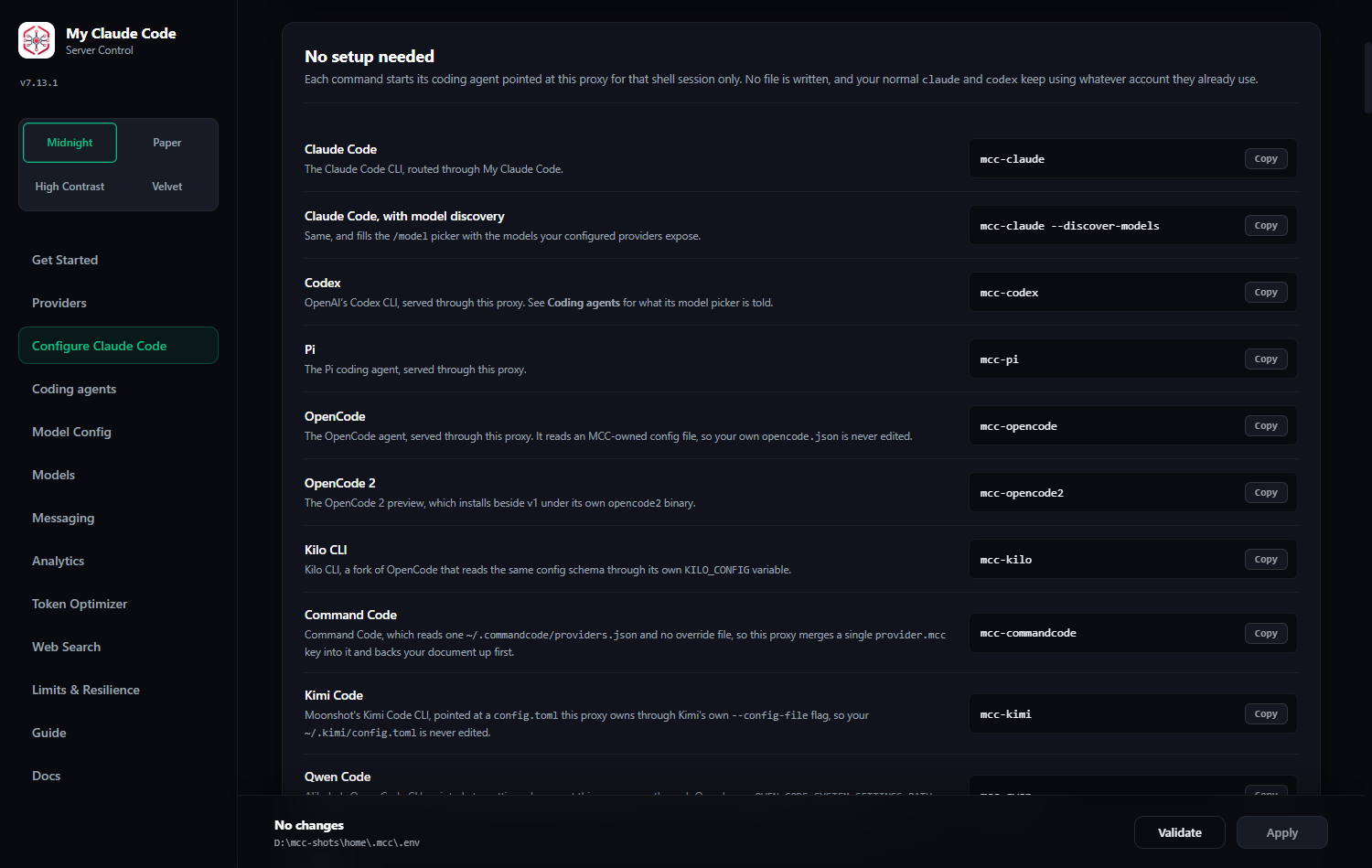
Configure Claude Code → No setup needed: every launcher command, and what each one does to that shell session only.
The Coding agents page is the same list with the detail behind it: whether the CLI is installed on this machine, which protocol MCC answers it on, the catalogue file MCC generates for it and when that file was last written. A card that is not installed has an Install button that shows its plan before anything runs (Install an agent from the dashboard).
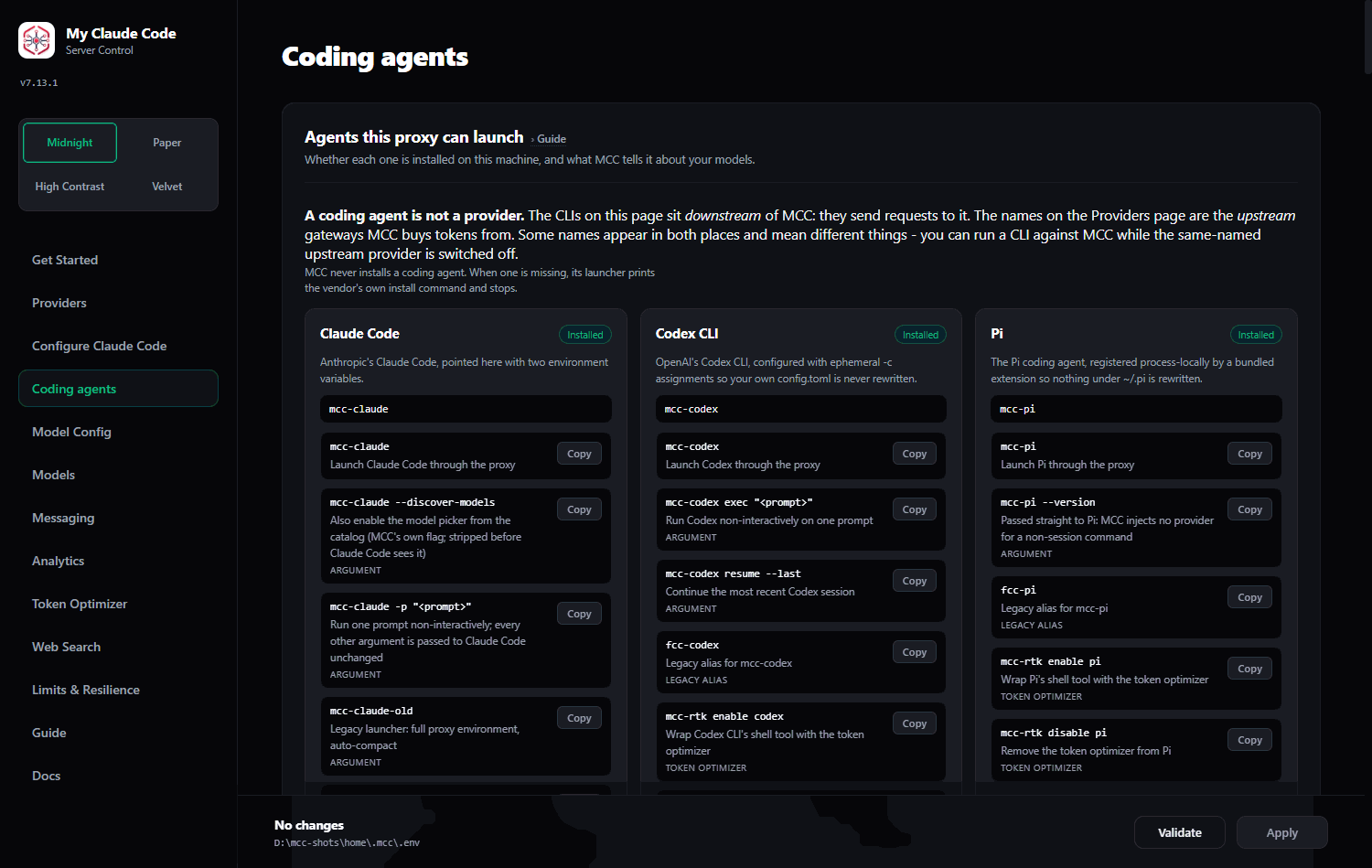
Coding agents: sixteen CLIs, each marked Installed or not, with its launcher commands.
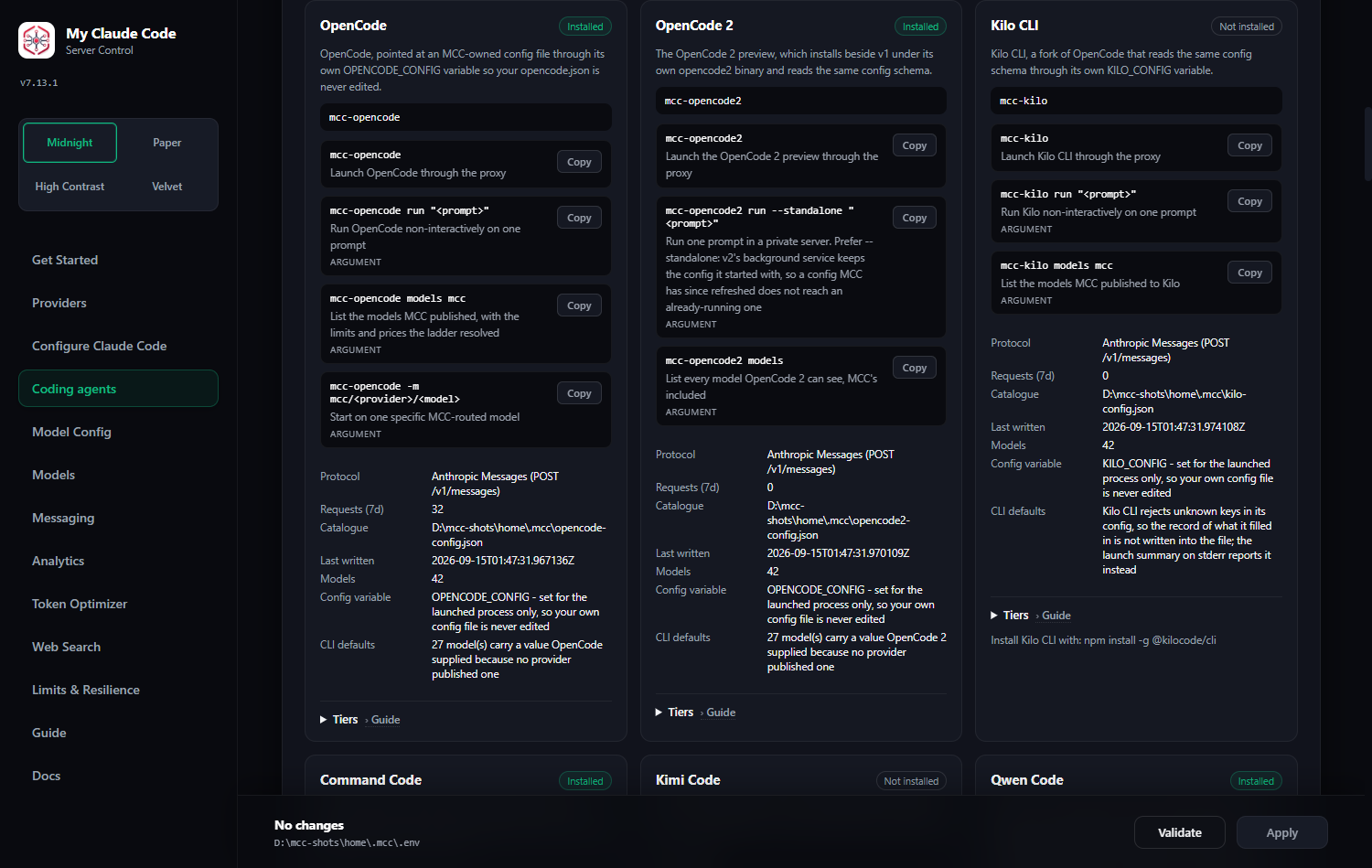
One card in full: the protocol MCC answers on, the catalogue file it generates, and how many models that file carries.
Applications MCC does not launch — the desktop apps — get a card each. It writes only its own keys into the one file each app reads at startup, and copies the original beside it first.
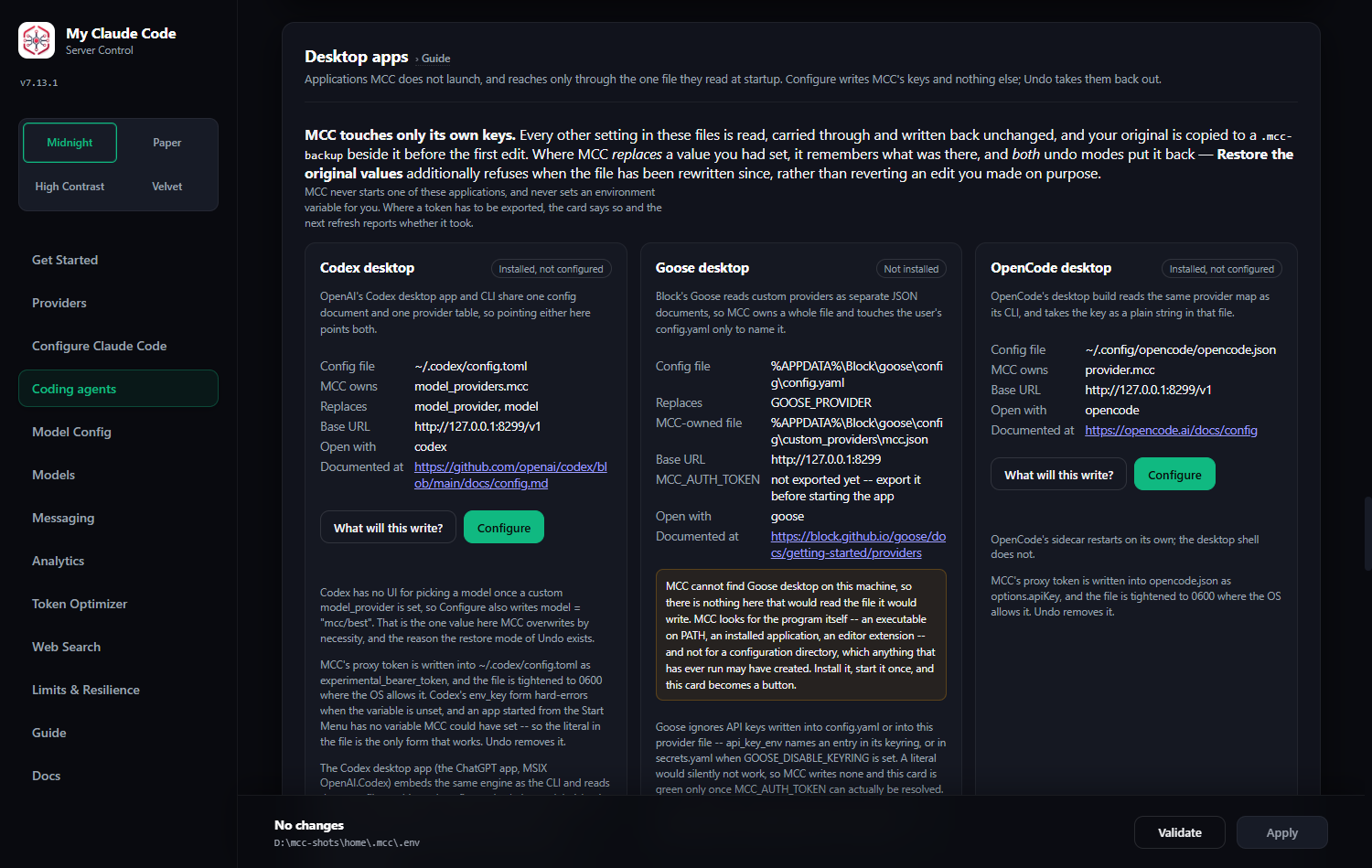
Desktop apps: the file each application reads, the keys MCC replaces, and a dry run before anything is written.
Media tools for an agent: MCC's media server (MCP, 7.99.0)
Every agent card (and the Claude Desktop card) has an Add MCP server button. It gives
that agent MCC's media server, mcc-mcp: tools for the media rails you filled in on
Model Config -- generate_image, edit_image, speak, transcribe, translate_audio,
create_video / get_video, and the free media_status -- so the agent can make
pictures, speech, transcripts and video itself. Remove MCP server takes it out and
puts back exactly what was there. MCC writes it only into what it already owns (the
mcc-claude and mcc-codex launch lines, its config layers for OpenCode, OpenCode 2,
Kilo, Crush, Qwen Code and Gemini CLI, and its own Claude Desktop document), never into
your own files, and the token never goes into any of them: mcc-mcp reads it from MCC's
settings. Each agent asks before a tool that spends money; for OpenCode and Kilo MCC's
layer turns that ask on. The agent sends a few KB of tool text with each request while it
has the server -- the MCC media server card on the same page shows the figure, the
tools your rails give, and a line to add mcc-mcp to any other MCP app. With its button
on, every Codex start waits up to about 3 seconds for the server and a broken mcc-mcp stops
Codex until you press Remove MCP server (7.107.0), and OpenCode 2's first run after its
service starts can begin before the server connects (Known limits). Details:
Coding agents: the media server.
In your own app files (7.100.0). The Desktop apps cards for Codex desktop,
OpenCode desktop and Command Code have the same Add MCP server / Remove MCP server
button, for the app's own file: ~/.codex/config.toml ([mcp_servers.mcc_media]),
~/.config/opencode/opencode.json (mcp.mcc_media, plus OpenCode's own ask for the
tools that spend money) and ~/.commandcode/mcp.json (mcpServers.mcc_media) -- so the
apps started from their own icons, and plain codex and opencode, get the tools too.
The first press shows the change and a Write it button; the first write takes a
one-time backup beside the file; Remove MCP server or the card's Undo gives the
file back byte for byte. An mcc_media entry MCC did not add is left alone, and no token
is written. The Claude Desktop card has it as a fallback for
claude_desktop_config.json -- 60 seconds per tool call there -- for use only if MCC's own
document did not bring the tools after a relaunch. VS Code and Roo Code: not measured yet.
Details: In your own app files.
Claude Code in VS Code
Install the [Claude Code extension](https://marketplace.visualstudio.com/items?itemName=anthropic.claude-code). Open VS Code's user settings as JSON and add:"claudeCode.disableLoginPrompt": true,
"claudeCode.environmentVariables": [
{ "name": "ANTHROPIC_BASE_URL", "value": "http://localhost:8082" },
{ "name": "ANTHROPIC_AUTH_TOKEN", "value": "<your token: dashboard Providers -> Runtime>" },
{ "name": "CLAUDE_CODE_ENABLE_GATEWAY_MODEL_DISCOVERY", "value": "1" },
{ "name": "CLAUDE_CODE_AUTO_COMPACT_WINDOW", "value": "190000" },
{ "name": "DISABLE_AUTOUPDATER", "value": "1" },
{ "name": "DISABLE_FEEDBACK_COMMAND", "value": "1" },
{ "name": "DISABLE_ERROR_REPORTING", "value": "1" },
{ "name": "DISABLE_TELEMETRY", "value": "1" }
]
Codex App
Start `mcc-server`, then edit your Codex configuration: - Windows: `%USERPROFILE%\.codex\config.toml` - macOS: `~/.codex/config.toml` Add the matching model-catalog path and replace `YOUR_USERNAME`. Windows: macOS: Then add the shared MCC settings: Match the model and port to the Admin UI. The `env_key` reads the same proxy auth token the `mcc-codex` launcher sets for each process. `mcc-server` publishes the catalog file under `~/.mcc/` on startup and whenever the model inventory changes, so restart the Codex App after setup or model changes, then select an MCC model from its model picker. **Images in Codex (7.95.0).** An image you attach to a Codex turn (`codex -i shot.png`, or a paste) now reaches the model on your route: MCC's Responses door accepts it as the same image the Chat Completions door sends (before 7.95.0 it answered `400` and the turn failed). Images a Codex tool returns (`view_image`) still reach the model as text. Codex's own image-generation tool never calls MCC (measured with Codex 0.162.1). Its `imagegen` skill's command-line fallback can use your **Image rail** if you point it at MCC yourself -- `mcc-codex` does not set `OPENAI_*` for Codex, on purpose: run the skill with `OPENAI_BASE_URL=http://127.0.0.1:8082/v1` and `OPENAI_API_KEY` set to your proxy token ([Media routing → Codex](MEDIA.md#codex)).Codex in VS Code
Install the [Codex extension](https://marketplace.visualstudio.com/items?itemName=openai.chatgpt). Create or edit `~/.codex/config.toml` (`%USERPROFILE%\.codex\config.toml` on Windows): Match `model`, the port, and bearer token to the Admin UI, then restart VS Code. For WSL-backed Codex, edit the file inside WSL.Claude Code in JetBrains ACP
Edit the installed Claude ACP configuration: - Windows: `C:\Users\%USERNAME%\AppData\Roaming\JetBrains\acp-agents\installed.json` - Linux/macOS: `~/.jetbrains/acp.json` Set the environment for `acp.registry.claude-acp`:"env": {
"ANTHROPIC_BASE_URL": "http://localhost:8082",
"ANTHROPIC_AUTH_TOKEN": "<your token: dashboard Providers -> Runtime>",
"CLAUDE_CODE_ENABLE_GATEWAY_MODEL_DISCOVERY": "1",
"CLAUDE_CODE_AUTO_COMPACT_WINDOW": "190000",
"DISABLE_AUTOUPDATER": "1",
"DISABLE_FEEDBACK_COMMAND": "1",
"DISABLE_ERROR_REPORTING": "1",
"DISABLE_TELEMETRY": "1"
}
Claude Code still asks you to log in
If Claude Code asks you to log in after you configure the MCC URL and token, open its state file: - Windows: `%USERPROFILE%\.claude.json` - macOS/Linux/WSL: `~/.claude.json` Merge this property into the existing JSON without removing its other fields: If the file does not exist, create it with a complete JSON object: Restart Claude Code or the IDE after saving the file.API reference
MCC speaks four vendors' APIs on one port. Every example below was run against a test install (its tiers pointed at a local stand-in provider) and answered as shown; on your install the answer comes from the model your tier routes to.
Base URL and authentication
| Client kind | Base URL to give it | Token header it sends (all accepted) |
|---|---|---|
| Anthropic SDK, Claude Code | http://127.0.0.1:8082 (the root; the SDK adds /v1/messages) |
x-api-key: <token> or Authorization: Bearer <token> |
| OpenAI SDK and compatible clients | http://127.0.0.1:8082/v1 |
Authorization: Bearer <token> |
Gemini SDK (google-genai), REST |
http://127.0.0.1:8082 (the SDK adds /v1beta) |
x-goog-api-key: <token>, or ?key=<token> |
The token is ANTHROPIC_AUTH_TOKEN (dashboard: Providers → Runtime). With it
empty, no token is asked for (see Security).
A wrong or missing token answers 401: {"detail": "Invalid proxy authentication token"}
on the Anthropic and OpenAI chat doors, OpenAI's envelope
({"error": {"message": "Invalid proxy authentication token", "type": "authentication_error", ...}})
on the OpenAI media routes (/v1/images/*, /v1/audio/*, /v1/videos*, since 7.95.0), and
Google's error shape ({"error": {"code": 401, "status": "UNAUTHENTICATED", ...}}) on /v1beta.
An optional x-mcc-harness: <name> request header names the client in
Analytics (the mcc-* launchers set it); it is never sent upstream.
Which model a request gets
model you send |
What answers |
|---|---|
mcc/cyber, mcc/best, mcc/good, mcc/medium, mcc/cheap |
the Mythos, Fable, Opus, Sonnet and Haiku tiers on Model Config, with their fallback chains |
mcc/vision |
the vision adapter's model |
a Claude name (claude-sonnet-4-5, claude-opus-…) |
the tier its family maps to |
provider/model (opencode/big-pickle, custom_x/y) |
that one model, which needs that provider's key |
| anything else | the default route (MODEL) |
GET /v1/models lists what your clients may pick, and since 8.21.0 each entry
carries the resolution ladder's record for that model under metadata: its
context window, output limit, vision and tool-call support, reasoning controls
and effort vocabulary, the four prices, and any parameters the provider
publishes or pins. The media routes pick their rail by endpoint; a
provider/model sent there must be one of that rail's models
(7.95.0: one that is not is refused with 400; any other name uses the rail --
Media routing).
Endpoints
| Method and path | Speaks | Example |
|---|---|---|
POST /v1/messages |
Anthropic Messages, streamed or not | below |
POST /v1/messages/count_tokens |
Anthropic token count | below |
POST /v1/chat/completions |
OpenAI Chat Completions, streamed or not | below |
POST /v1/responses |
OpenAI Responses, streamed or not | below |
GET /v1/models |
OpenAI/Anthropic model list | below |
POST /v1beta/models/{model}:generateContent, :streamGenerateContent, :countTokens; GET /v1beta/models |
Google Gemini | below |
POST /v1/images/generations, /v1/images/edits, /v1/audio/speech, /v1/audio/transcriptions, /v1/audio/translations, /v1/videos (+ GET/DELETE /v1/videos/{id}, GET /v1/videos/{id}/content) |
OpenAI media | Media routing |
GET /v1/media/models |
the media rails' models and the request fields each takes (7.98.0) | below |
POST /v1/websearch |
Standalone JSON web search over dashboard providers/chain | below |
POST /v1/webfetch |
Standalone SSRF-pinned web page fetch and extraction | below |
GET /health |
liveness | below |
Messages
curl http://127.0.0.1:8082/v1/messages \
  -H "x-api-key: $ANTHROPIC_AUTH_TOKEN" -H "anthropic-version: 2023-06-01" \
  -H "Content-Type: application/json" \
  -d '{"model": "mcc/medium", "max_tokens": 256, "messages": [{"role": "user", "content": "Say hello"}]}'
Answers an Anthropic message ("stream": true gives Anthropic's event stream).
Tool changes in the middle of a conversation (7.102.2). Claude Code 2.1.304
tells the model that its tools changed with a role: "system" message holding
tool_addition and tool_removal blocks; a resumed session always carries
them. MCC accepts both blocks on /v1/messages and /v1/messages/count_tokens
and turns them into the tool list before choosing a model, so every model gets
the same tools the conversation adds up to: an added tool is offered, a
removed one is not, and the blocks themselves are not sent on. A
cache_control breakpoint that sat on one of them moves to the block before
it. A request without these blocks is sent exactly as before. MCP references
(mcp_tool_reference, mcp_toolset_reference) name tools only Anthropic's own
MCP connector can reach, so they are dropped. A tool_result with no content
is accepted too, as Anthropic documents it.
Empty system messages (7.103.2). After a compaction, a resume or an effort
change Claude Code sends a role: "system" message with content: [] whose
only payload is the per-turn effort (output_config); on OpenAI-format models
MCC leaves that message out instead of refusing the request (Request detail
then says empty_system_messages_dropped), and Anthropic-format routes receive
it exactly as before.
Count tokens
curl http://127.0.0.1:8082/v1/messages/count_tokens \
  -H "x-api-key: $ANTHROPIC_AUTH_TOKEN" -H "anthropic-version: 2023-06-01" \
  -H "Content-Type: application/json" \
  -d '{"model": "mcc/medium", "messages": [{"role": "user", "content": "Say hello"}]}'
Answers {"input_tokens": 6}. MCC counts locally; nothing is sent to a provider.
Chat Completions
curl http://127.0.0.1:8082/v1/chat/completions \
  -H "Authorization: Bearer $ANTHROPIC_AUTH_TOKEN" -H "Content-Type: application/json" \
  -d '{"model": "mcc/medium", "stream": true, "messages": [{"role": "user", "content": "Say hello"}]}'
Server-sent chat.completion.chunk events ending in data: [DONE]; leave out
stream for one chat.completion. Reasoning streams as delta.reasoning_content.
Responses
curl -N http://127.0.0.1:8082/v1/responses \
  -H "Authorization: Bearer $ANTHROPIC_AUTH_TOKEN" -H "Content-Type: application/json" \
  -d '{"model": "mcc/medium", "input": "Say hello", "stream": true}'
Streams response.created … response.output_text.delta … response.completed
when stream is omitted or true, and returns a complete JSON response object
when "stream": false.
An image in a user message ({"type": "input_image", "image_url": "data:image/png;base64,…"}
or an https:// URL) is accepted since 7.95.0 and reaches the model as the same image the
Chat Completions door sends; an input_image with a file_id answers 400 (MCC has no
Files API).
Gemini
curl "http://127.0.0.1:8082/v1beta/models/claude-sonnet-4-5:generateContent" \
  -H "x-goog-api-key: $ANTHROPIC_AUTH_TOKEN" -H "Content-Type: application/json" \
  -d '{"contents": [{"role": "user", "parts": [{"text": "Say hello"}]}]}'
Answers candidates[0].content.parts[].text with usageMetadata; the path is the
model (here the Sonnet tier, by its Claude name; a tier alias works in the path
too, slash and all). GET /v1beta/models lists the same models in Google's shape. Asking for
IMAGE or AUDIO in generationConfig.responseModalities uses the media rails
(Media routing). Passing googleSearch,
googleSearchRetrieval, or urlContext in tools[] runs MCC's local web search/fetch
loop (WEB_SEARCH_GEMINI_ENABLED=true) and returns groundingMetadata and
urlContextMetadata on both :generateContent and :streamGenerateContent?alt=sse.
Models and health
curl http://127.0.0.1:8082/v1/models -H "Authorization: Bearer $ANTHROPIC_AUTH_TOKEN"
curl -i http://127.0.0.1:8082/health
An entry keeps the OpenAI-shaped keys it always had — object, created,
owned_by, created_at, display_name, id, type, plus Claude Desktop's
anthropic_family_tier / is_family_default — and since 8.21.0 appends a
metadata object holding what MCC's resolution ladder answered for that model:
context_length, max_output_tokens, supports_vision, supports_tool_calls,
reasoning (can_reason, the three control flags, supported_efforts,
mandatory, default_enabled), the four prices flat and per million tokens
(input_price, output_price, cache_read_price, cache_write_price),
supported_parameters and default_parameters. Every one of them is null
when no source stated it — a stated 0.0 price and an unknown one are different
answers — and the ten fixed Claude protocol aliases carry "metadata": null
because they name a route rather than a model. The four prices are MCC's
per-million floats, not OpenRouter's per-token strings.
/health needs no token and answers {"status": "healthy"}, with an
x-mcc-pid header naming the server's process; while the server is starting
it answers 503 with "status": "starting".
Media models and their request fields
Since 7.98.0. One entry per model on a media rail ("object": "media.model"), with
its rails and, per operation it serves, the endpoint to send it to and a JSON Schema of
the request it takes; and per rail and operation, which of the rail's models accept,
require, refuse or say nothing about each field. Every field carries an x-mcc record
(state, source, since, values): a field nobody has spoken about is
forwarded, not known, never "unsupported". Run on a scratch server (fake Agnes, fake
key): 200, 12,829 bytes, data = the Image rail's model and the two Video rail models;
the video rail's fields.mode answered
{"accepted_by": ["custom_agnes/agnes-video-2.5"], "required_by": ["custom_agnes/agnes-video-2.5"], "refused_by": [], "not_forwarded_by": [], "not_known_for": ["custom_agnes/agnes-video-lite"]}
after that model's host had refused a request with mode is required. Without a token it
answers 401 with {"detail": ...}, as /v1/models does. Read only: nothing a request
sends changes. Fields, states and sources:
Request fields per model.
The images doors also take an opt-in request header, x-mcc-inline-images: 1 (since
7.99.0; mcc-mcp sends it): every picture comes back as b64_json, and one the
provider answered with only a link is downloaded by MCC through that provider's own
client and proxy, so the caller never fetches a provider's address itself. Without the
header an answer is exactly what it was.
REST web search and fetch
curl http://127.0.0.1:8082/v1/websearch \
  -H "Authorization: Bearer $ANTHROPIC_AUTH_TOKEN" \
  -H "Content-Type: application/json" \
  -d '{"query": "python 3.14 release notes", "max_results": 5, "synthesize": true}'
curl http://127.0.0.1:8082/v1/webfetch \
  -H "Authorization: Bearer $ANTHROPIC_AUTH_TOKEN" \
  -H "Content-Type: application/json" \
  -d '{"url": "https://docs.python.org/3/", "extractor": "trafilatura"}'
Drop-in dialect endpoints reuse MCC's live Web Search configuration and key pools without changing client SDK code:
- Tavily:
POST /v1/websearch/tavily,/v1/websearch/tavily/search,/v1/websearch/tavily/extract(also accepts JSON bodyapi_key) - Exa:
POST /v1/websearch/exa,/v1/websearch/exa/search,/v1/websearch/exa/contents(x-api-keyorBearer) - Brave:
GET /v1/websearch/braveandGET /res/v1/web/search(also acceptsX-Subscription-Token) - DeepSeek wire dialect:
POST /v1/websearch/deepseek,/v1/websearch/deepseek/tools/search,/v1/websearch/deepseek/v1/tools/search,/v1/websearch/deepseek/tools/fetch,/v1/websearch/deepseek/v1/tools/fetch - SearXNG JSON:
GET /v1/websearch/searxngandGET /search?format=json&q=...&key=...(for OpenClaw, Hermes, and DSH; non-JSONformatreturns400)
All canonical and dialect search routes accept Bearer, x-api-key, x-goog-api-key,
and ?key=, answer HEAD/OPTIONS probes with 204, and default to
the live Web Search and Model Config → Web tools dashboard configuration.
POST /v1/websearch also accepts format ("mcc", "digest", "tavily", "exa",
"brave", "deepseek", or "searxng") and opt-in synthesize: true (+ model,
synthesis_max_tokens) to run a priced MCC model turn (is_local=0 in requests.db)
returning grounded inline [N] citations.
Validation and SSRF refusals answer 400 in OpenAI's {"error": {...}}
envelope; WEB_SEARCH_PROVIDER=disabled or ENABLE_WEB_SERVER_TOOLS=false
answers 503. See Web search guide.
Streamable HTTP MCP (POST /v1/mcp/websearch) and native door web search
Enabled by default (WEB_SEARCH_MCP_HTTP_ENABLED=true, WEB_SEARCH_RESPONSES_ENABLED=true,
WEB_SEARCH_ANTHROPIC_MULTI_TOOL_ENABLED=true, WEB_SEARCH_GEMINI_ENABLED=true,
WEB_SEARCH_CHAT_ENABLED=true, WEB_SEARCH_DOOR_MODE=local,
WEB_SEARCH_TOOL_LOOP_MAX_STEPS=5), every door shares the exact /v1/messages search
provider chain, fetch extractor/SSRF guards, and schema-on-error feedback:
- Antigravity (
agy/mcp_config.json):{"mcpServers": {"mcc_websearch": {"serverUrl": "http://127.0.0.1:8082/v1/mcp/websearch", "headers": {"Authorization": "Bearer YOUR_TOKEN"}}}}(while/v1betagoogleSearch/urlContextrequests also execute directly viaWEB_SEARCH_GEMINI_ENABLED=true) - Gemini CLI (
/v1beta):tools: [{"googleSearch": {}}, {"urlContext": {}}]runs MCC's local search and fetch loop and returnsgroundingMetadata/urlContextMetadataautomatically. - OpenAI Chat Completions (
/v1/chat/completions):web_search_optionsortools: [{"type": "web_search"}]runs MCC's local search loop and returns nestedurl_citationannotations inchoices[].message.annotations/ streamingdelta.annotations. - Codex (
config.toml):[mcp_servers.mcc_websearch]withurl = "http://127.0.0.1:8082/v1/mcp/websearch"andbearer_token_env_var = "ANTHROPIC_AUTH_TOKEN"(or use nativetools: [{"type": "web_search"}]directly againstPOST /v1/responses!) - OpenCode (
opencode.json):{"mcp": {"mcc_websearch": {"type": "remote", "url": "http://127.0.0.1:8082/v1/mcp/websearch", "headers": {"Authorization": "Bearer YOUR_TOKEN"}}}} - Cline (
cline_mcp_settings.json):{"mcpServers": {"mcc_websearch": {"type": "streamableHttp", "url": "http://127.0.0.1:8082/v1/mcp/websearch", "headers": {"Authorization": "Bearer YOUR_TOKEN"}}}} - Goose (
config.yaml):extensions.mcc_websearch: {type: streamable_http, uri: "http://127.0.0.1:8082/v1/mcp/websearch", headers: {Authorization: "Bearer YOUR_TOKEN"}} - Claude Code (
.mcp.json):{"mcpServers": {"mcc_websearch": {"type": "http", "url": "http://127.0.0.1:8082/v1/mcp/websearch", "headers": {"Authorization": "Bearer YOUR_TOKEN"}}}}(while native single-tool and mixed client +web_search/web_fetchturns onPOST /v1/messageswork out of the box).
See Multi-door agent search & HTTP MCP.
Errors
A routing or provider failure answers in the door's own vendor shape (OpenAI
{"error": {...}}, Anthropic {"type": "error", "error": {...}}, Google
{"error": {"code", "status", ...}}). One answer does not: the 401 above on the
chat doors (the OpenAI media routes answer it in OpenAI's envelope since 7.95.0,
and /v1/websearch and /v1/webfetch do the same).
A body that does not parse as the door's request (a messages that is not a
list, say, or a content block type MCC does not know) answers 400 on
/v1/messages, /v1/messages/count_tokens, /v1/chat/completions and
/v1/responses since 7.102.3, in the door's own envelope with
invalid_request_error: the message names each failing field and the reason,
for example messages.0.content.1: Input tag 'compaction' found using 'type'
does not match any of the expected tags: ... (at most three fields, then
"and N more"; on the OpenAI doors param is the first field). It never repeats
any part of the request; before 7.102.3 it was a 422 whose {"detail": [...]}
list carried the input, which for a conversation was the whole conversation.
Each refusal also leaves a REJECTED REQUEST line in server.log (the first
per client per minute, then a summary) with the door, the field, the reason,
the client and the body's size, never its content. The dashboard routes keep
FastAPI's 422.
A model whose provider has no key answers 503 naming the missing setting. A
request every model of its chain refused ends with
the last failure, its status and the sentence MCC wrote about it; the request
detail on Analytics shows every attempt. An empty media rail answers 404
(why).