Claude Code configuration reference¶
Complete reference for every knob the Claude Code CLI reads: environment
variables, settings.json keys, ~/.claude.json global config, permission
rules, sandbox policy, and hook events.
This exists so My Claude Code's Configure Claude Code page can present each setting with the right control, the right option list, and an explanation — rather than a free-text JSON box. Every row carries a Control column naming the widget the value wants.
Source: the official Claude Code docs (code.claude.com/docs/en/), pages
env-vars, settings, permissions, hooks, tools-reference, plus the
Claude Code changelog. Captured at Claude Code v2.1.228. Anthropic ships
Claude Code several times a week, so re-run the generator before trusting a
version-gated note.
Every key in this reference is also editable from the dashboard, on Configure Claude Code → All Claude Code settings: the same names, grouped, each with the values it accepts and the file it will be written to named at the top. Edits collect and are written only when you apply them, and the file is copied first.
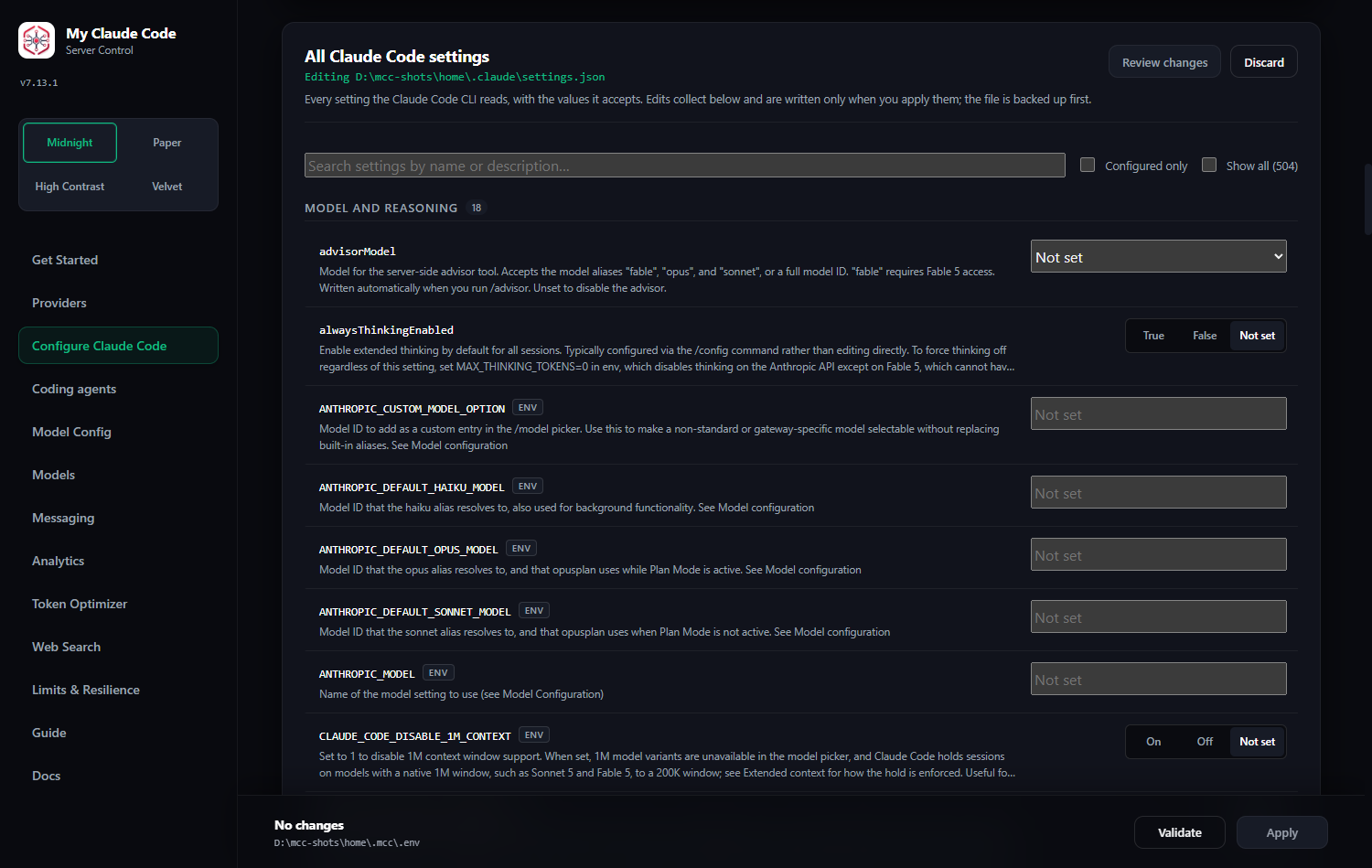
All Claude Code settings: 504 keys, grouped, with the target settings.json named above them.
1. Where configuration lives¶
Claude Code merges four scopes. Each has its own file, and the same key can appear in all of them.
| Scope | Location | Applies to | Shared |
|---|---|---|---|
| Managed | Server-managed (claude.ai admin console or a Claude apps gateway); macOS com.anthropic.claudecode managed preferences; Windows HKLM\SOFTWARE\Policies\ClaudeCode then HKCU\...; files at /Library/Application Support/ClaudeCode/, /etc/claude-code/, C:\Program Files\ClaudeCode\ (plus a managed-settings.d/ drop-in directory) |
Everyone in the org or on the machine | Yes, deployed by IT |
| User | ~/.claude/settings.json |
You, in every project | No |
| Project | .claude/settings.json in the repo |
Everyone on the repo | Yes, committed |
| Local | .claude/settings.local.json at the repository root |
You, in this repo only | No, gitignored |
Two more files sit outside that hierarchy:
~/.claude.json— OAuth session, user/local MCP servers, per-project trust state, caches, and the six global-config keys in §7. Keys from that section are silently ignored if you put them insettings.json..mcp.json— project-scoped MCP servers.
CLAUDE_CONFIG_DIR relocates the whole ~/.claude tree, which is how you run
two accounts side by side.
If you route Claude Code through My Claude Code's
anthropic_oauthprovider, MCC reads.credentials.jsonfrom this same directory and honoursCLAUDE_CONFIG_DIRwhen locating it — so relocating the tree moves the credential MCC discovers, too. MCC only ever reads that file: a refresh is written to MCC's own store instead, because rotating the token here would log out your real client.On macOS this file usually does not hold the credential at all. Claude Code stores it in the login keychain, which MCC cannot read, so MCC's "Use Claude Code credentials" button will report that none was found. That is expected on macOS rather than a fault; sign in to MCC directly instead. See ANTHROPIC-SUBSCRIPTION.md.
Precedence, highest first¶
- Managed settings — cannot be overridden, not even by CLI arguments.
- Command line —
--settings <file-or-json>merges like any other layer. - Local project settings (
.claude/settings.local.json). - Shared project settings (
.claude/settings.json). - User settings (
~/.claude/settings.json).
Within the managed tier only one source wins (they are not merged):
policyHelper output > remote/server-managed > MDM/OS policy > file-based >
HKCU registry. The exceptions are env (merged per key across admin sources
since v2.1.223), the sandbox lock keys, allowAllClaudeAiMcps,
sandbox.bwrapPath/socatPath, and forceRemoteSettingsRefresh.
Arrays merge across scopes — permissions.allow, sandbox.filesystem.*
and friends are concatenated and de-duplicated, so a lower scope can add
entries without displacing a higher one. Two arrays do not merge:
fallbackModel (ordered chain, highest-precedence file supplies all of it) and
a managed availableModels (applies as-is; lower scopes cannot extend it).
A few security-sensitive keys accept a restrictive value from a scope that
otherwise could not override: a true for disableClaudeAiConnectors or
isolatePeerMachines from any scope, a false for remoteControlAtStartup
from project/local, and a stricter crossSessionInbound on the
accept < hold < refuse ladder.
When an edit takes effect¶
Claude Code watches the settings files and reloads on change, so permissions,
hooks, apiKeyHelper and most keys apply to the running session. Two are
read once at startup: model (use /model instead) and outputStyle
(rebuilt on /clear or restart). Variables in an env block are re-applied to
a running session when the file changes — but removing one does not unset
it until the next launch, and features that read their variables once at
startup (OpenTelemetry) keep the startup values.
2. Environment variable vs settings key¶
Many behaviours have both. The rules:
- The environment variable wins over its settings-key twin.
ANTHROPIC_MODELbeatsmodel;CLAUDE_CODE_AUTO_CONNECT_IDEbeatsautoConnectIde. - A settings
envblock beats the shell. Claude Code writes eachenventry into the process environment at startup and again on file change, replacing whatever the shell exported. - You cannot unset a variable from a settings file — only set it. To
neutralise a stale shell export, set it to
""; Claude Code treats the empty value as unset for provider selection (subprocesses still inherit the empty value). - CLI flags and slash commands vary.
--modeland/modelbeatANTHROPIC_MODEL, butCLAUDE_CODE_EFFORT_LEVELbeats/effort.
3. Value formats a config editor must get right¶
These are the traps. An editor that renders every switch as a true/false toggle will silently do the opposite of what the user asked.
Normal on/off variables¶
1 or true turns it on, 0 or false turns it off, any casing.
"Set or unset" variables — 0 does NOT turn them off¶
These read only whether the variable exists. Any non-empty value, including
the string 0, enables the behaviour. The only way to turn them off is to
remove the variable entirely. Render these as a present/absent switch that
deletes the key, never as a false write.
CLAUDE_CODE_DISABLE_NONESSENTIAL_TRAFFICDISABLE_TELEMETRYDISABLE_ERROR_REPORTINGCLAUDE_CODE_TMUX_TRUECOLORFALLBACK_FOR_ALL_PRIMARY_MODELSIS_DEMO
One number-as-boolean¶
FORCE_HYPERLINK is parsed as a number, so false, no and off all
enable hyperlinks. Only 0 disables them.
Numbers¶
Since v2.1.211 numeric variables accept scientific notation and digit
separators — 2e3 is 2000, 64_000 is 64000 — except where a row says plain
digits only. Notable plain-digits-only cases:
CLAUDE_CODE_AUTO_COMPACT_WINDOW (500k reads as 500 and clamps to
100000), CLAUDE_CODE_MAX_CONCURRENT_SUBAGENTS,
CLAUDE_CODE_MAX_SUBAGENT_SPAWN_DEPTH, and
CLAUDE_CODE_MAX_WEB_SEARCHES_PER_SESSION. Out-of-range values are usually
ignored rather than rejected, so an editor should validate against the stated
bounds and say so, not rely on the CLI to complain.
Read-only variables¶
Claude Code sets these itself in the session and in the subprocesses it spawns.
An editor should display them, never offer to write them; a settings env
block that sets CLAUDE_CODE_MESSAGING_SOCKET or CLAUDE_CODE_MESSAGING_TOKEN
is ignored outright.
CLAUDECODE, CLAUDE_CODE_CHILD_SESSION, CLAUDE_CODE_SESSION_ID,
CLAUDE_CODE_BRIDGE_SESSION_ID, CLAUDE_CODE_REMOTE,
CLAUDE_CODE_REMOTE_SESSION_ID, CLAUDE_CODE_MESSAGING_SOCKET,
CLAUDE_CODE_MESSAGING_TOKEN, CLAUDE_EFFORT, CLAUDE_PID.
Claude Code also ignores identity variables its hosting environments own, such
as CLAUDE_CODE_ACCOUNT_UUID, when they appear in a settings env block.
Variables injected into hooks, skills, and subprocesses¶
Not settable and not in the reference table — read them from a hook or script:
CLAUDE_PROJECT_DIR, CLAUDE_PLUGIN_ROOT, CLAUDE_PLUGIN_DATA,
CLAUDE_SKILL_DIR, CLAUDE_JOB_DIR, CLAUDE_SESSION_ID, TRACEPARENT, and
CLAUDE_CODE_MCP_SERVER_NAME / CLAUDE_CODE_MCP_SERVER_URL (MCP
headersHelper scripts only).
Secrets¶
Ten variables carry credentials. An editor must mask them on display, never
log them, and never echo them back in an API response:
ANTHROPIC_API_KEY, ANTHROPIC_AUTH_TOKEN, ANTHROPIC_AWS_API_KEY,
ANTHROPIC_FOUNDRY_API_KEY, ANTHROPIC_FOUNDRY_AUTH_TOKEN,
AWS_BEARER_TOKEN_BEDROCK, CLAUDE_CODE_OAUTH_TOKEN,
CLAUDE_CODE_OAUTH_REFRESH_TOKEN, CLAUDE_CODE_CLIENT_KEY_PASSPHRASE,
MCP_CLIENT_SECRET, plus apiKeyHelper / awsCredentialExport output.
Turning off feature-flag fetching has side effects¶
DISABLE_GROWTHBOOK, DISABLE_TELEMETRY, DO_NOT_TRACK and
CLAUDE_CODE_DISABLE_NONESSENTIAL_TRAFFIC all stop Claude Code fetching
feature flags. That makes Remote Control, cross-session messaging,
claude import / /import, /schedule, the advisor tool, /loop
self-pacing, and the built-in /loop maintenance prompt unavailable. An editor
should warn on these four, not just flip them.
4. Environment variables (322)¶
Grouped the way a settings page would group them. The Control
column names the widget: toggle is a normal 1/0 boolean, set/unset ⚠
and number-as-toggle ⚠ are the traps from §3, select has a closed
value list, and secret must be masked.
4.1 Authentication and identity¶
| Variable | Control | Values / default | What it does |
|---|---|---|---|
ANTHROPIC_API_KEY |
secret | — | API key sent as X-Api-Key header. When set, this key is used instead of your Claude Pro, Max, Team, or Enterprise subscription even if you are logged in. In non-interactive mode (-p), the key is always used when present. In interactive mode, you are prompted to approve the key once before it overrides your subscription. To use your subscription instead, run unset ANTHROPIC_API_KEY |
ANTHROPIC_AUTH_TOKEN |
secret | — | Custom value for the Authorization header (the value you set here will be prefixed with Bearer) |
ANTHROPIC_FEDERATION_RULE_ID |
text | — | Federation rule ID for Workload Identity Federation. When you set it together with ANTHROPIC_ORGANIZATION_ID, Claude Code selects federation credentials, which rank above your /login credential. See authentication precedence |
ANTHROPIC_ORGANIZATION_ID |
text | — | Organization ID for Workload Identity Federation. Set it together with ANTHROPIC_FEDERATION_RULE_ID. See authentication precedence |
ANTHROPIC_PROFILE |
text | — | Name of the Anthropic profile to authenticate with, such as one created by ant auth login. The named profile ranks above your /login credential. See authentication precedence |
ANTHROPIC_WORKSPACE_ID |
text | — | Workspace ID for workload identity federation. Set this when your federation rule is scoped to more than one workspace so the token exchange knows which workspace to target |
CLAUDE_CODE_OAUTH_REFRESH_TOKEN |
secret | — | OAuth refresh token for Claude.ai authentication. When set, claude auth login exchanges this token directly instead of opening a browser. Requires CLAUDE_CODE_OAUTH_SCOPES. Useful for provisioning authentication in automated environments |
CLAUDE_CODE_OAUTH_SCOPES |
list | — | Space-separated OAuth scopes the refresh token was issued with, such as "user:profile user:inference user:sessions:claude_code". Required when CLAUDE_CODE_OAUTH_REFRESH_TOKEN is set |
CLAUDE_CODE_OAUTH_TOKEN |
secret | — | OAuth access token for Claude.ai authentication. Alternative to /login for SDK and automated environments. Takes precedence over keychain-stored credentials. Generate one with claude setup-token. Claude Code uses the token you set for the whole session. To replace an expired token, generate a new one and restart |
MCP_CLIENT_SECRET |
secret | — | OAuth client secret for MCP servers that require pre-configured credentials. Avoids the interactive prompt when adding a server with --client-secret |
MCP_OAUTH_CALLBACK_PORT |
number | — | Fixed port for the OAuth redirect callback, as an alternative to --callback-port when adding an MCP server with pre-configured credentials |
4.2 Endpoint, proxy, and TLS¶
| Variable | Control | Values / default | What it does |
|---|---|---|---|
ANTHROPIC_BASE_URL |
text | — | Override the API endpoint to route requests through a proxy or gateway. When set to a non-first-party host, MCP tool search is disabled by default. Set ENABLE_TOOL_SEARCH=true if your proxy forwards tool_reference blocks. As of v2.1.196, Remote Control is disabled when this points at a host other than api.anthropic.com, matching its behavior on Amazon Bedrock, Google Cloud's Agent Platform, and Microsoft Foundry |
ANTHROPIC_BETAS |
list | — | Comma-separated list of additional anthropic-beta header values to include in API requests. Claude Code already sends the beta headers it needs; use this to opt into an Anthropic API beta before Claude Code adds native support. Unlike the --betas flag, which requires API key authentication, this variable works with all auth methods including Claude.ai subscription |
ANTHROPIC_CUSTOM_HEADERS |
list | — | Custom headers to add to requests (Name: Value format, newline-separated for multiple headers). If a name or value contains a character an HTTP header can't carry, such as a curly quote or a zero-width space, Claude Code fails the request with an error that identifies the pair by position. Requires Claude Code v2.1.227 or later. Invalid request header value lists the exact character set and where the check runs |
CLAUDE_CODE_CERT_STORE |
select | bundled, system, bundled,system |
Comma-separated list of CA certificate sources for TLS connections. bundled is the Mozilla CA set shipped with Claude Code. system is the operating system trust store, read only on runtimes with tls.getCACertificates: the native binary, or Node 22.15 or later for npm installs. See CA certificate store. Default is bundled,system |
CLAUDE_CODE_CLIENT_CERT |
path | — | Path to client certificate file for mTLS authentication |
CLAUDE_CODE_CLIENT_KEY |
path | — | Path to client private key file for mTLS authentication |
CLAUDE_CODE_CLIENT_KEY_PASSPHRASE |
secret | — | Passphrase for encrypted CLAUDE_CODE_CLIENT_KEY (optional) |
CLAUDE_CODE_EXTRA_BODY |
JSON | — | JSON object to merge into the top level of every API request body. Useful for passing provider-specific parameters that Claude Code doesn't expose directly. A value exported in your shell also applies to the background sessions you dispatch with claude agents or --bg. Before v2.1.206, background sessions ignored a shell-exported value and used whatever copy the background supervisor process inherited |
CLAUDE_CODE_PROXY_RESOLVES_HOSTS |
toggle | — | Set to 1 to allow the proxy to perform DNS resolution instead of the caller. Opt-in for environments where the proxy should handle hostname resolution |
HTTPS_PROXY |
text | — | Specify HTTPS proxy server for network connections |
HTTP_PROXY |
text | — | Specify HTTP proxy server for network connections |
NO_PROXY |
list | — | List of domains and IPs to which requests will be directly issued, bypassing proxy |
4.3 Third-party providers (Bedrock, Agent Platform, Foundry, Claude on AWS)¶
| Variable | Control | Values / default | What it does |
|---|---|---|---|
ANTHROPIC_AWS_API_KEY |
secret | — | Workspace API key for Claude Platform on AWS, generated in the AWS Console. Sent as x-api-key and takes precedence over AWS SigV4 |
ANTHROPIC_AWS_BASE_URL |
text | default https://aws-external-anthropic.{AWS_REGION}.api.aws |
Override the Claude Platform on AWS endpoint URL. Use for custom regions or when routing through an LLM gateway. Defaults to https://aws-external-anthropic.{AWS_REGION}.api.aws |
ANTHROPIC_AWS_WORKSPACE_ID |
text | — | Required for Claude Platform on AWS. Sent on every request as the anthropic-workspace-id header |
ANTHROPIC_BEDROCK_BASE_URL |
text | — | Override the Amazon Bedrock endpoint URL. Use for custom Amazon Bedrock endpoints or when routing through an LLM gateway. See Amazon Bedrock |
ANTHROPIC_BEDROCK_MANTLE_BASE_URL |
text | — | Override the Amazon Bedrock Mantle endpoint URL. See Mantle endpoint |
ANTHROPIC_BEDROCK_REGION_PREFIX |
select | us, eu, apac, jp, au, global |
Cross-region inference profile prefix (us, eu, apac, jp, au, or global) Claude Code tries first instead of the one derived from the AWS region. Ignored in AWS GovCloud regions. Requires Claude Code v2.1.224 or later. See Amazon Bedrock |
ANTHROPIC_BEDROCK_SERVICE_TIER |
select | default, flex, priority |
Amazon Bedrock service tier (default, flex, or priority). Sent as the X-Amzn-Bedrock-Service-Tier header. See Amazon Bedrock |
ANTHROPIC_FOUNDRY_API_KEY |
secret | — | API key for Microsoft Foundry authentication (see Microsoft Foundry) |
ANTHROPIC_FOUNDRY_AUTH_TOKEN |
secret | — | Bearer token for Microsoft Foundry authentication, such as a Microsoft Entra access token. Claude Code sends it as the Authorization: Bearer header. Takes precedence over ANTHROPIC_FOUNDRY_API_KEY and over the Azure default credential chain. See Microsoft Foundry. Requires Claude Code v2.1.203 or later |
ANTHROPIC_FOUNDRY_BASE_URL |
text | — | Full base URL for the Microsoft Foundry resource (for example, https://my-resource.services.ai.azure.com/anthropic). Alternative to ANTHROPIC_FOUNDRY_RESOURCE (see Microsoft Foundry) |
ANTHROPIC_FOUNDRY_RESOURCE |
text | — | Microsoft Foundry resource name (for example, my-resource). Required if ANTHROPIC_FOUNDRY_BASE_URL is not set (see Microsoft Foundry) |
ANTHROPIC_VERTEX_BASE_URL |
text | — | Override Google Cloud's Agent Platform endpoint URL. Use for custom Google Cloud's Agent Platform endpoints or when routing through an LLM gateway. See Google Cloud's Agent Platform |
ANTHROPIC_VERTEX_PROJECT_ID |
text | — | GCP project ID for Google Cloud's Agent Platform requests. Overridden by GCLOUD_PROJECT, GOOGLE_CLOUD_PROJECT, or the project in your GOOGLE_APPLICATION_CREDENTIALS credential file. See Google Cloud's Agent Platform |
AWS_BEARER_TOKEN_BEDROCK |
secret | — | Amazon Bedrock API key for authentication (see Amazon Bedrock API keys) |
CLAUDE_CODE_SKIP_ANTHROPIC_AWS_AUTH |
text | — | Skip client-side authentication for Claude Platform on AWS, for gateways that sign requests themselves |
CLAUDE_CODE_SKIP_AWS_CRED_CACHE |
toggle | — | Set to 1 to turn off the in-process cache of credentials resolved from the AWS default credential provider chain, so Claude Code resolves the chain on every API request. With the cache off, an SSO-backed profile requests credentials from IAM Identity Center on every request. See credential caching and resolution timeout. Requires Claude Code v2.1.207 or later |
CLAUDE_CODE_SKIP_BEDROCK_AUTH |
text | — | Skip AWS authentication for Amazon Bedrock (for example, when using an LLM gateway) |
CLAUDE_CODE_SKIP_FOUNDRY_AUTH |
text | — | Skip Azure authentication for Microsoft Foundry, for a proxy or gateway that injects its own Authorization header. Claude Code sends requests without an Azure credential and preserves the Authorization header you supply, for example through ANTHROPIC_CUSTOM_HEADERS. Ignored when ANTHROPIC_FOUNDRY_API_KEY or ANTHROPIC_FOUNDRY_AUTH_TOKEN is set. Before v2.1.203, this variable left the Microsoft Foundry client unable to send requests unless an API key was also set |
CLAUDE_CODE_SKIP_MANTLE_AUTH |
text | — | Skip AWS authentication for Amazon Bedrock Mantle (for example, when using an LLM gateway) |
CLAUDE_CODE_SKIP_VERTEX_AUTH |
text | — | Skip Google authentication for Google Cloud's Agent Platform (for example, when using an LLM gateway) |
CLAUDE_CODE_USE_ANTHROPIC_AWS |
text | — | Use Claude Platform on AWS |
CLAUDE_CODE_USE_BEDROCK |
text | — | Use Amazon Bedrock |
CLAUDE_CODE_USE_FOUNDRY |
text | — | Use Microsoft Foundry |
CLAUDE_CODE_USE_MANTLE |
text | — | Use the Amazon Bedrock Mantle endpoint |
CLAUDE_CODE_USE_VERTEX |
text | — | Use Google Cloud's Agent Platform |
VERTEX_REGION_CLAUDE_3_5_HAIKU |
text | — | Override region for Claude 3.5 Haiku when using Google Cloud's Agent Platform |
VERTEX_REGION_CLAUDE_3_5_SONNET |
text | — | Override region for Claude 3.5 Sonnet when using Google Cloud's Agent Platform |
VERTEX_REGION_CLAUDE_3_7_SONNET |
text | — | Override region for Claude 3.7 Sonnet when using Google Cloud's Agent Platform |
VERTEX_REGION_CLAUDE_4_0_OPUS |
text | — | Override region for Claude 4.0 Opus when using Google Cloud's Agent Platform |
VERTEX_REGION_CLAUDE_4_0_SONNET |
text | — | Override region for Claude 4.0 Sonnet when using Google Cloud's Agent Platform |
VERTEX_REGION_CLAUDE_4_1_OPUS |
text | — | Override region for Claude 4.1 Opus when using Google Cloud's Agent Platform |
VERTEX_REGION_CLAUDE_4_5_OPUS |
text | — | Override region for Claude Opus 4.5 when using Google Cloud's Agent Platform |
VERTEX_REGION_CLAUDE_4_5_SONNET |
text | — | Override region for Claude Sonnet 4.5 when using Google Cloud's Agent Platform |
VERTEX_REGION_CLAUDE_4_6_OPUS |
text | — | Override region for Claude Opus 4.6 when using Google Cloud's Agent Platform |
VERTEX_REGION_CLAUDE_4_6_SONNET |
text | — | Override region for Claude Sonnet 4.6 when using Google Cloud's Agent Platform |
VERTEX_REGION_CLAUDE_4_7_OPUS |
text | — | Override region for Claude Opus 4.7 when using Google Cloud's Agent Platform |
VERTEX_REGION_CLAUDE_4_8_OPUS |
text | — | Override region for Claude Opus 4.8 when using Google Cloud's Agent Platform. Added in v2.1.154 |
VERTEX_REGION_CLAUDE_5_OPUS |
text | — | Override region for Claude Opus 5 when using Google Cloud's Agent Platform. Added in v2.1.219 |
VERTEX_REGION_CLAUDE_5_SONNET |
text | — | Override region for Claude Sonnet 5 when using Google Cloud's Agent Platform. Added in v2.1.197 |
VERTEX_REGION_CLAUDE_FABLE_5 |
text | — | Override region for Claude Fable 5 when using Google Cloud's Agent Platform. Added in v2.1.170 |
VERTEX_REGION_CLAUDE_HAIKU_4_5 |
text | — | Override region for Claude Haiku 4.5 when using Google Cloud's Agent Platform |
4.4 Model selection, thinking, and effort¶
| Variable | Control | Values / default | What it does |
|---|---|---|---|
ANTHROPIC_CUSTOM_MODEL_OPTION |
text | — | Model ID to add as a custom entry in the /model picker. Use this to make a non-standard or gateway-specific model selectable without replacing built-in aliases. See Model configuration |
ANTHROPIC_CUSTOM_MODEL_OPTION_DESCRIPTION |
text | default Custom model (<model-id>) |
Display description for the custom model entry in the /model picker. Defaults to Custom model (<model-id>) when not set |
ANTHROPIC_CUSTOM_MODEL_OPTION_NAME |
text | — | Display name for the custom model entry in the /model picker. Defaults to the model ID when not set |
ANTHROPIC_CUSTOM_MODEL_OPTION_SUPPORTED_CAPABILITIES |
list | — | Comma-separated list of capabilities the custom model supports, for example effort,thinking. See Model configuration |
ANTHROPIC_DEFAULT_FABLE_MODEL |
text | — | Model ID that the fable alias resolves to, and the ID Claude Code recognizes as Fable 5 for automatic model fallback on third-party providers. See Model configuration |
ANTHROPIC_DEFAULT_FABLE_MODEL_DESCRIPTION |
text | default Custom Fable model |
Display description for the pinned Fable model in the /model picker. Defaults to Custom Fable model when not set. See Model configuration |
ANTHROPIC_DEFAULT_FABLE_MODEL_NAME |
text | — | Display name for the pinned Fable model in the /model picker. Defaults to the model ID when not set. See Model configuration |
ANTHROPIC_DEFAULT_FABLE_MODEL_SUPPORTED_CAPABILITIES |
list | — | Comma-separated list of capabilities the pinned Fable model supports, for example effort,thinking. See Model configuration |
ANTHROPIC_DEFAULT_HAIKU_MODEL |
text | — | Model ID that the haiku alias resolves to, also used for background functionality. See Model configuration |
ANTHROPIC_DEFAULT_HAIKU_MODEL_DESCRIPTION |
text | default Custom Haiku model |
Display description for the pinned Haiku model in the /model picker. Defaults to Custom Haiku model when not set. See Model configuration |
ANTHROPIC_DEFAULT_HAIKU_MODEL_NAME |
text | — | Display name for the pinned Haiku model in the /model picker. Defaults to the model ID when not set. See Model configuration |
ANTHROPIC_DEFAULT_HAIKU_MODEL_SUPPORTED_CAPABILITIES |
list | — | Comma-separated list of capabilities the pinned Haiku model supports, for example effort,thinking. See Model configuration |
ANTHROPIC_DEFAULT_OPUS_MODEL |
text | — | Model ID that the opus alias resolves to, and that opusplan uses while Plan Mode is active. See Model configuration |
ANTHROPIC_DEFAULT_OPUS_MODEL_DESCRIPTION |
text | default Custom Opus model |
Display description for the pinned Opus model in the /model picker. When not set, defaults to Custom Opus model, or Custom Opus model (1M context) if the pinned model ID has the [1m] suffix and CLAUDE_CODE_DISABLE_1M_CONTEXT isn't turned on. See Model configuration |
ANTHROPIC_DEFAULT_OPUS_MODEL_NAME |
text | — | Display name for the pinned Opus model in the /model picker. Defaults to the model ID when not set. See Model configuration |
ANTHROPIC_DEFAULT_OPUS_MODEL_SUPPORTED_CAPABILITIES |
list | — | Comma-separated list of capabilities the pinned Opus model supports, for example effort,thinking. See Model configuration |
ANTHROPIC_DEFAULT_SONNET_MODEL |
text | — | Model ID that the sonnet alias resolves to, and that opusplan uses when Plan Mode is not active. See Model configuration |
ANTHROPIC_DEFAULT_SONNET_MODEL_DESCRIPTION |
text | default Custom Sonnet model |
Display description for the pinned Sonnet model in the /model picker. When not set, defaults to Custom Sonnet model, or Custom Sonnet model (1M context) if the pinned model ID has the [1m] suffix and CLAUDE_CODE_DISABLE_1M_CONTEXT isn't turned on. See Model configuration |
ANTHROPIC_DEFAULT_SONNET_MODEL_NAME |
text | — | Display name for the pinned Sonnet model in the /model picker. Defaults to the model ID when not set. See Model configuration |
ANTHROPIC_DEFAULT_SONNET_MODEL_SUPPORTED_CAPABILITIES |
list | — | Comma-separated list of capabilities the pinned Sonnet model supports, for example effort,thinking. See Model configuration |
ANTHROPIC_MODEL |
text | — | Name of the model setting to use (see Model Configuration) |
ANTHROPIC_SMALL_FAST_MODEL |
text | — | deprecated — [DEPRECATED] Name of Haiku-class model for background tasks |
ANTHROPIC_SMALL_FAST_MODEL_AWS_REGION |
text | — | Override AWS region for the Haiku-class model when using Amazon Bedrock or Amazon Bedrock Mantle. On Amazon Bedrock, this only takes effect when ANTHROPIC_DEFAULT_HAIKU_MODEL or the deprecated ANTHROPIC_SMALL_FAST_MODEL is also set, since Amazon Bedrock otherwise runs background tasks on the default Sonnet model or the primary model in the session region |
CLAUDE_CODE_ALWAYS_ENABLE_EFFORT |
toggle | — | Set to 1 to send the effort parameter with every request, even when Claude Code does not recognize the model ID as effort-capable. Use this when routing through an LLM gateway or third-party provider that serves models under custom identifiers. Models that reject the effort parameter at the API, including Claude 3 models, Sonnet 4.0 and 4.5, Opus 4.0 and 4.1, and Haiku 4.5, are still excluded so requests do not fail |
CLAUDE_CODE_DISABLE_1M_CONTEXT |
toggle | — | Set to 1 to disable 1M context window support. When set, 1M model variants are unavailable in the model picker, and Claude Code holds sessions on models with a native 1M window, such as Sonnet 5 and Fable 5, to a 200K window; see Extended context for how the hold is enforced. Useful for enterprise environments with compliance requirements. For its role in correcting the window for an unrecognized [1m] model ID, see Correct the window for a gateway or custom model ID |
CLAUDE_CODE_DISABLE_ADAPTIVE_THINKING |
toggle | — | Set to 1 to disable adaptive reasoning on Opus 4.6 and Sonnet 4.6 and fall back to the fixed thinking budget controlled by MAX_THINKING_TOKENS. Has no effect on Fable 5, Sonnet 5, or Opus 4.7 and later, which always use adaptive reasoning |
CLAUDE_CODE_DISABLE_FAST_MODE |
toggle | — | Set to 1 to disable fast mode |
CLAUDE_CODE_DISABLE_LEGACY_MODEL_REMAP |
toggle | — | Set to 1 to prevent automatic remapping of Opus 4.0 and 4.1 to the current Opus version on the Anthropic API. Use when you intentionally want to pin an older model. The remap does not run on Amazon Bedrock, Google Cloud's Agent Platform, or Microsoft Foundry |
CLAUDE_CODE_DISABLE_THINKING |
toggle | — | Set to 1 to omit the thinking parameter from API requests entirely. This is a compatibility option for proxies and gateways that reject the parameter. The variable's behavior is unchanged from earlier versions; on models that think by default, omitting the parameter means the model may still think. To explicitly disable extended thinking on the Anthropic API, use MAX_THINKING_TOKENS=0 instead, which is also ineffective on Fable 5 since it cannot have thinking turned off. On third-party providers, 0 likewise omits the parameter, so the two variables behave the same there |
CLAUDE_CODE_EFFORT_LEVEL |
select | low, medium, high, xhigh, max, auto |
Set the effort level for supported models. Values: low, medium, high, xhigh, max, or auto to use the model default. Available levels depend on the model. Takes precedence over /effort and the effortLevel setting. See Adjust effort level |
CLAUDE_CODE_MAX_CONTEXT_TOKENS |
text | — | Override the context window size Claude Code assumes for the active model. As of v2.1.193, how it applies depends on how Claude Code resolves the model ID; see Correct the window for a gateway or custom model ID. Use this when routing to a model through ANTHROPIC_BASE_URL whose context window does not match the built-in size for its name |
CLAUDE_CODE_MAX_OUTPUT_TOKENS |
number | — | Set the maximum number of output tokens for most requests. Defaults and caps vary by model; see max output tokens. Claude Code defaults to 32000 for model IDs it doesn't recognize, such as gateway-specific names, and lowers values above a model's cap to the cap. Increasing this value reduces the effective context window available before auto-compaction triggers |
CLAUDE_CODE_SKIP_FAST_MODE_NETWORK_ERRORS |
toggle | — | Set to 1 to treat a failed fast mode availability check as available, for networks that block the check's direct request to api.anthropic.com. Claude Code still honors a "disabled by your organization" response |
CLAUDE_CODE_SKIP_FAST_MODE_ORG_CHECK |
toggle | — | Set to 1 to skip the client-side fast mode availability check, for proxies that intercept the check's request rather than refuse it. The API still rejects fast mode requests when your organization has fast mode disabled |
CLAUDE_CODE_SUBAGENT_MODEL |
text | — | The model Claude Code uses for all subagents, agent teams, and agents in a workflow. Accepts an alias such as haiku or a full model name, and takes precedence over the per-invocation model parameter and the subagent definition's model frontmatter. See Model configuration. Setting it to inherit is the same as leaving it unset; before v2.1.196, inherit was an override that forced every subagent onto the main conversation's model |
CLAUDE_EFFORT |
select | low, medium, high, xhigh, max |
read-only — Set automatically in Bash tool subprocesses and hook commands to the active effort level for the turn: low, medium, high, xhigh, or max. Ultracode is not a distinct level and reports as xhigh. Matches the effort.level field passed to hooks. Only set when the current model supports the effort parameter |
FALLBACK_FOR_ALL_PRIMARY_MODELS |
set/unset ⚠ | — | Set to any non-empty value, such as 1, to make every model stop retrying with a repeated-overload error when no fallback model is configured. Setting it to 0 or false still enables this, unlike most on/off variables; unset the variable to restore the default retry behavior. Without it, models Claude Code recognizes as Opus, Fable 5, or Mythos models stop retrying this way when you authenticate with an API key or a third-party provider rather than a Claude subscription. As of v2.1.160, a configured fallback model chain triggers on repeated overload errors for any primary model, so this variable does not affect switching to a fallback model |
MAX_THINKING_TOKENS |
toggle | — | Fixed token budget for extended thinking. Claude Code caps it at one token below the request's max output tokens and never below 1,024; see CLAUDE_CODE_MAX_OUTPUT_TOKENS for how that limit is set. When unset and thinking is enabled, models with adaptive reasoning choose their own thinking depth, and other models use the cap. Set to 0 to disable thinking on the Anthropic API, except on Fable 5, which cannot have thinking turned off; on third-party providers, 0 omits the thinking parameter instead. Nonzero values are ignored on adaptive reasoning models unless CLAUDE_CODE_DISABLE_ADAPTIVE_THINKING is set |
4.5 Context window, compaction, and prompt caching¶
| Variable | Control | Values / default | What it does |
|---|---|---|---|
CLAUDE_AUTOCOMPACT_PCT_OVERRIDE |
number | — | Set the percentage (1-100) of the auto-compact window at which auto-compaction triggers. Use lower values like 50 to compact earlier; the variable can't raise the threshold, so values above the default percentage are ignored. It applies only in sessions that compact before the model's context limit. Applies to both main conversations and subagents |
CLAUDE_CODE_AUTO_COMPACT_WINDOW |
number | — | Set the auto-compact window in tokens, from 100000 to 1000000. Accepts a plain integer such as 500000 only: a value like 500k reads as 500 and clamps to the 100K minimum. Takes precedence over the /autocompact command, the --autocompact flag, and the autoCompactWindow setting. The status line's used_percentage always measures against the model's full context window, so once this variable is set, that percentage no longer indicates when compaction will run |
DISABLE_AUTO_COMPACT |
toggle | — | Set to 1 to disable automatic compaction when approaching the context limit. The manual /compact command remains available. Use when you want explicit control over when compaction occurs. Overrides the autoCompactEnabled setting |
DISABLE_COMPACT |
toggle | — | Set to 1 to disable all compaction: both automatic compaction and the manual /compact command |
DISABLE_PROMPT_CACHING |
toggle | — | Set to 1 to disable prompt caching for all models (takes precedence over per-model settings) |
DISABLE_PROMPT_CACHING_FABLE |
toggle | — | Set to 1 to disable prompt caching for Fable models |
DISABLE_PROMPT_CACHING_HAIKU |
toggle | — | Set to 1 to disable prompt caching for Haiku models |
DISABLE_PROMPT_CACHING_OPUS |
toggle | — | Set to 1 to disable prompt caching for Opus models |
DISABLE_PROMPT_CACHING_SONNET |
toggle | — | Set to 1 to disable prompt caching for Sonnet models |
ENABLE_PROMPT_CACHING_1H |
toggle | — | Set to 1 to request a 1-hour prompt cache TTL instead of the default 5 minutes. Intended for API key, Amazon Bedrock, Google Cloud's Agent Platform, Microsoft Foundry, and Claude Platform on AWS users. Subscription users within included usage receive 1-hour TTL automatically. Subscription users drawing on usage credits can set it to keep the 1-hour TTL. 1-hour cache writes are billed at a higher rate |
ENABLE_PROMPT_CACHING_1H_BEDROCK |
text | — | deprecated — Deprecated. Use ENABLE_PROMPT_CACHING_1H instead |
FORCE_PROMPT_CACHING_5M |
toggle | — | Set to 1 to force the 5-minute prompt cache TTL even when 1-hour TTL would otherwise apply. Overrides ENABLE_PROMPT_CACHING_1H |
SLASH_COMMAND_TOOL_CHAR_BUDGET |
text | — | Override the character budget for skill metadata shown to the Skill tool. The budget scales dynamically at 1% of the context window, with a fallback of 8,000 characters. Legacy name kept for backwards compatibility |
4.6 Request timeouts, retries, and stream watchdogs¶
| Variable | Control | Values / default | What it does |
|---|---|---|---|
API_FORCE_IDLE_TIMEOUT |
toggle | — | Override the 5-minute body idle timeout that aborts a streaming model response when no bytes arrive. Set to 0 to turn the timeout off, for example when a slow gateway or local model pauses longer than 5 minutes between chunks, or 1 to keep it on for every provider. When unset, the timeout is active on providers other than the direct Anthropic API and Claude Platform on AWS. The stream watchdogs run independently of it and abort a long silent pause even when you set 0 here. Requires Claude Code v2.1.169 or later |
API_TIMEOUT_MS |
number | default 600000 |
Timeout for API requests in milliseconds (default: 600000, or 10 minutes; maximum: 2147483647). Increase this when requests time out on slow networks or when routing through a proxy. Values above the maximum overflow the underlying timer and cause requests to fail immediately |
CLAUDE_BYTE_STREAM_IDLE_TIMEOUT_MS |
number | — | Timeout in milliseconds for the byte-level streaming idle watchdog only; when set, it takes precedence over CLAUDE_STREAM_IDLE_TIMEOUT_MS for that watchdog and leaves the event-level watchdog unchanged. Claude Code clamps this variable to between 10 seconds and 30 minutes. Requires Claude Code v2.1.210 or later |
CLAUDE_CODE_DISABLE_NONSTREAMING_FALLBACK |
toggle | — | Set to 1 to disable the non-streaming fallback when a streaming request fails mid-stream. Streaming errors propagate to the retry layer instead. Useful when a proxy or gateway causes the fallback to produce duplicate tool execution |
CLAUDE_CODE_MAX_RETRIES |
number | default 10 |
Override the number of times to retry failed API requests (default: 10). Capped at 15 as of v2.1.186; as of v2.1.199, CLAUDE_CODE_RETRY_WATCHDOG raises the default and removes the cap. For unattended sessions that need to wait through longer outages, set CLAUDE_CODE_RETRY_WATCHDOG instead |
CLAUDE_CODE_RETRY_WATCHDOG |
toggle | — | Set to 1 for unattended sessions such as eval harnesses, CI jobs, or remote workers. Retries 429 and 529 capacity errors indefinitely instead of failing after CLAUDE_CODE_MAX_RETRIES attempts. The watchdog backs off up to 5 minutes between attempts, or until the limit resets when the response carries a rate-limit reset time, so a session that hits a usage limit waits out the remaining window. As of v2.1.199 it also raises the default retry count for other transient errors, such as server errors, timeouts, and dropped connections, to 300, roughly three hours of backoff, and removes the cap of 15 on CLAUDE_CODE_MAX_RETRIES if you set that variable explicitly. Requires Claude Code v2.1.186 or later |
CLAUDE_ENABLE_BYTE_WATCHDOG |
toggle | — | Set to 1 to force-enable the byte-level streaming idle watchdog, or set to 0 to force-disable it. When unset, the watchdog is enabled by default for direct Anthropic API and Claude Platform on AWS connections, and for streaming responses on gateway connections reached through ANTHROPIC_BASE_URL or ANTHROPIC_AWS_BASE_URL; before v2.1.222 it didn't run on those gateway connections, so the event-level watchdog could report a stall there even while keep-alive pings were arriving. For timeouts and how the timers interact, see Streaming idle watchdogs |
CLAUDE_ENABLE_BYTE_WATCHDOG_BEDROCK |
toggle | — | Set to 1 to enable the byte-level streaming idle watchdog on Amazon Bedrock vnd.amazon.eventstream responses. Off by default. Configure the timeout with CLAUDE_STREAM_IDLE_TIMEOUT_MS |
CLAUDE_ENABLE_STREAM_WATCHDOG |
toggle | — | Set to 0 to force-disable the event-level streaming idle watchdog, or set to 1 to force-enable it. When unset, the watchdog is on by default for all providers. Before v2.1.196, the unset default was server-controlled on the direct Anthropic API and off on other providers. Configure the timeout with CLAUDE_STREAM_IDLE_TIMEOUT_MS; for the other stall timers that run alongside this one, see Streaming idle watchdogs |
CLAUDE_STREAM_IDLE_TIMEOUT_MS |
number | — | Timeout in milliseconds before the event- and byte-level streaming idle watchdogs close a stalled connection. When you set this variable explicitly, the minimum is 300000 (5 minutes); lower values are silently clamped to absorb extended thinking pauses and proxy buffering, and the byte-level watchdog caps the value at 30 minutes. CLAUDE_BYTE_STREAM_IDLE_TIMEOUT_MS takes precedence over this variable for the byte-level watchdog. For the per-watchdog unset defaults, see Streaming idle watchdogs |
4.7 Built-in tool behaviour¶
| Variable | Control | Values / default | What it does |
|---|---|---|---|
BASH_DEFAULT_TIMEOUT_MS |
number | default 120000 |
Default timeout for long-running bash commands (default: 120000, or 2 minutes) |
BASH_MAX_OUTPUT_LENGTH |
number | default 30000 |
Maximum number of characters of bash output that Claude Code reads back into a command's result (default: 30000; maximum: 150000). See Output limits |
BASH_MAX_TIMEOUT_MS |
number | default 600000 |
Maximum timeout the model can set for long-running bash commands (default: 600000, or 10 minutes). The effective ceiling is the larger of this and BASH_DEFAULT_TIMEOUT_MS |
CLAUDE_CODE_FILE_READ_MAX_OUTPUT_TOKENS |
text | — | Override the default token limit for file reads. Useful when you need to read larger files in full |
CLAUDE_CODE_GLOB_HIDDEN |
toggle | — | Set to false to exclude dotfiles from results when Claude invokes the Glob tool. Included by default. Does not affect @ file autocomplete, ls, Grep, or Read |
CLAUDE_CODE_GLOB_NO_IGNORE |
toggle | — | Set to false to make the Glob tool respect .gitignore patterns. By default, Glob returns all matching files including gitignored ones. Does not affect @ file autocomplete, which has its own respectGitignore setting |
CLAUDE_CODE_GLOB_TIMEOUT_SECONDS |
number | — | Timeout in seconds for Glob tool file discovery. Defaults to 20 seconds on most platforms and 60 seconds on WSL |
CLAUDE_CODE_MAX_TOOL_USE_CONCURRENCY |
number | default 10 |
Maximum number of read-only tools and subagents that can execute in parallel (default: 10). Higher values increase parallelism but consume more resources |
CLAUDE_CODE_MAX_WEB_SEARCHES_PER_SESSION |
number | default 200 |
Cap on the total number of WebSearch calls one session can make (default: 200). When Claude reaches the cap, further WebSearch calls return a notice telling it to continue with the information it already gathered. Accepts a positive whole number with no upper bound. Anything else is ignored and the default applies, so the cap can be raised but not turned off. Requires Claude Code v2.1.212 or later |
CLAUDE_CODE_PERFORCE_MODE |
toggle | — | Set to 1 to enable Perforce-aware write protection. When set, Edit, Write, and NotebookEdit fail with a p4 edit <file> hint if the target file lacks the owner-write bit, which Perforce clears on synced files until p4 edit opens them. This prevents Claude Code from bypassing Perforce change tracking |
CLAUDE_CODE_POWERSHELL_RESPECT_EXECUTION_POLICY |
toggle | — | Set to 1 to stop Claude Code from passing -ExecutionPolicy Bypass when spawning PowerShell for tool calls, hooks, and status line commands, and respect the machine's effective execution policy instead. By default Claude Code bypasses execution policy at process scope so .ps1 scripts and module imports work on default-Restricted Windows installs. Process-scope bypass never overrides Group Policy MachinePolicy or UserPolicy regardless of this setting |
CLAUDE_CODE_SCRIPT_CAPS |
JSON | — | JSON object limiting how many times specific scripts may be invoked per session when CLAUDE_CODE_SUBPROCESS_ENV_SCRUB is set. Keys are substrings matched against the command text; values are integer call limits. For example, {"deploy.sh": 2} allows deploy.sh to be called at most twice. Matching is substring-based so shell-expansion tricks like ./scripts/deploy.sh $(evil) still count against the cap. Runtime fan-out via xargs or find -exec is not detected; this is a defense-in-depth control |
CLAUDE_CODE_SHELL |
path | — | Set the shell Claude Code uses to run Bash tool commands. Accepts a path to a bash or zsh binary, for example /opt/homebrew/bin/bash. Other shells such as fish are not supported. If the value is not a working bash or zsh path, Claude Code ignores it and falls back to auto-detection. Auto-detection uses your $SHELL when it points to bash or zsh, otherwise it picks the first working zsh then bash found on your PATH and standard install locations |
CLAUDE_CODE_SHELL_PREFIX |
text | — | Command prefix that wraps shell commands Claude Code spawns: Bash tool calls, hook commands, status line commands, and stdio MCP server startup commands. PowerShell hooks and exec-form hooks run without the prefix. Useful for logging or auditing. Setting a bare executable path such as /path/to/logger.sh runs each command as /path/to/logger.sh '<command>'. The wrapper receives the command line as a single shell-quoted argument in $1, so the wrapper must re-evaluate $1 with a shell, for example exec bash -c "$1". Treating $1 as a bare executable path breaks stdio MCP servers that pass arguments such as npx -y <package>. For Bash tool calls, $1 contains the full shell invocation Claude Code assembles, including environment setup, not only the command Claude ran |
CLAUDE_CODE_USE_POWERSHELL_TOOL |
toggle | — | Controls the PowerShell tool. On Windows without Git Bash, the tool is enabled automatically; set to 0 to disable it. On Windows with Git Bash installed, the tool is rolling out progressively: set to 1 to opt in or 0 to opt out. On Linux, macOS, and WSL, set to 1 to enable it, which requires pwsh on your PATH. When enabled on Windows, Claude can run PowerShell commands natively instead of routing through Git Bash. See PowerShell tool |
CLAUDE_ENV_FILE |
path | — | Path to a shell script whose contents Claude Code runs before each Bash command in the same shell process, so exports in the file are visible to the command. Use to persist virtualenv or conda activation across commands. Also populated dynamically by SessionStart, Setup, CwdChanged, and FileChanged hooks |
TASK_MAX_OUTPUT_LENGTH |
number | default 32000 |
Maximum number of characters in subagent output before truncation (default: 32000, maximum: 160000). When truncated, the full output is saved to disk and the path is included in the truncated response |
USE_BUILTIN_RIPGREP |
toggle | — | Set to 0 to use system-installed rg instead of rg included with Claude Code |
4.8 Subagents, background work, and workflows¶
| Variable | Control | Values / default | What it does |
|---|---|---|---|
CLAUDE_AGENT_SDK_DISABLE_BUILTIN_AGENTS |
toggle | — | Set to 1 to disable all built-in subagent types such as Explore and Plan. Only applies in non-interactive mode (the -p flag). Useful for SDK users who want a blank slate |
CLAUDE_AGENT_SDK_MCP_NO_PREFIX |
toggle | — | Set to 1 to skip the mcp__<server>__ prefix on tool names from SDK-created MCP servers. Tools use their original names. SDK usage only |
CLAUDE_ASYNC_AGENT_STALL_TIMEOUT_MS |
number | default 600000 |
Stall timeout in milliseconds for background subagents. Default 600000 (10 minutes). The timer resets on each streaming progress event; if no progress arrives within the window, the subagent is aborted and the task is marked failed, surfacing any partial result to the parent |
CLAUDE_AUTO_BACKGROUND_TASKS |
toggle | — | Set to 1 to force-enable automatic backgrounding of long-running agent tasks. When enabled, subagents are moved to the background after running for approximately two minutes. Also enables automatic backgrounding of long MCP tool calls in non-interactive mode on Claude Code v2.1.212 or later |
CLAUDE_CODE_DISABLE_AGENT_VIEW |
toggle | — | Set to 1 to turn off background agents and agent view: claude agents, --bg, /background, and the on-demand supervisor. Equivalent to the disableAgentView setting |
CLAUDE_CODE_DISABLE_BACKGROUND_TASKS |
toggle | — | Set to 1 to disable all background task functionality, including the run_in_background parameter on Bash and subagent tools, auto-backgrounding, and the Ctrl+B shortcut |
CLAUDE_CODE_DISABLE_EXPLORE_PLAN_AGENTS |
toggle | — | Set to 1 to disable the built-in Explore and Plan subagents. Claude explores with its search tools or the general-purpose subagent instead, and plan mode reads files directly rather than launching Explore and Plan agents. Custom subagents named Explore or Plan are unaffected. To remove every built-in subagent type in the Agent SDK or non-interactive mode, use CLAUDE_AGENT_SDK_DISABLE_BUILTIN_AGENTS instead. Requires Claude Code v2.1.198 or later |
CLAUDE_CODE_DISABLE_WORKFLOWS |
toggle | — | Set to 1 to disable workflows. Equivalent to the disableWorkflows setting |
CLAUDE_CODE_ENABLE_APPEND_SUBAGENT_PROMPT |
toggle | — | Set to 1 to enable appending extra text to the end of every subagent's system prompt. The --append-subagent-system-prompt flag supplies the appended text and sets this variable automatically, so you don't need to set it yourself. Requires Claude Code v2.1.205 or later |
CLAUDE_CODE_ENABLE_TASKS |
toggle | — | Controls whether sessions use the structured Task tools (TaskCreate, TaskUpdate, TaskGet, TaskList) or the legacy TodoWrite tool. As of Claude Code v2.1.142, Task tools are the default in all modes. Set to 0 to revert to TodoWrite. See Task list and Migrate to Task tools |
CLAUDE_CODE_EXPERIMENTAL_AGENT_TEAMS |
toggle | — | Set to 1 to enable agent teams. Agent teams are experimental and disabled by default |
CLAUDE_CODE_FORK_SUBAGENT |
toggle | — | Set to 1 to let Claude spawn forked subagents, or 0 to disable them, overriding any server-side rollout. When enabled, Claude can request the fork subagent type to spawn a fork, a subagent that inherits the full conversation context instead of starting fresh. When Claude doesn't request a subagent type, it still gets the general-purpose subagent, and every subagent runs in the background. The explicit /subtask command, named /fork on v2.1.161 through v2.1.211, works without this variable; on v2.1.117 through v2.1.160, /fork is the forked-subagent command only when this variable is set to 1 or a server-side rollout enabled it. Works in interactive mode and via the SDK or claude -p. When agent view is turned off, /subtask isn't available and the command stays /fork |
CLAUDE_CODE_FORWARD_SUBAGENT_TEXT |
toggle | — | Set to 1 to emit subagent text and thinking blocks in claude -p --output-format stream-json output, the same behavior as the --forward-subagent-text flag. Use the variable when a harness invokes claude and can't pass the flag itself. Unlike the flag, which exits with an error outside non-interactive mode with stream-json output, the variable is ignored there so that nested invocations keep working when it's set process-wide. Requires Claude Code v2.1.211 or later |
CLAUDE_CODE_MAX_CONCURRENT_SUBAGENTS |
number | default 20 |
How many subagents can be running in one session before the Agent tool refuses to spawn another (default: 20). Accepts a positive whole number in plain digits; anything else is ignored, so the variable can adjust the cap but can't disable it. Requires Claude Code v2.1.217 or later |
CLAUDE_CODE_MAX_SUBAGENTS_PER_SESSION |
number | default 200 |
deprecated — Removed in v2.1.224 and now a no-op. Previously capped the total number of subagents Claude could spawn with the Agent tool in one session (default: 200); spawning past the cap failed with Subagent spawn limit reached. The concurrent subagent limit and the depth limit still apply |
CLAUDE_CODE_MAX_SUBAGENT_SPAWN_DEPTH |
number | default 3 |
Number of subagent layers allowed below the main conversation (default: 3). At the default, subagents can spawn their own subagents, and a subagent at the third layer can't spawn further; set 1 to turn nesting off. In v2.1.217 through v2.1.218, the default was 1, so a subagent couldn't spawn its own unless you raised the limit; v2.1.219 raised the default to 3. Accepts a positive whole number in plain digits; anything else is ignored, so the limit can be adjusted but not removed. Requires Claude Code v2.1.217 or later |
CLAUDE_CODE_MAX_TURNS |
number | — | Cap the number of agentic turns when no explicit limit is passed. Equivalent to passing --max-turns, which takes precedence when both are set. A value that is not a positive integer is rejected at startup with an error rather than treated as no cap |
CLAUDE_CODE_STOP_HOOK_BLOCK_CAP |
number | default 8 |
Maximum number of consecutive times a Stop or SubagentStop hook may block the turn from ending before Claude Code overrides it and ends the turn anyway (default: 8). Set to 0 to disable the cap. Raise this if your hook legitimately needs more iterations to resolve |
CLAUDE_CODE_TASK_LIST_ID |
text | — | Share a task list across sessions. Set the same ID in multiple Claude Code instances to coordinate on a shared task list. See Task list |
CLAUDE_SUBAGENT_BG_SHELL_MAX_MS |
number | default 3600000 |
Maximum lifetime in milliseconds for a background shell command that a subagent started. Default 3600000 (60 minutes). When you set 0, Claude Code applies the default instead of removing the cap. When the subagent runs in the foreground, Claude Code also ends the command when that subagent gives its final response, regardless of this cap. See the background command lifetime rules. Claude Code doesn't cap main-session background commands this way. For the memory-pressure limit that covers them, see How backgrounding works |
4.9 MCP servers and tool search¶
| Variable | Control | Values / default | What it does |
|---|---|---|---|
CLAUDE_CODE_MCP_ALLOWLIST_ENV |
toggle | — | Set to 1 to spawn stdio MCP servers with only a safe baseline environment plus the server's configured env, instead of inheriting your shell environment |
CLAUDE_CODE_MCP_AUTO_BACKGROUND_MS |
number | default 120000 |
Elapsed time in milliseconds before a still-running MCP tool call moves to a background task (default: 120000, or 2 minutes). Set to 0 to turn automatic backgrounding off. Requires Claude Code v2.1.212 or later |
CLAUDE_CODE_MCP_TOOL_IDLE_TIMEOUT |
number | — | Idle timeout in milliseconds for MCP tool calls. When a stdio, HTTP, SSE, WebSocket, or claude.ai connector MCP server sends no response and no progress notification for this long, the tool call aborts with an error instead of waiting for the overall MCP_TOOL_TIMEOUT. Overrides the per-transport defaults of 300000 (5 minutes) for network servers and 1800000 (30 minutes) for stdio servers. Set to 0 to disable the idle check. Values below 1000 are raised to one second, and the value is capped at the effective MCP_TOOL_TIMEOUT. A per-server timeout in .mcp.json of at least 1000 raises that server's idle window to at least the timeout value. Doesn't apply to IDE servers or SDK in-process servers. Requires Claude Code v2.1.187 or later. Before v2.1.203, stdio servers were exempt from the idle timeout |
ENABLE_CLAUDEAI_MCP_SERVERS |
toggle | — | Set to false to disable claude.ai MCP servers in Claude Code. Enabled by default for logged-in users. To disable per-project or per-org, set disableClaudeAiConnectors in settings instead |
ENABLE_TOOL_SEARCH |
select | true, false, auto, auto:N |
Controls MCP tool search. Unset, Claude Code defers all MCP tools by default. It still loads them upfront on Google Cloud's Agent Platform models earlier than the Claude 4.5 generation, on a Microsoft Foundry deployment hosted on Azure, and when ANTHROPIC_BASE_URL points to a non-first-party host. true always defers and sends the beta header, except on those same Agent Platform models and Microsoft Foundry deployments; requests fail on proxies that don't support tool_reference. auto loads upfront when tool definitions fit within 10% of context. auto:N sets a custom threshold, such as auto:5 for 5%. false loads all tools upfront. A value you set yourself is ignored when CLAUDE_CODE_DISABLE_EXPERIMENTAL_BETAS is set. Before v2.1.221, Claude Code disabled tool search for all models on Google Cloud's Agent Platform unless you set this variable to true |
MAX_MCP_OUTPUT_TOKENS |
number | default 25000 |
Maximum number of tokens allowed in MCP tool responses. Claude Code displays a warning when output exceeds 10,000 tokens. Tools that declare anthropic/maxResultSizeChars use that character limit for text content instead, but image content from those tools is still subject to this variable (default: 25000) |
MCP_CONNECTION_NONBLOCKING |
toggle | — | Controls whether startup waits for MCP servers to connect before the first query. MCP startup is non-blocking by default: servers connect in the background and their tools become available as they finish; before v2.1.142, the blocking wait was the default. Set to 0 to restore the blocking 5-second connection wait. Servers configured with alwaysLoad: true still make startup wait regardless, except when served from the discovery cache, since their tools must be present when the first prompt is built. In non-interactive mode (-p), Claude Code also waits for still-pending servers before the first turn regardless of this variable, with a longer deadline when you pass --mcp-config explicitly; see that flag's entry for the cached-server exception |
MCP_CONNECT_TIMEOUT_MS |
number | default 5000 |
How long blocking MCP startup waits, in milliseconds, for the connection batch before snapshotting the tool list (default: 5000). Applies when MCP_CONNECTION_NONBLOCKING=0 or for servers marked alwaysLoad: true. Servers still pending at the deadline keep connecting in the background. Distinct from MCP_TIMEOUT, which bounds an individual server's connect attempt |
MCP_DISCOVERY_CACHE |
toggle | — | Set to 0 to turn off the cross-process MCP discovery cache, so every server connects at startup instead of showing the connects on first use cached status and connecting on its first tool call. The cached status requires Claude Code v2.1.221 or later |
MCP_REMOTE_SERVER_CONNECTION_BATCH_SIZE |
number | default 20 |
Maximum number of remote MCP servers (HTTP/SSE) to connect in parallel during startup (default: 20) |
MCP_SDK_GENERATION |
select | v1, v2 |
Pin which MCP client runtime this process uses, the implementation behind MCP server connections, while Claude Code migrates from its v1 runtime to v2. Set v1 to stay on the current runtime or v2 to opt in early. Without the variable, a gradual rollout decides, and defaults to v1. On Claude Code v2.1.221 or later, the v2 runtime checks the issuer an MCP OAuth server returns in its authorization response and fails the sign-in with an error that begins Issuer mismatch in authorization response when it doesn't match. The v1 runtime doesn't run this check. If you set an unrecognized value, Claude Code ignores it and writes a warning to the debug log. Claude Code reads the value once per process. Requires Claude Code v2.1.218 or later |
MCP_SERVER_CONNECTION_BATCH_SIZE |
number | default 3 |
Maximum number of local MCP servers (stdio) to connect in parallel during startup (default: 3) |
MCP_TIMEOUT |
number | default 30000 |
Timeout in milliseconds for MCP server startup (default: 30000, or 30 seconds) |
MCP_TOOL_TIMEOUT |
number | default 100000000 |
Timeout in milliseconds for MCP tool execution (default: 100000000, about 28 hours). For an HTTP, SSE, or claude.ai connector server, each request also times out after 60 seconds by default; set this variable, or the per-server timeout, above 60000 to raise that per-request limit. A lower value still shortens the overall tool-execution timeout but leaves the per-request limit at 60 seconds. Stdio and WebSocket servers have no per-request timer. A per-server timeout field in .mcp.json overrides this for that server. A per-server timeout of at least 1000 also sets the minimum idle window for that server's tool calls, so CLAUDE_CODE_MCP_TOOL_IDLE_TIMEOUT never aborts them sooner; this floor requires Claude Code v2.1.203 or later. For the env variable, values below 1000 are floored to one second; for the per-server field, values below 1000 are ignored |
4.10 Session, storage, and process environment¶
| Variable | Control | Values / default | What it does |
|---|---|---|---|
CLAUDECODE |
toggle | — | Set to 1 in subprocesses Claude Code spawns (Bash and PowerShell tools, tmux sessions, hook commands, status line commands, stdio MCP server subprocesses). IDE extensions also set this in their integrated terminals. Use to detect when a script is running inside a subprocess spawned by Claude Code. To check whether the current process was spawned directly by a tool call or hook, rather than inside a stdio MCP server that Claude Code started, use CLAUDE_CODE_CHILD_SESSION instead |
CLAUDE_AFK_COUNTDOWN_MS |
number | default 20000 |
How many milliseconds before auto-continue the on-screen countdown appears on an unanswered AskUserQuestion dialog. Default 20000 (20 seconds), capped at the auto-continue timeout. Has no effect unless auto-continue is on; see the askUserQuestionTimeout setting and CLAUDE_AFK_TIMEOUT_MS. Requires Claude Code v2.1.198 or later |
CLAUDE_AFK_TIMEOUT_MS |
number | — | How many milliseconds of idle time before an unanswered AskUserQuestion dialog auto-continues without you. Auto-continue is off by default; opt in with the askUserQuestionTimeout setting. This variable is an override for demos and automated tests: when set, it takes precedence over that setting and turns auto-continue on even when the setting is unset or never. Setting 0 doesn't turn the timeout off; it closes the dialog immediately. In v2.1.198 and v2.1.199, auto-continue was on by default with a 60000 (60 seconds) timeout. Requires Claude Code v2.1.198 or later |
CLAUDE_CLIENT_PRESENCE_FILE |
path | — | Path to a file that an external tool, such as a screen-lock listener, creates when you unlock your screen and deletes when you lock it. While the file exists, Claude Code skips Remote Control mobile push notifications, so you stop getting pushes while you are actively using the computer. When the file is absent or unreadable, notifications are sent as normal. Claude Code checks the file once per push-triggering event rather than polling it. Requires Claude Code v2.1.181 or later |
CLAUDE_CODE_BRIDGE_SESSION_ID |
text | — | read-only — Set automatically in Bash tool and hook command subprocesses while the session has an active Remote Control connection, and removed when the connection ends. The value is the session's ID in session_ form, the same identifier that appears in the session's claude.ai/code URL, so a script can link back to the session that ran it. Requires Claude Code v2.1.199 or later. In cloud sessions, read CLAUDE_CODE_REMOTE_SESSION_ID instead |
CLAUDE_CODE_CHILD_SESSION |
toggle | — | Set to 1 in subprocesses Claude Code spawns via the Bash, PowerShell, and Monitor tools, hook commands, and status line commands. Not set for stdio MCP server subprocesses, which are long-lived and outlive the session that spawned them. Unlike CLAUDECODE, this is only set by Claude Code itself when it launches a subprocess and not by IDE extensions, so it reliably distinguishes a nested session from a top-level claude launched in an IDE-integrated terminal. A nested interactive claude TUI started this way is automatically excluded from --resume, --continue, up-arrow history, and the claude agents list. Non-interactive claude -p sessions still persist. Set CLAUDE_CODE_FORCE_SESSION_PERSISTENCE=1 to override this exclusion. Requires Claude Code v2.1.172 or later |
CLAUDE_CODE_DEBUG_LOGS_DIR |
path | default ~/.claude/debug/<session-id>.txt |
Override the debug log file path. Despite the name, this is a file path, not a directory. Requires debug mode to be enabled separately via --debug, /debug, or the DEBUG environment variable: setting this variable alone does not enable logging. The --debug-file flag does both at once. Defaults to ~/.claude/debug/<session-id>.txt |
CLAUDE_CODE_DEBUG_LOG_LEVEL |
select | verbose, debug, info, warn, error |
Minimum log level written to the debug log file. Values: verbose, debug (default), info, warn, error. Set to verbose to include high-volume diagnostics like full status line command output, or raise to error to reduce noise |
CLAUDE_CODE_DISABLE_CRON |
toggle | — | Set to 1 to disable scheduled tasks. The /loop skill and cron tools become unavailable and any already-scheduled tasks stop firing, including tasks that are already running mid-session |
CLAUDE_CODE_EXIT_AFTER_STOP_DELAY |
number | — | Time in milliseconds to wait after the query loop becomes idle before automatically exiting. Useful for automated workflows and scripts using SDK mode |
CLAUDE_CODE_FORCE_SESSION_PERSISTENCE |
toggle | — | Set to 1 to force transcript persistence, prompt history, and claude agents registration even when this claude was launched from inside another Claude Code session. Use when an inherited CLAUDE_CODE_CHILD_SESSION value, for example from a screen session or a background launcher first started by Claude Code's Bash tool, causes a genuine top-level session to be misclassified as nested. As of v2.1.178, Claude Code detects the tmux case automatically and ignores the inherited marker, so tmux no longer needs this variable. Also honored on v2.1.169 and earlier; has no effect on v2.1.170 and v2.1.171, where the nested-session detection it overrides was removed |
CLAUDE_CODE_MESSAGING_SOCKET |
path | — | read-only — Set by Claude Code, not by you: in sessions that bind an inbox socket, Claude Code exports that socket's path to hooks and Bash commands when it binds the socket. In a session that starts with messaging on, Claude Code binds the socket before any hook runs. Other sessions on the machine deliver messages to this path. Each session exports its own socket rather than one inherited from a parent, and messages arriving on it go through the session's inbound controls. Settings env blocks can't set it. Requires Claude Code v2.1.224 or later |
CLAUDE_CODE_MESSAGING_TOKEN |
text | — | read-only — Set by Claude Code, not by you: in sessions that bind an inbox socket, Claude Code exports this per-session token to hooks and Bash commands alongside CLAUDE_CODE_MESSAGING_SOCKET. A script posting to the socket can send {"type":"auth","token":"<token>"} as its first line to prove it belongs to the session. The own-child rules say when Claude Code consults it. Each session exports its own token, never one inherited from a parent session. Settings env blocks can't set it. Requires Claude Code v2.1.228 or later |
CLAUDE_CODE_REMOTE |
text | — | read-only — Set automatically to true when Claude Code is running as a cloud session. Read this from a hook or setup script to detect whether you are in a cloud session |
CLAUDE_CODE_REMOTE_SESSION_ID |
text | — | read-only — Set automatically in cloud sessions to the current session's ID. Read this to construct a link back to the session transcript. See Link output back to the session |
CLAUDE_CODE_RESUME_INTERRUPTED_TURN |
toggle | — | Set to 1 to automatically resume if the previous session ended mid-turn. Used in SDK mode so the model continues without requiring the SDK to re-send the prompt. To turn this off, unset the variable or set it to 0. Before v2.1.221, Claude Code ignored 0 and other falsy values, so setting 0 still triggered the resume in non-interactive mode and unsetting the variable was the only way to turn it off |
CLAUDE_CODE_RESUME_PROMPT |
text | default Continue from where you left off. |
Override the continuation message injected when resuming a session that ended mid-turn. Defaults to Continue from where you left off.. Spawn scripts for long-running agents can set this to a more directive boot message. An empty string uses the default |
CLAUDE_CODE_SAFE_MODE |
toggle | — | Set to 1 to start in safe mode: CLAUDE.md, skills, plugins, hooks, MCP servers, custom commands and agents, output styles, workflows, custom themes, custom keybindings, status line and file-suggestion commands, LSP servers, and auto memory do not load, for troubleshooting a broken configuration. Managed settings policy still applies, including policy-configured hooks, status line, and file-suggestion commands; managed plugins, managed skills, managed CLAUDE.md, and policy-configured MCP servers do not. Equivalent to passing --safe-mode. Directly spawned child processes inherit the variable |
CLAUDE_CODE_SESSIONEND_HOOKS_TIMEOUT_MS |
number | — | Override the time budget in milliseconds for SessionEnd hooks. Applies to session exit, /clear, and switching sessions via interactive /resume. By default the budget is 1.5 seconds, automatically raised to the highest per-hook timeout configured in settings files, up to 60 seconds. Timeouts on plugin-provided hooks do not raise the budget |
CLAUDE_CODE_SESSION_ID |
text | — | read-only — Set automatically to the current session ID in Bash and PowerShell tool subprocesses, hook command subprocesses, and stdio MCP server subprocesses. For Bash, PowerShell, and hooks this matches the session_id field in the hook JSON input and is updated on /clear. An MCP server subprocess retains the ID it was spawned with. On --resume <session-id> it receives the resumed ID, matching hooks and Bash. On --continue or --resume without an explicit ID it may receive the initial startup ID instead. Use to correlate scripts and external tools with the Claude Code session that launched them |
CLAUDE_CODE_SKIP_PROMPT_HISTORY |
toggle | — | Set to 1 to skip writing prompt history and session transcripts to disk. Sessions started with this variable set do not appear in --resume, --continue, or up-arrow history. Useful for ephemeral scripted sessions |
CLAUDE_CODE_TMPDIR |
path | — | Override the temp directory used for internal temp files. Claude Code appends /claude-{uid}/ on Unix or /claude/ on Windows to this path. Default: /tmp on macOS, os.tmpdir() on Linux and Windows. As of v2.1.161, on macOS and Linux, sandboxed Bash subprocesses receive a short fallback $TMPDIR under the system default when your override is a long path, since some tools fail when temp paths get too long. Unsandboxed Bash commands inherit your shell's $TMPDIR unchanged. Claude Code's own temp files always use your override |
CLAUDE_CODE_USER_DIALOG_TIMEOUT_MS |
number | — | Deadline in milliseconds for dialogs Claude Code forwards to a remote client, such as a Remote Control or SDK host, and for the approval dialog for a held cross-session message, before Claude Code cancels them; permission prompts and AskUserQuestion questions use their own flows and aren't governed by it. Control inbound messages and non-interactive sessions cover the full held-message expiry rules, including the cases where the deadline doesn't apply. Overrides the dialogExpiry setting; 0 or a negative value disables the deadline |
CLAUDE_CONFIG_DIR |
path | default ~/.claude |
Override the configuration directory (default: ~/.claude). All settings, session history, and plugins are stored under this path, as are credentials on Linux and Windows; on macOS, credentials are in the system Keychain. Useful for running multiple accounts side by side: for example, alias claude-work='CLAUDE_CONFIG_DIR=~/.claude-work claude' |
CLAUDE_PID |
text | — | Claude Code sets this to its own process ID in the subprocesses it spawns: Bash and PowerShell tool commands and hook commands. On Linux, the Bash tool's shell integration uses it to refuse a pkill pattern that would match the Claude Code process itself; see the error reference. Read it from your own scripts to identify or signal the parent Claude Code process deliberately. Requires Claude Code v2.1.214 or later |
CLAUDE_REMOTE_CONTROL_SESSION_NAME_PREFIX |
text | — | Prefix for auto-generated Remote Control session names when no explicit name is provided. Defaults to your machine's hostname, producing names like myhost-graceful-unicorn. The --remote-control-session-name-prefix CLI flag sets the same value for a single invocation |
DEBUG |
toggle | — | Set to 1 to enable debug mode, equivalent to launching with --debug. Debug logs are written to ~/.claude/debug/<session-id>.txt, or to the path set by CLAUDE_CODE_DEBUG_LOGS_DIR. Only the truthy values 1, true, yes, and on enable debug mode, so namespace patterns like DEBUG=express:* set for other tools do not trigger it |
4.11 Telemetry and OpenTelemetry¶
| Variable | Control | Values / default | What it does |
|---|---|---|---|
CLAUDE_CODE_DISABLE_FEEDBACK_SURVEY |
toggle | — | Set to 1 to disable the "How is Claude doing?" session quality surveys. Surveys are also disabled when DISABLE_TELEMETRY, DO_NOT_TRACK, or CLAUDE_CODE_DISABLE_NONESSENTIAL_TRAFFIC is set, unless CLAUDE_CODE_ENABLE_FEEDBACK_SURVEY_FOR_OTEL opts back in. To set a sample rate instead of disabling outright, use the feedbackSurveyRate setting. See Session quality surveys |
CLAUDE_CODE_ENABLE_FEEDBACK_SURVEY_FOR_OTEL |
toggle | — | Set to 1 to route the "How is Claude doing?" session quality survey to your own OpenTelemetry collector when Anthropic-bound nonessential traffic is blocked. Survey ratings are emitted only as OTEL events to your configured collector. No survey data is sent to Anthropic in this mode. Applies when CLAUDE_CODE_DISABLE_NONESSENTIAL_TRAFFIC, DISABLE_TELEMETRY, or DO_NOT_TRACK is set, and has no effect otherwise. CLAUDE_CODE_DISABLE_FEEDBACK_SURVEY and the organization product feedback policy take precedence |
CLAUDE_CODE_ENABLE_TELEMETRY |
toggle | — | Set to 1 to enable OpenTelemetry data collection for metrics and logging. Required before configuring OTel exporters. See Monitoring |
CLAUDE_CODE_PROPAGATE_TRACEPARENT |
toggle | — | Set to 1 to propagate W3C trace context when ANTHROPIC_BASE_URL points at a custom proxy. Propagation covers the traceparent header on model and HTTP MCP requests and the TRACEPARENT environment variable for Bash, PowerShell, and hook subprocesses. By default, propagation is enabled only when connected directly to the Anthropic API. Added in v2.1.152. See Traces (beta) |
DISABLE_ERROR_REPORTING |
set/unset ⚠ | — | Set to any non-empty value, such as 1, to opt out of error reporting. Setting it to 0 or false still opts out, unlike most on/off variables; unset the variable to turn error reporting back on |
DISABLE_GROWTHBOOK |
toggle | — | Set to 1 to disable GrowthBook feature-flag fetching and use code defaults for every flag. This makes Remote Control and the other features that need feature-flag fetching unavailable. Telemetry event logging stays on unless DISABLE_TELEMETRY is also set |
DISABLE_TELEMETRY |
set/unset ⚠ | — | Set to any non-empty value, such as 1, to opt out of telemetry. Setting it to 0 or false still opts out, unlike most on/off variables; unset the variable to turn telemetry back on. Telemetry events do not include user data like code, file paths, or bash commands. Also disables feature-flag fetching with the same effect as DISABLE_GROWTHBOOK, which makes Remote Control and the other features that need feature-flag fetching unavailable |
DO_NOT_TRACK |
toggle | — | Set to 1 to opt out of telemetry, with the same effect as DISABLE_TELEMETRY, including making Remote Control and the other features that need feature-flag fetching unavailable. Claude Code reads this variable as a standard boolean, so 0 leaves telemetry on, and honors it as the cross-tool convention recognized by many developer CLIs |
OTEL_ATTRIBUTE_VALUE_LENGTH_LIMIT |
text | — | Standard OpenTelemetry SDK limit on attribute value length. Claude Code caps content-bearing telemetry attributes at the smaller of this and CLAUDE_CODE_OTEL_CONTENT_MAX_LENGTH, so the truncation marker stays within the SDK limit. Claude Code reads the OTEL_LOGRECORD_ATTRIBUTE_VALUE_LENGTH_LIMIT and OTEL_SPAN_ATTRIBUTE_VALUE_LENGTH_LIMIT variants the same way, and the smallest set value applies to all signals. Requires Claude Code v2.1.214 or later. See Monitoring |
OTEL_LOG_ASSISTANT_RESPONSES |
toggle | — | Set to 1 to include the model's response text on assistant_response OpenTelemetry log events. When unset, the value of OTEL_LOG_USER_PROMPTS is used instead. Set to 0 to keep responses redacted even when OTEL_LOG_USER_PROMPTS is set. Requires Claude Code v2.1.193 or later. See Monitoring |
OTEL_LOG_RAW_API_BODIES |
select | 0, 1, file:<dir> |
Emit Anthropic Messages API request and response JSON as api_request_body / api_response_body log events. Set to 1 for inline bodies truncated at the content limit, or file:<dir> to write untruncated bodies to disk and emit a body_ref path instead. CLAUDE_CODE_OTEL_CONTENT_MAX_LENGTH configures the content limit, 60 KB by default. Disabled by default; bodies include the entire conversation history. See Monitoring |
OTEL_LOG_TOOL_CONTENT |
toggle | — | Set to 1 to include tool input and output content in OpenTelemetry span events. Disabled by default to protect sensitive data. See Monitoring |
OTEL_LOG_TOOL_DETAILS |
toggle | — | Set to 1 to include tool input arguments, MCP server names, user-authored workflow names, raw error strings on tool failures, the refusal category on api_refusal events, and other tool details in OpenTelemetry traces and logs. Disabled by default to protect PII. See Monitoring |
OTEL_LOG_USER_PROMPTS |
toggle | — | Set to 1 to include user prompt text in OpenTelemetry traces and logs. Disabled by default (prompts are redacted). See Monitoring |
OTEL_METRICS_INCLUDE_ACCOUNT_UUID |
toggle | default included |
Set to false to exclude account UUID from metrics attributes (default: included). See Monitoring |
OTEL_METRICS_INCLUDE_ENTRYPOINT |
toggle | default excluded |
Set to true to include the session entrypoint in metrics attributes (default: excluded). Added in v2.1.152. See Monitoring |
OTEL_METRICS_INCLUDE_RESOURCE_ATTRIBUTES |
toggle | default included |
As of v2.1.161, Claude Code attaches OTEL_RESOURCE_ATTRIBUTES keys to metric datapoint labels. Set to false to exclude them (default: included). See Monitoring |
OTEL_METRICS_INCLUDE_SESSION_ID |
toggle | default included |
Set to false to exclude session ID from metrics attributes (default: included). See Monitoring |
OTEL_METRICS_INCLUDE_VERSION |
toggle | default excluded |
Set to true to include Claude Code version in metrics attributes (default: excluded). See Monitoring |
4.12 Terminal rendering and accessibility¶
| Variable | Control | Values / default | What it does |
|---|---|---|---|
CLAUDE_AX_SCREEN_READER |
toggle | — | Set to 1 to render screen-reader friendly output: flat text without decorative borders or animations. Set to 0 to force screen-reader mode off even when axScreenReader is true. The --ax-screen-reader flag takes precedence. Requires Claude Code v2.1.181 or later |
CLAUDE_AX_STARTUP_QUIET_MS |
number | default 3000 |
In screen reader mode, how many milliseconds Claude Code holds the first interface render after the startup confirmation line, so your screen reader can speak the line in full before new output interrupts it. Default 3000. Set 0 to render immediately. Claude Code caps the hold at 600000 (10 minutes). Your first keystroke ends the hold early. Requires Claude Code v2.1.217 or later |
CLAUDE_CODE_ACCESSIBILITY |
toggle | — | Set to 1 to keep the native terminal cursor visible and disable the inverted-text cursor indicator. Allows screen magnifiers like macOS Zoom to track cursor position |
CLAUDE_CODE_ALT_SCREEN_FULL_REPAINT |
toggle | — | Set to 1 to repaint the entire screen on every frame in fullscreen rendering instead of sending incremental updates. Use this if fullscreen mode shows stale or misplaced text fragments. Claude Code enables this automatically for background sessions and agent view on Windows |
CLAUDE_CODE_DISABLE_MOUSE |
toggle | — | Set to 1 to disable mouse tracking in fullscreen rendering. Keyboard scrolling with PgUp and PgDn still works. Use this to keep your terminal's native copy-on-select behavior |
CLAUDE_CODE_DISABLE_MOUSE_CLICKS |
toggle | — | Set to 1 to disable click, drag, and hover handling in fullscreen rendering while keeping mouse-wheel scrolling. Use this when you want wheel scroll to work inside Claude Code but don't want clicks to position the cursor, expand tool output, or open links. CLAUDE_CODE_DISABLE_MOUSE takes precedence when both are set. Requires Claude Code v2.1.195 or later |
CLAUDE_CODE_DISABLE_TERMINAL_TITLE |
toggle | — | Set to 1 to disable automatic terminal title updates based on conversation context. In Agent SDK and claude -p sessions, this also skips the background small/fast-model request that generates the session title |
CLAUDE_CODE_DISABLE_VIRTUAL_SCROLL |
toggle | — | Set to 1 to disable virtual scrolling in fullscreen rendering and render every message in the transcript. Use this if scrolling in fullscreen mode shows blank regions where messages should appear |
CLAUDE_CODE_FORCE_STRIKETHROUGH |
toggle | — | Set to 1 to force strikethrough rendering for ~~text~~ in Claude's responses when your terminal supports it but is not auto-detected, such as over SSH without TERM_PROGRAM forwarded. Without this, undetected terminals show the literal ~~ markers instead of rendering the text as strikethrough. Requires Claude Code v2.1.186 or later |
CLAUDE_CODE_FORCE_SYNC_OUTPUT |
toggle | — | Set to 1 to force-enable DEC private mode 2026 synchronized output when your terminal supports it but is not auto-detected. Useful for emulators such as Emacs eat that implement BSU/ESU but do not reply to the capability probe. Has no effect under tmux. Unlike CLAUDE_CODE_NO_FLICKER, which switches to fullscreen rendering, this doesn't change the renderer |
CLAUDE_CODE_HIDE_CWD |
toggle | — | Set to 1 to hide the working directory in the startup logo. Useful for screenshares or recordings where the path exposes your OS username |
CLAUDE_CODE_NATIVE_CURSOR |
toggle | — | Set to 1 to show the terminal's own cursor at the input caret instead of a drawn block. The cursor respects the terminal's blink, shape, and focus settings |
CLAUDE_CODE_NO_FLICKER |
toggle | — | Set to 1 to enable fullscreen rendering, a research preview that reduces flicker and keeps memory flat in long conversations. Equivalent to the tui setting; you can also switch with /tui fullscreen |
CLAUDE_CODE_OTEL_CONTENT_MAX_LENGTH |
number | default 61440 |
Maximum length of content-bearing OpenTelemetry attributes (model responses, tool content, system prompts, raw API bodies), truncation marker included, in UTF-16 code units (default: 61440, i.e. 60 KB). Raise it only if your telemetry backend accepts attribute values larger than 64 KB, or lower it to cut telemetry volume. Requires Claude Code v2.1.214 or later. See Monitoring |
CLAUDE_CODE_RESUME_INTERRUPTED_TURN_MAX_AGE_MS |
number | — | Maximum age in milliseconds of the last transcript message for a session that ended mid-turn to continue automatically on resume. When the last message is older than this bound, Claude Code skips both the CLAUDE_CODE_RESUME_INTERRUPTED_TURN automatic resume and the injected CLAUDE_CODE_RESUME_PROMPT continuation message, and the session starts idle so you continue explicitly. Unset or 0 means no bound; a negative or non-numeric value applies a one-hour bound. Spawn scripts for long-running agents can set this so a restart against an old transcript doesn't re-run a stale prompt. Claude Code sets a one-hour bound itself when it restarts a crashed agent view session that inherited its conversation from an interactive session. Requires Claude Code v2.1.211 or later |
CLAUDE_CODE_SCROLL_SPEED |
text | — | Set the mouse wheel scroll multiplier in fullscreen rendering. Accepts any positive value up to 20, including fractional values below 1 such as 0.5 to slow accelerated trackpad and wheel scrolling in terminals that already amplify wheel events. Set to 3 to match vim if your terminal sends one wheel event per notch without amplification. Ignored in the JetBrains IDE terminal, where Claude Code uses its own scroll handling |
CLAUDE_CODE_SYNTAX_HIGHLIGHT |
toggle | — | Set to false to disable syntax highlighting in diff output. Useful when colors interfere with your terminal setup. To also disable highlighting in code blocks and file previews, use the syntaxHighlightingDisabled setting |
CLAUDE_CODE_TMUX_TRUECOLOR |
set/unset ⚠ | — | Set to any non-empty value, such as 1, to allow 24-bit truecolor output inside tmux. Setting it to 0 or false still allows truecolor, unlike most on/off variables; unset the variable to restore the 256-color clamp. By default, Claude Code clamps to 256 colors when $TMUX is set because tmux does not pass through truecolor escape sequences unless configured to. Set this after adding set -ga terminal-overrides ',*:Tc' to your ~/.tmux.conf. See Terminal configuration for other tmux settings |
FORCE_HYPERLINK |
number-as-toggle ⚠ | — | Set to 1 to enable clickable OSC 8 hyperlinks when your terminal supports them but isn't auto-detected, or 0 to disable them. When unset, Claude Code enables hyperlinks only when it detects terminal support. Claude Code parses this value as a number, not a Boolean, so a value such as false, no, or off enables hyperlinks rather than disabling them. Claude Code renders the footer PR badge as a hyperlink even when it can't detect terminal support, such as over SSH. Set 0 to render the badge as plain text |
IS_DEMO |
set/unset ⚠ | — | Set to any non-empty value, such as 1, to enable demo mode: hides your email and organization name from the header and /status output, and skips onboarding. Setting it to 0 or false still enables demo mode, unlike most on/off variables; unset the variable to turn it off. Useful when streaming or recording a session |
MAX_STRUCTURED_OUTPUT_RETRIES |
number | — | Number of times Claude Code retries when the model's response fails validation against the --json-schema in non-interactive mode with the -p flag. The same retry count applies when a workflow subagent's structured output fails validation. Defaults to 5 |
4.13 Plugins, marketplaces, and skills¶
| Variable | Control | Values / default | What it does |
|---|---|---|---|
CLAUDE_CODE_DISABLE_BUNDLED_SKILLS |
toggle | — | Set to 1 to disable the skills and workflows included with Claude Code: bundled skills and workflows are removed entirely, while built-in commands like /init stay typable but are hidden from the model. /doctor stays typable like the built-in commands; hide it with DISABLE_DOCTOR_COMMAND instead. Skills from plugins, .claude/skills/, and .claude/commands/ are unaffected. Equivalent to the disableBundledSkills setting |
CLAUDE_CODE_DISABLE_OFFICIAL_MARKETPLACE_AUTOINSTALL |
toggle | — | Set to 1 to disable automatic registration of the official plugin marketplace. Claude Code reads the variable when it is about to register the marketplace, usually during a machine's first interactive launch. If the variable is set at that point, Claude Code skips the registration permanently. Unsetting the variable later doesn't undo the skip. Run claude plugin marketplace add anthropics/claude-plugins-official to register the marketplace at any time |
CLAUDE_CODE_DISABLE_POLICY_SKILLS |
toggle | — | Set to 1 to skip loading skills from the system-wide managed skills directory. Useful for container or CI sessions that should not load operator-provisioned skills |
CLAUDE_CODE_ENABLE_BACKGROUND_PLUGIN_REFRESH |
toggle | — | Set to 1 to refresh plugin state at turn boundaries in non-interactive mode after a background install completes. Off by default because the refresh changes the system prompt mid-session, which invalidates prompt caching for that turn |
CLAUDE_CODE_PLUGIN_CACHE_DIR |
path | default ~/.claude/plugins |
Override the plugins root directory. Despite the name, this sets the parent directory, not the cache itself: marketplaces and the plugin cache live in subdirectories under this path. Defaults to ~/.claude/plugins |
CLAUDE_CODE_PLUGIN_GIT_TIMEOUT_MS |
number | default 120000 |
Timeout in milliseconds for git operations when installing or updating plugins (default: 120000). Increase this value for large repositories or slow network connections. See Git operations time out |
CLAUDE_CODE_PLUGIN_KEEP_MARKETPLACE_ON_FAILURE |
toggle | — | Set to 1 to skip the re-clone attempt and keep using the existing marketplace cache when a git pull fails. Useful in offline or airgapped environments where re-cloning would fail the same way. See Marketplace updates fail in offline environments |
CLAUDE_CODE_PLUGIN_PREFER_HTTPS |
toggle | — | Set to 1 to clone GitHub owner/repo shorthand sources over HTTPS instead of SSH. Applies to plugin install and update, and to /plugin marketplace add and update. Useful in CI runners, containers, or any environment without a configured SSH key for github.com |
CLAUDE_CODE_PLUGIN_SEED_DIR |
path | — | Path to one or more read-only plugin seed directories, separated by : on Unix or ; on Windows. Use this to bundle a pre-populated plugins directory into a container image. Claude Code registers marketplaces from these directories at startup and uses pre-cached plugins without re-cloning. See Pre-populate plugins for containers |
CLAUDE_CODE_SYNC_PLUGIN_INSTALL |
toggle | — | Set to 1 in non-interactive mode (the -p flag) to wait for plugin installation to complete before the first query. Without this, plugins install in the background and may not be available on the first turn. Combine with CLAUDE_CODE_SYNC_PLUGIN_INSTALL_TIMEOUT_MS to bound the wait |
CLAUDE_CODE_SYNC_PLUGIN_INSTALL_TIMEOUT_MS |
number | — | Timeout in milliseconds for synchronous plugin installation. When exceeded, Claude Code proceeds without plugins and logs an error. No default: without this variable, synchronous installation waits until complete |
CLAUDE_CODE_SYNC_SKILLS |
toggle | — | Set to 1 to download your enabled claude.ai skills into ~/.claude/skills/synced/ and resync every 10 minutes. Before it runs the first query, Claude Code waits up to CLAUDE_CODE_SYNC_SKILLS_WAIT_TIMEOUT_MS for the list of your skills. The downloads themselves finish in the background, and Claude waits for a skill's download when it invokes that skill. The synced folder name is reserved for this download. Before v2.1.227, the skills downloaded into ~/.claude/skills/ directly. Applies only in non-interactive mode with the -p flag. Requires claude.ai authentication. Claude Code on the web sessions receive your enabled claude.ai skills automatically; you don't need to set this there. Claude Code applies extra rules to the downloaded skills, such as not running their ! commands on your machine |
CLAUDE_CODE_SYNC_SKILLS_INSTALL_TIMEOUT_MS |
number | default 30000 |
Timeout in milliseconds for a mid-session skills resync when CLAUDE_CODE_SYNC_SKILLS is set (default: 30000). Bounds the download triggered when the host requests a skill reload during the session. When exceeded, the resync stops and remaining downloads continue in the background |
CLAUDE_CODE_SYNC_SKILLS_WAIT_TIMEOUT_MS |
number | default 5000 |
Timeout in milliseconds for the first query to wait for the initial skill list when CLAUDE_CODE_SYNC_SKILLS is set (default: 5000). When exceeded, the first query runs with whichever skills have arrived. The downloads finish in the background either way, and Claude waits for a skill's download when it invokes that skill |
FORCE_AUTOUPDATE_PLUGINS |
toggle | — | Set to 1 to force plugin auto-updates even when the main auto-updater is disabled via DISABLE_AUTOUPDATER |
4.14 Updates¶
| Variable | Control | Values / default | What it does |
|---|---|---|---|
CLAUDE_CODE_PACKAGE_MANAGER_AUTO_UPDATE |
toggle | — | Set to 1 to let Claude Code run your package manager's upgrade command in the background when a new version is available. Applies to Homebrew and WinGet installations. Other package managers continue to show the upgrade command without running it. See Auto updates |
DISABLE_AUTOUPDATER |
toggle | — | Set to 1 to disable automatic background updates. Manual claude update still works. Use DISABLE_UPDATES to block both |
DISABLE_INSTALLATION_CHECKS |
toggle | — | Set to 1 to disable installation warnings. Use only when manually managing the installation location, as this can mask issues with standard installations |
DISABLE_UPDATES |
toggle | — | Set to 1 to block all updates including manual claude update and claude install. Stricter than DISABLE_AUTOUPDATER. Use when distributing Claude Code through your own channels and users should not self-update |
4.15 Hide built-in slash commands¶
| Variable | Control | Values / default | What it does |
|---|---|---|---|
DISABLE_COST_WARNINGS |
toggle | — | Set to 1 to disable cost warning messages |
DISABLE_DOCTOR_COMMAND |
toggle | — | Set to 1 to hide the /doctor setup checkup skill and its /checkup alias. Useful for managed deployments where users shouldn't run setup diagnostics from a session. Doesn't affect the claude doctor terminal command. Before v2.1.205, this variable hid the /doctor diagnostics screen command |
DISABLE_EXTRA_USAGE_COMMAND |
toggle | — | Set to 1 to hide the /usage-credits command that lets users purchase additional usage beyond rate limits |
DISABLE_FEEDBACK_COMMAND |
toggle | — | Set to 1 to disable the /feedback command. Also disables /bug and /share, which report through the same path; before v2.1.212 they were aliases of /feedback, so the command was disabled under every name. The older name DISABLE_BUG_COMMAND is also accepted |
DISABLE_INSTALL_GITHUB_APP_COMMAND |
toggle | — | Set to 1 to hide the /install-github-app command. Already hidden when using third-party providers (Amazon Bedrock, Google Cloud's Agent Platform, or Microsoft Foundry) |
DISABLE_LOGIN_COMMAND |
toggle | — | Set to 1 to hide the /login command. Useful when authentication is handled externally via API keys or apiKeyHelper |
DISABLE_LOGOUT_COMMAND |
toggle | — | Set to 1 to hide the /logout command |
DISABLE_UPGRADE_COMMAND |
toggle | — | Set to 1 to hide the /upgrade command |
4.16 Feature switches¶
| Variable | Control | Values / default | What it does |
|---|---|---|---|
CCR_FORCE_BUNDLE |
toggle | — | Set to 1 to force claude --cloud to bundle and upload your local repository even when GitHub access is available |
CLAUDE_CODE_DISABLE_ADMIN_ENV_UNION |
toggle | — | Set to 1 to stop Claude Code from merging managed settings env blocks per key across admin sources, so only the highest-priority source's whole env block applies, as before v2.1.223. Set it in the environment that launches Claude Code, since Claude Code ignores a copy delivered through a settings env block. Requires Claude Code v2.1.223 or later |
CLAUDE_CODE_DISABLE_ADVISOR_TOOL |
toggle | — | Set to 1 to disable the advisor tool. The /advisor command becomes unavailable, any configured advisorModel is ignored, and the --advisor flag is accepted but has no effect, so existing scripts that pass it continue to work without errors |
CLAUDE_CODE_DISABLE_ALTERNATE_SCREEN |
toggle | — | Set to 1 to disable fullscreen rendering and use the classic main-screen renderer. The conversation stays in your terminal's native scrollback so Cmd+f and tmux copy mode work as usual. Takes precedence over CLAUDE_CODE_NO_FLICKER and the tui setting. You can also switch with /tui default. Does not apply to background sessions opened from agent view, which always use fullscreen rendering |
CLAUDE_CODE_DISABLE_ARTIFACT |
toggle | — | Set to 1 to disable the Artifact tool, which publishes session output as a private web page on claude.ai. Equivalent to the disableArtifact setting |
CLAUDE_CODE_DISABLE_ATTACHMENTS |
toggle | — | Set to 1 to disable attachment processing. File mentions with @ syntax are sent as plain text instead of being expanded into file content |
CLAUDE_CODE_DISABLE_AUTO_MEMORY |
toggle | — | Set to 1 to disable auto memory. Set to 0 to force auto memory on even when --bare mode or autoMemoryEnabled: false would otherwise disable it. When disabled, Claude does not create or load auto memory files |
CLAUDE_CODE_DISABLE_BEDROCK_CONTENT_TYPE_GUARD |
toggle | — | Set to 1 to skip the check that an Amazon Bedrock streaming response carries the application/vnd.amazon.eventstream content-type. Without this variable, a response with a different content-type fails with an error naming that content-type, which means a gateway or proxy is transforming the response. Set it only when the gateway rewrites the Content-Type header but passes the binary event-stream body through unmodified; if the body itself was transformed, requests fail with Truncated event message received instead. Requires Claude Code v2.1.208 or later |
CLAUDE_CODE_DISABLE_BG_EXIT_HANDOFF |
toggle | — | Set to 1 to stop a background session's running background shell commands, dynamic workflows, and, as of v2.1.198, background subagents when the supervisor stops, restarts, or updates that session's process, instead of handing them to the session's next process. Affects only that handoff: backgrounding a session with ← or /background still carries in-flight work over, and CLAUDE_DISABLE_ADOPT turns off both. Requires Claude Code v2.1.196 or later |
CLAUDE_CODE_DISABLE_BG_SHELL_PRESSURE_REAP |
toggle | — | Set to 1 to stop Claude Code from terminating background shell commands when the operating system reports memory pressure. By default, on macOS and Linux, Claude Code terminates a background shell started in the main session on a memory-pressure signal once the session has been idle for 30 minutes and no turn or subagent is running. Windows has no memory-pressure signal, so this variable has no effect there. Requires Claude Code v2.1.193 or later |
CLAUDE_CODE_DISABLE_CLAUDE_MDS |
toggle | — | Set to 1 to prevent loading any CLAUDE.md memory files into context, including user, project, and auto memory files |
CLAUDE_CODE_DISABLE_EXPERIMENTAL_BETAS |
toggle | — | Set to 1 to strip Anthropic-specific anthropic-beta request headers and beta tool-schema fields (such as defer_loading and eager_input_streaming) from API requests. Use this when a proxy gateway rejects requests with errors like "Unexpected value(s) for the anthropic-beta header" or "Extra inputs are not permitted". Standard fields (name, description, input_schema, cache_control) are preserved. MCP tool search is disabled and all MCP tools load upfront, even when you set ENABLE_TOOL_SEARCH. On Claude Code v2.1.227 or later, managed settings can keep tool search on. Disable pre-release capabilities covers where the override applies |
CLAUDE_CODE_DISABLE_FILE_CHECKPOINTING |
toggle | — | Set to 1 to disable file checkpointing. The /rewind command will not be able to restore code changes. Overrides the fileCheckpointingEnabled setting |
CLAUDE_CODE_DISABLE_GIT_INSTRUCTIONS |
toggle | — | Set to 1 to remove built-in commit and PR workflow instructions and the git status snapshot from Claude's system prompt. Useful when using your own git workflow skills. Takes precedence over the includeGitInstructions setting when set |
CLAUDE_CODE_DISABLE_NONESSENTIAL_TRAFFIC |
set/unset ⚠ | — | Set to any non-empty value, such as 1, to disable nonessential network traffic: auto-updates, telemetry, error reporting, the /feedback command, release notes, gateway model discovery refreshes, and availability checks such as the fast mode check. Setting it to 0 or false still disables this traffic, unlike most on/off variables; unset the variable to allow it again. Also disables feature-flag fetching, which makes Remote Control and the other features that need feature-flag fetching unavailable. Official plugin marketplace auto-install isn't covered; disable it with CLAUDE_CODE_DISABLE_OFFICIAL_MARKETPLACE_AUTOINSTALL |
CLAUDE_CODE_DISABLE_NOTIFICATION_PRESENCE_CHECK |
toggle | — | Set to 1 to send the PushNotification tool's desktop notification even while you are typing in or focused on the terminal. By default the tool skips both the desktop notification and the mobile push when it detects recent keyboard activity or terminal focus. This variable disables only that local check, so the server can still suppress the mobile push when it detects that you are active. Requires Claude Code v2.1.193 or later |
CLAUDE_CODE_DISABLE_UNKNOWN_MODEL_WINDOW_ENFORCEMENT |
toggle | — | Set to 1 to skip proactive auto-compaction when Claude Code doesn't recognize the model ID, such as an LLM gateway alias. Without this variable, Claude Code compacts at the context window it assumes for the ID. CLAUDE_CODE_MAX_CONTEXT_TOKENS can correct the assumed window instead; see Correct the window for a gateway or custom model ID for when each variable applies. Requires Claude Code v2.1.223 or later |
CLAUDE_CODE_ENABLE_AUTO_MODE |
text | — | deprecated — Accepted for compatibility with older releases and has no effect. Auto mode is available by default on every provider, including Amazon Bedrock, Google Cloud's Agent Platform, Microsoft Foundry, and signed-in Claude apps gateway sessions. In v2.1.158 through v2.1.206, setting this to 1 was required to make auto mode available on those providers |
CLAUDE_CODE_ENABLE_AWAY_SUMMARY |
toggle | — | Override session recap availability. Set to 0 to force recaps off regardless of the /config toggle. Set to 1 to force recaps on when awaySummaryEnabled is false. Takes precedence over the setting and /config toggle |
CLAUDE_CODE_ENABLE_FINE_GRAINED_TOOL_STREAMING |
toggle | — | Controls whether tool call inputs stream from the API as Claude generates them. With this off, a large tool input such as a long file write arrives only after Claude finishes generating it, which can look like it's hanging. Enabled by default on the Anthropic API. On Amazon Bedrock and Google Cloud's Agent Platform, enabled per model where the deployed container supports it. Set to 0 to opt out. Set to 1 to force on when routing through a proxy via ANTHROPIC_BASE_URL, ANTHROPIC_VERTEX_BASE_URL, or ANTHROPIC_BEDROCK_BASE_URL. Off by default on Microsoft Foundry and gateway connections |
CLAUDE_CODE_ENABLE_GATEWAY_MODEL_DISCOVERY |
toggle | — | Set to 1 to populate the /model picker from your gateway's /v1/models endpoint when ANTHROPIC_BASE_URL points at an Anthropic-compatible gateway such as LiteLLM, Kong, or an internal proxy. Off by default because gateways backed by a shared API key would otherwise show every user every model the key can access. Discovered models are still filtered by an availableModels allowlist the session receives; deliver the list through MDM or a managed settings file, since server-managed delivery is not available on gateway configurations |
CLAUDE_CODE_ENABLE_OPUS_4_7_FAST_MODE |
text | — | deprecated — Removed in v2.1.142, when the fast mode default moved from Opus 4.6 to Opus 4.7 |
CLAUDE_CODE_ENABLE_PROMPT_SUGGESTION |
toggle | — | Set to false to disable prompt suggestions (the "Prompt suggestions" toggle in /config). These are the grayed-out predictions that appear in your prompt input. Takes precedence over the promptSuggestionEnabled setting. See Prompt suggestions |
CLAUDE_CODE_IDE_SKIP_AUTO_INSTALL |
toggle | — | Set to 1 to skip auto-installation of IDE extensions. Equivalent to setting autoInstallIdeExtension to false |
CLAUDE_CODE_IDE_SKIP_VALID_CHECK |
toggle | — | Set to 1 to skip validation of IDE lockfile entries during connection. Use when auto-connect fails to find your IDE despite it running |
CLAUDE_DISABLE_ADOPT |
toggle | — | Set to 1 to stop in-flight background work instead of carrying it over when you background a session by pressing ← or with /background. Claude Code asks you to confirm before backgrounding, then stops the tasks that would otherwise carry over. Requires Claude Code v2.1.195 or later |
DISABLE_INTERLEAVED_THINKING |
toggle | — | Set to 1 to prevent sending the interleaved-thinking beta header. Useful when your LLM gateway or provider does not support interleaved thinking |
4.17 Everything else¶
| Variable | Control | Values / default | What it does |
|---|---|---|---|
CLAUDE_BASH_MAINTAIN_PROJECT_WORKING_DIR |
path | — | Return to the original working directory after each Bash or PowerShell command in the main session |
CLAUDE_CODE_ADDITIONAL_DIRECTORIES_CLAUDE_MD |
toggle | — | Set to 1 to load memory files from directories specified with --add-dir. Loads CLAUDE.md, .claude/CLAUDE.md, .claude/rules/*.md, and CLAUDE.local.md. By default, additional directories do not load memory files |
CLAUDE_CODE_API_KEY_HELPER_TTL_MS |
number | — | Interval in milliseconds at which credentials should be refreshed (when using apiKeyHelper) |
CLAUDE_CODE_ARTIFACT_AUTO_OPEN |
toggle | — | Set to 0 to stop Claude Code from opening the browser automatically when a new artifact is published. Republishing an existing artifact does not open the browser regardless of this setting |
CLAUDE_CODE_ATTRIBUTION_HEADER |
toggle | — | Set to 0 to omit the attribution block, which carries the client version and a prompt fingerprint, from the start of the system prompt. Caching on a direct connection to the Anthropic API is unaffected either way. Before v2.1.181 the block included a per-request token on custom base URLs and Microsoft Foundry connections, so on those versions set it to 0 when your LLM gateway caches on the request body or forwards requests to a third-party provider, or when you connect to Microsoft Foundry directly |
CLAUDE_CODE_AUTO_CONNECT_IDE |
toggle | — | Override automatic IDE connection. By default, Claude Code connects automatically when launched inside a supported IDE's integrated terminal. Set to false to prevent this. Set to true to force a connection attempt when auto-detection fails, such as when tmux obscures the parent terminal. Takes precedence over the autoConnectIde global config setting |
CLAUDE_CODE_AWS_CHAIN_RESOLVE_TIMEOUT_MS |
number | default 60000 |
Time in milliseconds Claude Code waits for the AWS default credential provider chain to produce credentials before the request fails with AWS default-chain credential resolve timed out (default: 60000). Raise it when a step in your chain legitimately needs longer, such as a browser-based SSO sign-in with MFA through a wrapper like aws-vault. Applies wherever Claude Code signs with the default chain: Amazon Bedrock, Claude Platform on AWS, and the Mantle endpoint. Requires Claude Code v2.1.207 or later |
CLAUDE_CODE_CONNECT_TIMEOUT_MS |
text | — | deprecated — Removed in v2.1.186 and now a no-op. Previously set a separate timeout for the connect, TLS, and response-header phase of a streaming API request. Use API_TIMEOUT_MS for the per-request timeout |
CLAUDE_CODE_GIT_BASH_PATH |
path | — | Windows only: path to the Git Bash executable (bash.exe). Use when Git Bash is installed but not in your PATH. If the path doesn't exist or the file isn't named bash.exe, sh.exe, bash, or sh, Claude Code ignores the variable and auto-detects Git Bash as if it were unset, logging a warning visible with --debug. Before v2.1.219, Claude Code exited at startup when the path didn't exist, and used any existing file as the shell without checking that it was bash or sh. See Windows setup |
CLAUDE_CODE_IDE_HOST_OVERRIDE |
text | — | Override the host address used to connect to the IDE extension. By default Claude Code auto-detects the correct address, including WSL-to-Windows routing |
CLAUDE_CODE_NEW_INIT |
toggle | — | Set to 1 to make /init run an interactive setup flow. The flow asks which files to generate, including CLAUDE.md, skills, and hooks, before exploring the codebase and writing them. Without this variable, /init generates a CLAUDE.md automatically without prompting |
CLAUDE_CODE_OPUS_4_6_FAST_MODE_OVERRIDE |
text | — | deprecated — Removed in v2.1.160 and now a no-op. Previously pinned fast mode to Claude Opus 4.6 instead of the current default. Opus 4.6 no longer supports fast mode |
CLAUDE_CODE_OTEL_DIAG_STDERR |
number | — | Set to 1 to write OpenTelemetry exporter diagnostic errors to stderr. By default these errors only appear with --debug, so a misconfigured exporter such as a Prometheus port collision otherwise fails silently. Requires Claude Code v2.1.179 or later. See Monitoring |
CLAUDE_CODE_OTEL_FLUSH_TIMEOUT_MS |
number | default 5000 |
Timeout in milliseconds for flushing pending OpenTelemetry spans (default: 5000). See Monitoring |
CLAUDE_CODE_OTEL_HEADERS_HELPER_DEBOUNCE_MS |
number | default 1740000 / 29 minutes |
Interval for refreshing dynamic OpenTelemetry headers in milliseconds (default: 1740000 / 29 minutes). See Dynamic headers |
CLAUDE_CODE_OTEL_SHUTDOWN_TIMEOUT_MS |
number | default 2000 |
Timeout in milliseconds for the OpenTelemetry exporter to finish on shutdown (default: 2000). Increase if metrics are dropped at exit. See Monitoring |
CLAUDE_CODE_PRINT_BG_WAIT_CEILING_MS |
number | default 600000 |
Maximum time in milliseconds that non-interactive mode with the -p flag waits after the final turn for background subagents and workflows whose result is part of the output. Default: 600000, or 10 minutes. When the cap is exceeded, remaining background tasks are terminated and the process exits. Set to 0 to wait indefinitely. This cap is separate from the five-second grace period that applies to plain background shells |
CLAUDE_CODE_PROCESS_WRAPPER |
text | — | Launch the processes Claude Code starts from its own binary, such as the background service that hosts agent view sessions, through a corporate launcher given as an argv prefix like /opt/corp/launcher. Set it in the env block of user or managed settings, not as a shell export, so the detached background service inherits it; project and local settings can't set it. Equivalent to the processWrapper setting, which requires Claude Code v2.1.210 or later; this variable takes precedence when both are set. The VS Code extension configures its own launcher separately through its claudeProcessWrapper setting. Ignored on Windows. See Run Claude Code behind a corporate launcher for the value format, what the launcher covers, and the contract the launcher must satisfy. Requires Claude Code v2.1.208 or later |
CLAUDE_CODE_PROVIDER_MANAGED_BY_HOST |
text | — | Set by host platforms that embed Claude Code and manage model provider routing on its behalf. When set, Claude Code ignores provider-selection, endpoint, and authentication variables such as CLAUDE_CODE_USE_BEDROCK, ANTHROPIC_BASE_URL, and ANTHROPIC_API_KEY in settings files, so user settings can't override the host's routing. Claude Code also ignores model-selection keys such as model, fallbackModel, and modelOverrides in managed settings, whichever managed source delivers them, so the host's model configuration takes precedence over an out-of-date managed model pin; an availableModels allowlist in managed settings still applies unless the host supplies its own. Claude Code also skips the automatic telemetry opt-out for Amazon Bedrock, Google Cloud's Agent Platform, and Microsoft Foundry, so telemetry follows the standard DISABLE_TELEMETRY opt-out. See Default behaviors by API provider |
CLAUDE_CODE_SIMPLE |
toggle | — | Set to 1 to run with a minimal system prompt and only the Bash, file read, and file edit tools. MCP tools from --mcp-config are still available. Disables auto-discovery of hooks, skills, plugins, MCP servers, auto memory, and CLAUDE.md. OAuth tokens and keychain credentials are not read, so Anthropic authentication must come from ANTHROPIC_API_KEY or an apiKeyHelper in --settings. Equivalent to passing --bare |
CLAUDE_CODE_SIMPLE_SYSTEM_PROMPT |
toggle | — | Set to 1 to use a shorter system prompt and abbreviated tool descriptions on any model. Set to 0, false, no, or off to opt out even on models where the experiment or server configuration would otherwise enable it. The full tool set, hooks, MCP servers, and CLAUDE.md discovery remain enabled |
CLAUDE_CODE_SUBPROCESS_ENV_SCRUB |
toggle | — | Set to 1 to strip Anthropic and cloud provider credentials from subprocess environments (Bash tool, hooks, MCP stdio servers). The parent Claude process keeps these credentials for API calls, but child processes cannot read them, reducing exposure to prompt injection attacks that attempt to exfiltrate secrets via shell expansion. On Linux, this also runs Bash subprocesses in an isolated PID namespace so they cannot read host process environments via /proc; as a side effect, ps, pgrep, and kill cannot see or signal host processes. claude-code-action sets this automatically when allowed_non_write_users is configured |
CLAUDE_CODE_TEAM_TEARDOWN_PARK_TIMEOUT_MS |
number | — | Override, in milliseconds, how long a non-interactive session waits at exit for its agent team to finish tearing down. Accepts 1000 to 60000; an out-of-range value is ignored and the default of 10000 applies. Requires Claude Code v2.1.206 or later |
CLAUDE_CODE_USE_NATIVE_FILE_SEARCH |
toggle | — | Set to 1 to discover custom commands, subagents, and output styles using Node.js file APIs instead of ripgrep. Set this if the bundled ripgrep binary is unavailable or blocked in your environment. Does not affect the Grep or file search tools |
5. settings.json keys (136)¶
Top-level keys, including the worktree.* group. permissions.*,
sandbox.* and attribution.* have their own sections below.
| Key | Control | Values / default | Example | What it does |
|---|---|---|---|---|
advisorModel |
select | fable, opus, sonnet, <model-id> |
"opus" |
Model for the server-side advisor tool. Accepts the model aliases "fable", "opus", and "sonnet", or a full model ID. "fable" requires Fable 5 access. Written automatically when you run /advisor. Unset to disable the advisor. |
agent |
text | — | "code-reviewer" |
Run the main thread as a named subagent, and set the default agent for sessions dispatched from claude agents. Applies that subagent's system prompt, tool restrictions, and model. See Invoke subagents explicitly |
agentPushNotifEnabled |
toggle | default false |
true |
Default: false. When Remote Control is connected, allow Claude to send proactive push notifications to your phone, for example when a long task finishes. Appears in /config as Push when Claude decides. See Mobile push notifications |
allowAllClaudeAiMcps |
toggle | — | true |
managed-only — (Managed settings only) Load claude.ai connectors alongside a deployed managed-mcp.json, which otherwise takes exclusive control and suppresses them. See Managed MCP configuration |
allowManagedHooksOnly |
toggle | — | true |
managed-only — (Managed settings only) Restrict which hooks run, and Claude Code also narrows statusLine, fileSuggestion, and subagentStatusLine to managed settings. See Hook configuration |
allowManagedMcpServersOnly |
toggle | — | true |
managed-only — (Managed settings only) Only allowedMcpServers from managed settings are respected. deniedMcpServers still merges from all sources. Users can still add MCP servers, but only the admin-defined allowlist applies. See Managed MCP configuration |
allowManagedPermissionRulesOnly |
toggle | — | true |
managed-only — (Managed settings only) Prevent user and project settings from defining allow, ask, or deny permission rules. Only rules in managed settings apply. See Managed-only settings |
allowedChannelPlugins |
array | — | [{ "marketplace": "claude-plugins-official", "plugin": "telegram" }] |
managed-only — (Managed settings only) Allowlist of channel plugins that may push messages. Replaces the default Anthropic allowlist when set. Undefined = fall back to the default, empty array = block all channel plugins. Requires channelsEnabled: true. See Restrict which channel plugins can run |
allowedHttpHookUrls |
array | — | ["https://hooks.example.com/*"] |
Allowlist of URL patterns that HTTP hooks may target. Supports * as a wildcard. When set, hooks with non-matching URLs are blocked. Undefined = no restrictions, empty array = block all HTTP hooks. Arrays merge across settings sources. See Hook configuration |
allowedMcpServers |
array | — | [{ "serverName": "github" }] |
When set in managed-settings.json, allowlist of MCP servers users can configure. Undefined = no restrictions, empty array = lockdown. Applies to all scopes. Denylist takes precedence. See Managed MCP configuration |
alwaysThinkingEnabled |
toggle | — | true |
Enable extended thinking by default for all sessions. Typically configured via the /config command rather than editing directly. To force thinking off regardless of this setting, set MAX_THINKING_TOKENS=0 in env, which disables thinking on the Anthropic API except on Fable 5, which cannot have thinking turned off. On third-party providers this omits the thinking parameter instead, and adaptive-reasoning models may still think |
apiKeyHelper |
text | — | /bin/generate_temp_api_key.sh |
Custom command, run through the system shell (/bin/sh on macOS and Linux, cmd on Windows), to generate an auth value. This value will be sent as X-Api-Key and Authorization: Bearer headers for model requests. Set the refresh interval with CLAUDE_CODE_API_KEY_HELPER_TTL_MS |
askUserQuestionTimeout |
select | 60s, 5m, 10m, neverdefault "never" |
"5m" |
Default: "never". Idle time before an unanswered AskUserQuestion dialog auto-continues with whatever options you'd already selected. Accepts "60s", "5m", "10m", or "never". With the default, questions wait until you answer them. Appears in /config as Question auto-continue timeout, which writes this key to user settings. Not read from project or local settings. Requires Claude Code v2.1.200 or later |
attribution |
object | — | {"commit": "🤖 Generated with Claude Code", "pr": ""} |
Customize attribution for git commits and pull requests. See Attribution settings |
autoCompactEnabled |
toggle | default true |
false |
Default: true. Automatically compact the conversation when context approaches the limit. Appears in /config as Auto-compact. To disable via environment variable, set DISABLE_AUTO_COMPACT in env |
autoCompactWindow |
number | — | 500000 |
How full the context window gets before Claude Code compacts automatically, in tokens from 100000 to 1000000. When unset, Claude Code uses a window tuned for your model. Set it with the /autocompact command, which writes this key to user settings; the --autocompact flag and the CLAUDE_CODE_AUTO_COMPACT_WINDOW environment variable can override it. Set the auto-compact window covers how they interact |
autoMemoryDirectory |
text | — | "~/my-memory-dir" |
Custom directory for auto memory storage. Accepts an absolute path or a ~/-prefixed path. From project or local settings, this is honored only after you accept the workspace trust dialog, since a cloned repository can supply this file |
autoMemoryEnabled |
toggle | default true |
false |
Default: true. Enable auto memory. When false, Claude does not read from or write to the auto memory directory. You can also toggle this with /memory during a session. To disable via environment variable, set CLAUDE_CODE_DISABLE_AUTO_MEMORY in env |
autoMode |
object | — | {"soft_deny": ["$defaults", "Never run terraform apply"]} |
Customize what the auto mode classifier blocks and allows. Contains environment, allow, soft_deny, and hard_deny arrays of prose rules. Include the literal string "$defaults" in an array to inherit the built-in rules at that position. See Configure auto mode. Read from user settings, the --settings flag, and managed settings only. Ignored in project .claude/settings.json and local .claude/settings.local.json. Before v2.1.207, .claude/settings.local.json was also read |
autoMode.classifyAllShell |
toggle | default false |
true |
Default: false. When true, suspends every Bash and PowerShell allow rule while auto mode is active so all shell commands route through the classifier, not only rules that match arbitrary-code-execution patterns. See Route all shell commands through the classifier. Requires Claude Code v2.1.193 or later |
autoScrollEnabled |
toggle | default true |
false |
Default: true. In fullscreen rendering, follow new output to the bottom of the conversation. Appears in /config as Auto-scroll. Permission prompts still scroll into view when this is off |
autoUpdatesChannel |
select | latest, stabledefault "latest" |
"stable" |
Default: "latest". Release channel to follow for updates. Use "stable" for a version that is typically about one week old and skips versions with major regressions, or "latest" for the most recent release. To disable auto-updates entirely, set DISABLE_AUTOUPDATER in env |
availableModels |
array | — | ["sonnet", "haiku"] |
Restrict which models users can select for the main session, subagents, skills, and the advisor. Does not affect the Default option unless enforceAvailableModels is also set. See Restrict model selection |
awaySummaryEnabled |
toggle | — | true |
Show a one-line session recap when you return to the terminal after a few minutes away. Set to false or turn off Session recap in /config to disable. Same as CLAUDE_CODE_ENABLE_AWAY_SUMMARY |
awsAuthRefresh |
text | — | aws sso login --profile myprofile |
Custom script that modifies the .aws directory (see advanced credential configuration) |
awsCredentialExport |
text | — | /bin/generate_aws_grant.sh |
Custom script that outputs JSON with AWS credentials (see advanced credential configuration) |
axScreenReader |
toggle | — | true |
Render screen-reader friendly output: flat text without decorative borders or animations. Screen-reader mode uses the classic renderer, so the tui setting has no effect while it is active; attached background sessions still render fullscreen. The CLAUDE_AX_SCREEN_READER environment variable and the --ax-screen-reader flag take precedence. Requires Claude Code v2.1.181 or later |
blockedMarketplaces |
array | — | [{ "source": "github", "repo": "untrusted/plugins" }] |
managed-only — (Managed settings only) Blocklist of marketplace sources. Enforced on marketplace add and on plugin install, update, refresh, and auto-update, so a marketplace added before the policy was set cannot be used to fetch plugins. Blocked sources are checked before downloading, so they never touch the filesystem. A github entry may use the owner-wildcard form "owner/*" to block every repository under that GitHub owner. Requires Claude Code v2.1.223 or later. See Managed marketplace restrictions |
browserExternalPageTools |
select | disabled |
"disabled" |
managed-only — (Managed settings only) Set to "disabled" to prevent Claude from using tools to read or act on external pages in the desktop app's Browser pane. Users can still navigate to external sites themselves, and local dev server previews are unaffected |
channelsEnabled |
toggle | — | true |
managed-only — (Managed settings only) Allow channels for the organization. On claude.ai Team and Enterprise plans, channels are blocked when this is unset or false. For Anthropic Console accounts using API key authentication, channels are allowed by default unless your organization deploys managed settings, in which case this key must be set to true |
claudeMd |
text | — | "Always run make lint before committing." |
managed-only — (Managed settings only) CLAUDE.md-style instructions injected as organization-managed memory. Only honored when set in managed or policy settings and ignored in user, project, and local settings. See organization-wide CLAUDE.md |
claudeMdExcludes |
array | — | ["**/vendor/**/CLAUDE.md"] |
Glob patterns or absolute paths of CLAUDE.md files to skip when loading memory. Patterns match against absolute file paths. Only applies to user, project, and local memory; managed policy files cannot be excluded |
cleanupPeriodDays |
number | default 30 |
20 |
Default: 30 days, minimum 1. Claude Code deletes session files and other application data older than this period at startup, as long as it can safely determine the retention period. To disable transcript writes entirely, see Plaintext storage. |
companyAnnouncements |
array | — | ["Welcome to Acme Corp! Review our code guidelines at docs.acme.com"] |
Announcement to display to users at startup. If multiple announcements are provided, they will be cycled through at random. |
crossSessionInbound |
select | accept, hold, refuse |
"hold" |
How this session treats inbound cross-session messages from your other Claude Code sessions: "accept" delivers them to Claude, "hold" shows a notice for each message without delivering it, and "refuse" drops them. When no value applies, Claude Code decides per message from the two sessions' permission-mode classes; see Control inbound messages for the rules. Claude Code reads managed settings first, then the --settings flag, then user settings, and applies the first value found; a value in project or local settings applies only when it's stricter, on the accept \< hold \< refuse ladder, than the value those trusted sources give. When none of the trusted sources sets a value, a project or local hold or refuse still applies, replacing the per-message default. Requires Claude Code v2.1.224 or later |
defaultShell |
select | bash, powershelldefault "bash" |
"powershell" |
Default: "bash", or "powershell" on Windows when Bash isn't available. Default shell for input-box ! commands. Accepts "bash" or "powershell". Setting "powershell" routes interactive ! commands through PowerShell when the PowerShell tool is enabled: it's on by default on Windows without Git Bash, and CLAUDE_CODE_USE_POWERSHELL_TOOL=1 enables it elsewhere |
deniedMcpServers |
array | — | [{ "serverName": "filesystem" }] |
When set in managed-settings.json, denylist of MCP servers that are explicitly blocked. Applies to all scopes including managed servers. Denylist takes precedence over allowlist. See Managed MCP configuration |
dialogExpiry |
select | 60s, 5m, 10m, neverdefault "5m" |
"10m" |
Default: "5m". Deadline for dialogs Claude Code forwards to a remote client, such as a Remote Control or SDK host, and for the approval dialog for a held cross-session message. When no answer arrives before the deadline, Claude Code cancels the dialog and continues with its no-action default. Permission prompts and AskUserQuestion questions use their own flows and aren't governed by this deadline. Accepts "60s", "5m", "10m", or "never", which disables the deadline. The CLAUDE_CODE_USER_DIALOG_TIMEOUT_MS environment variable overrides this setting. Read from user, managed, and --settings sources only. Requires Claude Code v2.1.224 or later |
disableAgentView |
toggle | — | true |
Set to true to turn off background agents and agent view: claude agents, --bg, /background, and the on-demand supervisor. Typically set in managed settings. Equivalent to setting CLAUDE_CODE_DISABLE_AGENT_VIEW to 1 |
disableAllHooks |
toggle | — | true |
Disable all hooks, any custom status line, and any custom file suggestion command |
disableArtifact |
toggle | — | true |
Set to true to disable the Artifact tool, which publishes session output as a private web page on claude.ai. Equivalent to setting CLAUDE_CODE_DISABLE_ARTIFACT to 1 |
disableAutoMode |
select | disable |
"disable" |
Set to "disable" to prevent auto mode from being activated. Removes auto from the Shift+Tab cycle and rejects --permission-mode auto at startup. Also accepted under permissions as permissions.disableAutoMode. Most useful in managed settings where users cannot override it |
disableBrowserExternalNavigation |
toggle | — | true |
managed-only — (Managed settings only) Set to true to turn off external browsing in the desktop app's Browser pane. Neither users nor Claude can navigate to external sites, and localhost dev server previews are unaffected. The value must be the JSON boolean true; the string "true" is ignored |
disableBundledSkills |
toggle | — | true |
Set to true to disable the skills and workflows included with Claude Code: bundled skills and workflows are removed entirely, while built-in commands like /init stay typable but are hidden from the model. /doctor stays typable like the built-in commands; hide it with DISABLE_DOCTOR_COMMAND instead. Skills from plugins, .claude/skills/, and .claude/commands/ are unaffected. Equivalent to setting CLAUDE_CODE_DISABLE_BUNDLED_SKILLS to 1 |
disableClaudeAiConnectors |
toggle | — | true |
Disable claude.ai MCP connectors so they are not auto-fetched or connected. Set in any settings scope. true in any source takes precedence, so a checked-in project .claude/settings.json can opt a repo out of cloud connectors, but a project-level false cannot override a user- or policy-level true. Servers passed explicitly via --mcp-config are unaffected. To deny individual connectors instead of all of them, use deniedMcpServers. Requires Claude Code v2.1.182 or later |
disableDeepLinkRegistration |
select | disable |
"disable" |
Set to "disable" to prevent Claude Code from registering the claude-cli:// protocol handler with the operating system when you send the first prompt of an interactive session. Deep links let external tools open a Claude Code session with a pre-filled prompt. Useful in environments where protocol handler registration is restricted or managed separately |
disableMobileSimulatorTools |
toggle | — | true |
managed-only — (Managed settings only) Set to true to block Claude's tools for the desktop app's iOS Simulator pane. Users keep manual use of the pane; only Claude's access is removed. The value must be the JSON boolean true; any other value is ignored, and a malformed value such as "true" or 1 logs a warning |
disableRemoteControl |
toggle | — | true |
Disable Remote Control: blocks claude remote-control, the --remote-control flag, auto-start, and the in-session toggle. Typically placed in managed settings for per-device MDM enforcement, but works from any scope |
disableSideloadFlags |
toggle | — | true |
managed-only — (Managed settings only) Reject the --plugin-dir, --plugin-url, --agents, and --mcp-config CLI flags at startup, which users could otherwise pass to bypass strictKnownMarketplaces for a single run. Also rejects these flags from any surface that spawns the CLI with them internally, currently Cowork local sessions in the desktop app. A --mcp-config whose servers are all in-process type: "sdk" entries is still accepted, so the Agent SDK and VS Code extension keep working. Doesn't block claude mcp add, .mcp.json, or SDK setMcpServers(); pair with allowedMcpServers for per-server MCP control. Requires Claude Code v2.1.193 or later |
disableSkillShellExecution |
toggle | — | true |
Disable inline shell execution for !`...` and ```! blocks in skills and custom commands from user, project, plugin, or additional-directory sources. Commands are replaced with [shell command execution disabled by policy] instead of being run. Bundled and managed skills are not affected. Most useful in managed settings where users cannot override it |
disableWorkflows |
toggle | default false |
true |
Default: false. Disable dynamic workflows and the bundled workflow commands. Equivalent to setting CLAUDE_CODE_DISABLE_WORKFLOWS to 1 |
disabledMcpjsonServers |
array | — | ["filesystem"] |
List of specific MCP servers from .mcp.json files to reject |
editorMode |
select | normal, vimdefault "normal" |
"vim" |
Default: "normal". Key binding mode for the input prompt: "normal" or "vim". Appears in /config as Editor mode |
effortLevel |
select | low, medium, high, xhigh |
"xhigh" |
Persist the effort level across sessions. Accepts "low", "medium", "high", or "xhigh". Written automatically when you run /effort with one of those values. --effort and CLAUDE_CODE_EFFORT_LEVEL override this for one session. See Adjust effort level for supported models |
emojiCompletionEnabled |
toggle | default true |
false |
Default: true. Show emoji suggestions when you type : plus a shortcode in the prompt input, and replace a completed shortcode such as :heart: with its emoji. Set to false to disable both. See Emoji shortcodes. Requires Claude Code v2.1.217 or later |
enableAllProjectMcpServers |
toggle | — | true |
Automatically approve all MCP servers defined in project .mcp.json files. As of v2.1.196, claude mcp list and claude mcp get honor this key in an untrusted folder only from settings files that aren't checked into the repository |
enableArtifact |
toggle | — | true |
Enable or disable the Artifact tool for this user. When unset, the default follows the feature's availability for your account. The Artifacts row in /config writes this key. A managed disableArtifact and your organization's admin setting take precedence, and the key is ignored in project and local settings (.claude/settings.json, .claude/settings.local.json), which a repository could otherwise commit. Requires Claude Code v2.1.196 or later |
enabledMcpjsonServers |
array | — | ["memory", "github"] |
List of specific MCP servers from .mcp.json files to approve. As of v2.1.196, claude mcp list and claude mcp get honor this key in an untrusted folder only from settings files that aren't checked into the repository |
enforceAvailableModels |
toggle | — | true |
Extend the availableModels allowlist to the Default model. When true in managed settings and availableModels is a non-empty array, the Default option falls back to the first allowlisted entry that is available, but only when the model Default would resolve to (the organization default when one applies, otherwise the account-type default) is not in the allowlist; an allowlisted default is kept as-is. Has no effect when availableModels is unset or empty. See Enforce the allowlist for the Default model. Requires Claude Code v2.1.175 or later |
env |
object | — | {"FOO": "bar"} |
Environment variables applied to every session and to subprocesses Claude Code spawns from it. Set a variable to "" to override a shell export with an empty string, which Claude Code treats as unset for provider selection. Subprocesses still inherit the empty value. NO_COLOR and FORCE_COLOR set here reach only subprocesses; to change Claude Code's own interface colors, set them in your shell before launching claude. Claude Code ignores identity variables set here that its hosting environments own, such as CLAUDE_CODE_REMOTE and CLAUDE_CODE_ACCOUNT_UUID. It also ignores CLAUDE_CODE_MESSAGING_SOCKET and CLAUDE_CODE_MESSAGING_TOKEN, which it exports itself. Ignoring the socket variable requires Claude Code v2.1.224 or later, and ignoring the token requires v2.1.228 or later |
fallbackModel |
array | — | ["claude-sonnet-5", "claude-haiku-4-5"] |
Fallback model(s) to try in order when the primary model is overloaded or unavailable. Claude Code switches to the next available model in the chain for the rest of the turn and shows a notice. "default" expands to the default model. Chains are capped at three models; extra entries are ignored. Unlike most array settings, this key does not merge across settings files: the highest-precedence file that defines it supplies the entire chain. The --fallback-model flag overrides this for one session. See Fallback model chains |
fastMode |
toggle | — | true |
Turn fast mode on for sessions where it's available. Toggling with /fast writes true here in user settings and removes the key when you turn fast mode off |
fastModePerSessionOptIn |
toggle | — | true |
When true, fast mode does not persist across sessions. Each session starts with fast mode off, requiring users to enable it with /fast. The user's fast mode preference is still saved. See Require per-session opt-in |
feedbackSurveyRate |
number | — | 0.05 |
Probability (0–1) that the session quality survey appears when eligible. Set to 0 to suppress entirely, or set CLAUDE_CODE_DISABLE_FEEDBACK_SURVEY in env. Useful when using Amazon Bedrock, Google Cloud's Agent Platform, or Microsoft Foundry where the default sample rate does not apply |
fileCheckpointingEnabled |
toggle | default true |
false |
Default: true. Snapshot files before each edit so /rewind can restore them. Appears in /config as Rewind code (checkpoints). To disable via environment variable, set CLAUDE_CODE_DISABLE_FILE_CHECKPOINTING in env |
fileSuggestion |
object | — | {"type": "command", "command": "~/.claude/file-suggestion.sh"} |
Configure a custom script for @ file autocomplete. See File suggestion settings |
footerLinksRegexes |
array | — | [{"type": "regex", "pattern": "\\b(?<key>PROJ-\\d+)\\b", "url": "https://issues.example.com/browse/{key}", "label": "{key}"}] |
Render extra clickable badges in the footer when a regex matches turn output. Each entry has a pattern, a url template with {name} placeholders filled from named capture groups, and an optional label. Read from user, --settings flag, and managed settings only. See Footer link badges for URL constraints, scheme allowlist, and limits. Requires Claude Code v2.1.176 or later |
forceLoginGatewayUrl |
text | — | "https://claude-gateway.example.com" |
Pre-fills and locks the gateway URL on the /login Cloud gateway screen. Either this key or forceLoginMethod: "gateway" surfaces that screen; set both so the URL is filled in. Honored only at the managed policy tier; ignored in user and project settings. See Claude apps gateway |
forceLoginMethod |
text | — | claudeai |
Use claudeai to restrict login to claude.ai accounts, console to restrict login to Claude Console accounts, or gateway to restrict login to a cloud gateway; see Claude apps gateway. On Claude Code v2.1.212 or later, every first-party login path applies the restriction, including the VS Code extension, the Agent SDK, claude setup-token, and /install-github-app; before v2.1.212, only terminal logins applied it. See Restrict login to your organization for how each login path, environment credentials, and third-party providers are handled |
forceLoginOrgUUID |
text | — | "xxxxxxxx-xxxx-xxxx-xxxx-xxxxxxxxxxxx" or ["xxxxxxxx-xxxx-xxxx-xxxx-xxxxxxxxxxxx", "yyyyyyyy-yyyy-yyyy-yyyy-yyyyyyyyyyyy"] |
Require claude.ai account logins to belong to a specific Anthropic organization. Accepts a single UUID string, which also pre-selects that organization during a claude.ai or Claude Console login, or an array of UUIDs where any listed organization is accepted without pre-selection. An empty array fails closed and blocks login with a misconfiguration message. See Restrict login to your organization for how Claude Code treats Claude Console logins, the other login paths, and environment credentials |
forceRemoteSettingsRefresh |
toggle | — | true |
managed-only — (Managed settings only) Block CLI startup until remote managed settings are freshly fetched from the server. If the fetch fails, the CLI exits rather than continuing with cached or no settings. When not set, startup continues without waiting for remote settings. See fail-closed enforcement |
gcpAuthRefresh |
text | — | gcloud auth application-default login |
Custom script that refreshes GCP Application Default Credentials when they expire or cannot be loaded. See advanced credential configuration |
hooks |
text | — | See hooks | Configure custom commands to run at lifecycle events. See hooks documentation for format |
httpHookAllowedEnvVars |
array | — | ["MY_TOKEN", "HOOK_SECRET"] |
Allowlist of environment variable names HTTP hooks may interpolate into headers. When set, each hook's effective allowedEnvVars is the intersection with this list. Undefined = no restriction. Arrays merge across settings sources. See Hook configuration |
includeGitInstructions |
toggle | default true |
false |
Default: true. Include built-in commit and PR workflow instructions and the git status snapshot in Claude's system prompt. Set to false to remove both, for example when using your own git workflow skills. The CLAUDE_CODE_DISABLE_GIT_INSTRUCTIONS environment variable takes precedence over this setting when set |
inputNeededNotifEnabled |
toggle | default false |
true |
Default: false. When Remote Control is connected, send a push notification to your phone when a permission prompt or question is waiting for your input. Appears in /config as Push when actions required. See Mobile push notifications |
isolatePeerMachines |
toggle | — | true |
Require your explicit approval before Claude's SendMessage reaches one of your sessions beyond this machine; see cross-session messaging. The approval prompt appears even in bypassPermissions mode. A true from any settings scope applies, so a checked-in project file can turn the requirement on but not off. The cross-machine SendMessage approval requires Claude Code v2.1.224 or later |
language |
text | — | "japanese" |
Configure Claude's preferred response language (e.g., "japanese", "spanish", "french"). Claude will respond in this language by default. Also sets the language for voice dictation and auto-generated session titles. As of v2.1.176, when not set, session titles match the language of your conversation |
minimumVersion |
text | — | "2.1.100" |
Floor that prevents background auto-updates and claude update from installing a version below this one. Switching from the "latest" channel to "stable" via /config prompts you to stay on the current version or allow the downgrade. Choosing to stay sets this value. Also useful in managed settings to pin an organization-wide minimum. For a hard floor that blocks startup entirely, see requiredMinimumVersion |
model |
text | — | "claude-sonnet-5" |
Override the default model to use for Claude Code. --model and ANTHROPIC_MODEL override this for one session |
modelOverrides |
object | — | {"claude-opus-4-6": "arn:aws:bedrock:..."} |
Map Anthropic model IDs to provider-specific model IDs such as Amazon Bedrock inference profile ARNs. Each model picker entry uses its mapped value when calling the provider API. See Override model IDs per version |
otelHeadersHelper |
text | — | /bin/generate_otel_headers.sh |
Script to generate dynamic OpenTelemetry headers. Runs at startup and periodically. Set the refresh interval with CLAUDE_CODE_OTEL_HEADERS_HELPER_DEBOUNCE_MS. See Dynamic headers |
outputStyle |
select | Default, Explanatory, Learning, <custom> |
"Explanatory" |
Configure an output style to adjust the system prompt. See output styles documentation |
parentSettingsBehavior |
select | first-wins, mergedefault "first-wins" |
"merge" |
managed-only — (Managed settings only) Default: "first-wins". Controls whether Claude Code applies managed settings supplied by an embedding host process, such as the Agent SDK or an IDE extension, when an admin-deployed managed tier is also present. With "first-wins", Claude Code drops the parent-supplied settings. With "merge", Claude Code applies them under the admin tier through a restrictive-only filter. For the filter's limits and how the managed sources interact, see Settings precedence and Restrict parent settings |
permissions |
text | — | — | See table below for structure of permissions. |
plansDirectory |
text | default ~/.claude/plans |
"./plans" |
Default: ~/.claude/plans. Customize where plan files are stored. Path is relative to project root. |
pluginSuggestionMarketplaces |
array | — | ["acme-corp-plugins"] |
managed-only — (Managed settings only) Marketplace names whose plugins can appear as contextual install suggestions. No marketplace-declared suggestions surface without this allowlist; the built-in first-party frontend-design tip is unaffected. Suggestions come from each plugin's relevance declaration in its marketplace entry. A name only takes effect when the marketplace is registered on the machine and its registered source is also declared in managed settings, either as the extraKnownMarketplaces entry for that name or as an entry of strictKnownMarketplaces. A marketplace registered from a different source under an allowlisted name is ignored. The official marketplace is exempt from the source requirement: allowlisting its name alone suffices, since that name can only register from the official Anthropic source. |
pluginTrustMessage |
text | — | "All plugins from our marketplace are approved by IT" |
managed-only — (Managed settings only) Custom message appended to the plugin trust warning shown before installation. Use this to add organization-specific context, for example to confirm that plugins from your internal marketplace are vetted. |
policyHelper |
object | — | {"path": "/usr/local/bin/claude-policy"} |
Admin-deployed executable that computes managed settings dynamically at startup. Only honored from MDM or a system managed-settings.json file. See Compute managed settings with a policy helper |
prUrlTemplate |
text | — | "https://reviews.example.com/{owner}/{repo}/pull/{number}" |
URL template for the PR badge shown in the footer and in tool-result summaries. Substitutes {host}, {owner}, {repo}, {number}, and {url} from the gh-reported PR URL. Use to point PR links at an internal code-review tool instead of github.com. Does not affect #123 autolinks in Claude's prose |
preferredNotifChannel |
select | auto, terminal_bell, iterm2, iterm2_with_bell, kitty, ghostty, notifications_disableddefault "auto" |
"terminal_bell" |
Default: "auto". Method for task-complete and permission-prompt notifications: "auto", "terminal_bell", "iterm2", "iterm2_with_bell", "kitty", "ghostty", or "notifications_disabled". "auto" sends a desktop notification in iTerm2, Ghostty, and Kitty and does nothing in other terminals. Set "terminal_bell" to ring the bell character in any terminal. Appears in /config as Notifications. See Get a terminal bell or notification |
prefersReducedMotion |
toggle | — | true |
Reduce or disable UI animations (spinners, shimmer, flash effects) for accessibility |
processWrapper |
text | — | "/opt/corp/launcher --profile claude" |
Corporate launcher command placed in front of the background processes Claude Code starts. Honored from managed settings, a --settings file, and user settings only; the CLAUDE_CODE_PROCESS_WRAPPER environment variable takes precedence when both are set. See Run Claude Code behind a corporate launcher for the launcher contract. Requires Claude Code v2.1.210 or later |
promptSuggestionEnabled |
toggle | default true |
false |
Default: true. Show prompt suggestions, the grayed-out predictions that appear in your prompt input. Set to false or turn off Prompt suggestions in /config to disable. CLAUDE_CODE_ENABLE_PROMPT_SUGGESTION takes precedence when both are set |
remote.defaultEnvironmentId |
text | — | "env_0123abcd" |
Default cloud environment for cloud sessions you create from the CLI, such as with claude --cloud. Written to user settings when you pick an environment with /remote-env. For Anthropic-hosted environment IDs (env_...), follows the standard settings precedence, so a value in a repo's project settings overrides the user-level pick. A self-hosted environment ID (ccpool_...) is honored only from user settings, managed settings, and the --settings CLI flag; Claude Code ignores one in a repo's project or local settings with a warning, so a checked-in file can't steer sessions onto a self-hosted environment you didn't choose |
remoteControlAtStartup |
toggle | — | false |
Connect Remote Control automatically when each interactive session starts, instead of waiting for /remote-control. Set to true to turn auto-connect on, false to turn it off, or leave unset to follow your organization's admin default if one is set, and otherwise Claude Code's current default. Appears in /config as Enable Remote Control for all sessions. Claude Code ignores a true from project or local settings; for the full per-scope behavior, see Enable Remote Control for all sessions and the exceptions under Settings precedence |
requiredMaximumVersion |
text | — | "2.1.150" |
managed-only — Managed settings only. Maximum Claude Code version allowed to start. If the running version is newer, Claude Code exits at startup and instructs the user to install an approved version through the organization's approved method; claude install <version> may also work. Background auto-updates and claude update skip versions above the ceiling, so an in-range installation stays in range. claude update, claude install, and claude doctor keep working above the ceiling so users can recover. Versions that predate this setting ignore it |
requiredMinimumVersion |
text | — | "2.1.150" |
managed-only — Managed settings only. Minimum Claude Code version required to start. If the running version is older, Claude Code exits at startup and instructs the user to update through the organization's approved method. claude update, claude install, and claude doctor keep working below the floor so users can recover. Differs from minimumVersion, which prevents downgrades but never blocks startup. Versions that predate this setting ignore it |
respectGitignore |
toggle | default true |
false |
Default: true. Control whether the @ file picker respects .gitignore patterns. When true, files matching .gitignore patterns are excluded from suggestions |
respondToBashCommands |
toggle | default true |
false |
Default: true. Whether Claude responds after an input-box ! shell command runs. Set to false to add the command output to context without a response. See Shell mode with ! prefix. Requires Claude Code v2.1.186 or later |
showClearContextOnPlanAccept |
toggle | default false |
true |
Default: false. Show the "clear context" option on the plan accept screen. Set to true to restore the option |
showThinkingSummaries |
toggle | default false |
true |
Default: false. Show extended thinking summaries in interactive sessions. When unset or false, thinking blocks are redacted by the API and shown as a collapsed stub. Redaction only changes what you see, not what the model generates: to reduce thinking spend, lower the budget or disable thinking instead. This setting has no effect in non-interactive mode (-p), the Agent SDK, or IDE extensions such as VS Code |
showTurnDuration |
toggle | default true |
false |
Default: true. Show turn duration messages after responses, e.g. "Cooked for 1m 6s". Appears in /config as Show turn duration |
skillListingBudgetFraction |
number | default 0.01 |
0.02 |
Default: 0.01. Fraction of the model's context window reserved for the skill listing Claude sees each turn, so the default reserves 1%. When the listing exceeds the budget, descriptions for the least-used skills are dropped and only their names are listed, so Claude can still invoke them but can't see what they do. Raise to keep more descriptions visible at the cost of more context per turn. /doctor estimates the listing cost against the budget |
skillListingMaxDescChars |
number | default 1536 |
2048 |
Default: 1536. Per-skill character cap on the combined description and when_to_use text in the skill listing Claude sees each turn. Text longer than this is truncated. Raise to keep long descriptions intact at the cost of more context per turn; lower to fit more skills under skillListingBudgetFraction |
skillOverrides |
object | — | {"legacy-context": "name-only", "deploy": "off"} |
Per-skill visibility overrides keyed by skill name. Value is "on", "name-only", "user-invocable-only", or "off". Lets you hide or collapse a skill without editing its SKILL.md. Does not apply to plugin skills, which are managed through /plugin. The /skills menu writes these to .claude/settings.local.json. See Override skill visibility from settings |
skipWebFetchPreflight |
toggle | — | true |
Skip the WebFetch domain safety check that sends each requested hostname to api.anthropic.com before fetching. Set to true in environments that block traffic to Anthropic, such as Amazon Bedrock, Google Cloud's Agent Platform, or Microsoft Foundry deployments with restrictive egress. When skipped, WebFetch attempts any URL without consulting the blocklist |
spinnerTipsEnabled |
toggle | default true |
false |
Default: true. Show tips in the spinner while Claude is working. Set to false to disable tips |
spinnerTipsOverride |
object | — | { "excludeDefault": true, "tips": ["Use our internal tool X"] } |
Override spinner tips with custom strings. tips: array of tip strings. excludeDefault: if true, only show custom tips; if false or absent, custom tips are merged with built-in tips |
spinnerVerbs |
object | — | {"mode": "append", "verbs": ["Pondering", "Crafting"]} |
Customize the action verbs shown while a turn is in progress. Set mode to "replace" to use only your verbs, or "append" to add them to the defaults |
sshConfigs |
array | — | [{"id": "dev-vm", "name": "Dev VM", "sshHost": "user@dev.example.com"}] |
SSH connections to show in the Desktop environment dropdown. Each entry requires id, name, and sshHost; sshPort, sshIdentityFile, and startDirectory are optional. When set in managed settings, connections are read-only for users. Read from managed and user settings only |
statusLine |
object | — | {"type": "command", "command": "~/.claude/statusline.sh"} |
Configure a custom status line to display context. The object's optional padding, refreshInterval, and hideVimModeIndicator fields control spacing, periodic re-runs, and whether the built-in vim mode indicator below the prompt is hidden. See statusLine documentation |
strictKnownMarketplaces |
array | — | [{ "source": "github", "repo": "acme-corp/plugins" }] |
managed-only — (Managed settings only) Allowlist of plugin marketplace sources. Undefined = no restrictions, empty array = lockdown. Enforced on marketplace add and on plugin install, update, refresh, and auto-update, so a marketplace added before the policy was set cannot be used to fetch plugins. See Managed marketplace restrictions |
strictPluginOnlyCustomization |
array | — | ["skills", "hooks"] |
managed-only — (Managed settings only) Block skills, agents, hooks, and MCP servers from user and project sources, so they can only come from plugins or managed settings. true locks all four surfaces; an array locks only the named ones. See strictPluginOnlyCustomization |
subagentStatusLine |
object | — | {"type": "command", "command": "~/.claude/subagent-statusline.sh"} |
Configure a custom command that rewrites rows in the subagent task display. See Subagent status lines |
switchModelsOnFlag |
toggle | default true |
false |
Default: true. When a safety classifier flags a request, switch to the fallback model automatically and continue the session. Set to false to pause instead and choose between switching and editing the prompt. See Ask before switching. Appears in /config as Switch models when a message is flagged. Requires Claude Code v2.1.170 or later |
syntaxHighlightingDisabled |
toggle | — | true |
Disable syntax highlighting in diffs, code blocks, and file previews |
teammateMode |
select | in-process, auto, tmux, iterm2default in-process |
"auto" |
Default: in-process. How agent team teammates display: in-process, auto (split panes when running inside tmux, or inside iTerm2 with it2 on your PATH; in-process otherwise), tmux (split panes using tmux or iTerm2, detected from your terminal), or iterm2 (iTerm2 native split panes via the it2 CLI, added in v2.1.186). The default changed from auto in v2.1.179. --teammate-mode overrides this for one session. See choose a display mode |
terminalProgressBarEnabled |
toggle | default true |
false |
Default: true. Show the terminal progress bar in supported terminals: ConEmu, Ghostty 1.2.0+, and iTerm2 3.6.6+. Appears in /config as Terminal progress bar |
theme |
select | auto, dark, light, dark-daltonized, light-daltonized, dark-ansi, light-ansi, custom:<slug>default "dark" |
"dark" |
Default: "dark". Color theme for the interface: "auto", "dark", "light", "dark-daltonized", "light-daltonized", "dark-ansi", "light-ansi", or a custom theme reference such as "custom:<slug>" or "custom:<plugin-name>:<slug>". See Create a custom theme. Appears in /config as Theme |
tui |
select | default, fullscreen |
"fullscreen" |
Terminal UI renderer. Use "fullscreen" for the flicker-free alt-screen renderer with virtualized scrollback. Use "default" for the classic main-screen renderer. Set via /tui. You can also set the CLAUDE_CODE_NO_FLICKER environment variable. Background sessions opened from agent view always use the fullscreen renderer regardless of this setting |
ultracode |
toggle | — | true |
Turn on ultracode for the current session. This key isn't read from settings.json. Set it through /effort ultracode, --settings, or an Agent SDK control request. To start a session with ultracode already on, launch with claude --effort ultracode, which requires Claude Code v2.1.203 or later |
useAutoModeDuringPlan |
toggle | default true |
false |
Default: true. Whether plan mode uses auto mode semantics when auto mode is available. Not read from shared project settings. Appears in /config as "Use auto mode during plan" |
verbose |
toggle | default false |
true |
Default: false. Show full tool output instead of truncated summaries. Appears in /config as Verbose output. The --verbose flag overrides this for one session |
viewMode |
select | default, verbose, focus |
"verbose" |
Default transcript view mode on startup: "default", "verbose", or "focus". Overrides the sticky /focus selection when set. The --verbose flag overrides this for one session |
vimInsertModeRemaps |
object | — | {"jj": "<Esc>"} |
Map two-key INSERT-mode sequences to Escape in vim editor mode. Each key is exactly two printable characters typed in sequence, and "<Esc>" is the only supported target; other entries are ignored. Read from user, --settings flag, and managed settings only, so a repository's checked-in settings can't remap your keystrokes. Has no effect unless editorMode is "vim". See Remap INSERT-mode key sequences. Requires Claude Code v2.1.208 or later |
voice |
object | — | { "enabled": true, "mode": "tap" } |
Voice dictation settings: enabled turns dictation on, mode selects "hold" or "tap", and autoSubmit sends the prompt on key release in hold mode. Written automatically when you run /voice. Requires a Claude.ai account |
voiceEnabled |
toggle | — | true |
Legacy alias for voice.enabled. Prefer the voice object |
wheelScrollAccelerationEnabled |
toggle | default true |
false |
Default: true. In fullscreen rendering, accelerate mouse-wheel scroll speed during fast scrolls. Set to false for a constant scroll rate per wheel notch. Requires Claude Code v2.1.174 or later |
workflowKeywordTriggerEnabled |
toggle | default true |
false |
Default: true. Whether the keyword ultracode in a prompt you type triggers a dynamic workflow. Set to false to type the word without triggering one. The ultracode effort setting, /workflows, and saved workflow commands are unaffected. Appears in /config as Ultracode keyword trigger. Added in v2.1.157; before v2.1.160 the trigger keyword was workflow |
workflowSizeGuideline |
select | unrestricted, small, medium, largedefault medium |
"small" |
Default: medium. Sets the agent count Claude aims for in the dynamic workflows it writes. Claude Code sends the value to Claude as advice, not an enforced cap. Accepts unrestricted, small, medium, or large. Takes precedence over the Dynamic workflow size choice in /config, and Claude Code hides that row while a settings file sets the key. Requires Claude Code v2.1.219 or later; on v2.1.202 through v2.1.218, set the guideline in /config instead |
worktree.baseRef |
select | fresh, head |
"head" |
Which ref new worktrees branch from. "fresh" (default) branches from origin/<default-branch> for a clean tree matching the remote. "head" branches from your current local HEAD, so unpushed commits and feature-branch state are present in the worktree. Inside a linked worktree, "head" resolves to that worktree's HEAD, not the main checkout's. Applies to --worktree, the EnterWorktree tool, and subagent isolation |
worktree.bgIsolation |
select | worktree, none |
"none" |
Isolation mode for background sessions. "worktree" (default) blocks Edit/Write in the main checkout until EnterWorktree is called. Outside a git repository, a WorktreeCreate hook that fails releases the block so the session can edit the working directory in place; requires Claude Code v2.1.203 or later. "none" lets background jobs edit the working copy directly. Requires Claude Code v2.1.143 or later |
worktree.sparsePaths |
array | — | ["packages/my-app", "shared/utils"] |
Directories to check out in each worktree via git sparse-checkout. Only the listed directories plus root-level files are written to disk, which is faster in large monorepos. While a sparse worktree exists, git enables extensions.worktreeConfig in the repository's shared .git/config; see Check out only the directories you need |
worktree.symlinkDirectories |
array | — | ["node_modules", ".cache"] |
Directories to symlink from the main repository into each worktree to avoid duplicating large directories on disk. No directories are symlinked by default |
wslInheritsWindowsSettings |
toggle | — | true |
(Windows managed settings only) When true, Claude Code on WSL reads managed settings from the Windows policy chain in addition to /etc/claude-code, with Windows sources taking priority. Only honored when set in the HKLM registry key or C:\Program Files\ClaudeCode\managed-settings.json, both of which require Windows admin to write. For HKCU policy to also apply on WSL, the flag must additionally be set in HKCU itself. Has no effect on native Windows |
6. permissions keys¶
See §9 for the rule syntax that goes inside allow, ask and deny.
| Key | Control | Values / default | Example | What it does |
|---|---|---|---|---|
permissions.additionalDirectories |
array | — | [ "../docs/" ] |
Additional working directories for file access. Most .claude/ configuration is not discovered from these directories |
permissions.allow |
array | — | [ "Bash(git diff *)" ] |
Array of permission rules to allow tool use. Tool-name globs are supported only in the tool position after a literal mcp__<server>__ prefix, such as mcp__github__get_*; the server segment must be glob-free. See Permission rule syntax below for pattern matching details |
permissions.ask |
array | — | [ "Bash(git push *)" ] |
Array of permission rules to ask for confirmation upon tool use. See Permission rule syntax below |
permissions.defaultMode |
select | default, manual, acceptEdits, plan, auto, dontAsk, bypassPermissions |
"acceptEdits" |
Default permission mode for new sessions. In sessions the VS Code extension starts, the extension resolves the starting mode instead. Valid values: default, acceptEdits, plan, auto, dontAsk, bypassPermissions, and manual as an alias for default, the mode labeled Manual in the CLI, the VS Code and JetBrains extensions, and the desktop app. The manual alias requires Claude Code v2.1.200 or later. auto is ignored when set in project or local settings, so a repository can't grant itself auto mode; set it in ~/.claude/settings.json instead. Before v2.1.142, project settings could set auto. The --permission-mode CLI flag overrides this setting for a single session |
permissions.deny |
array | — | [ "WebFetch", "Bash(curl *)", "Read(./.env)", "Read(./secrets/**)" ] |
Array of permission rules to deny tool use. Use this to exclude sensitive files from Claude Code access. Tool names accept glob patterns: "*" denies every tool and "mcp__*" denies every MCP tool. Deny rules can't remove EndConversation while any other tool remains. See Permission rule syntax and Bash permission limitations |
permissions.disableAutoMode |
select | disable |
"disable" |
Set to "disable" to prevent auto mode from being activated. Equivalent to the top-level disableAutoMode setting, which describes the full effect. Most useful in managed settings where users cannot override it |
permissions.disableBypassPermissionsMode |
select | disable |
"disable" |
Set to "disable" to prevent bypassPermissions mode from being activated. This disables the --dangerously-skip-permissions command-line flag, and Claude Code ignores an agent definition's permissionMode: bypassPermissions, so the subagent runs with the parent session's mode. Before v2.1.223, Claude Code applied the frontmatter mode even with bypass disabled. Typically placed in managed settings to enforce organizational policy, but works from any scope |
permissions.skipDangerousModePermissionPrompt |
toggle | — | true |
Skip the confirmation prompt shown before entering bypass permissions mode via --dangerously-skip-permissions or defaultMode: "bypassPermissions". Ignored when set in project settings (.claude/settings.json) to prevent untrusted repositories from auto-bypassing the prompt |
7. Global config (~/.claude.json, not settings.json)¶
Putting these in settings.json does nothing — Claude Code ignores them
silently at startup.
| Key | Control | Values / default | Example | What it does |
|---|---|---|---|---|
autoConnectIde |
toggle | default false |
true |
Default: false. Automatically connect to a running IDE when Claude Code starts from an external terminal. Appears in /config as Auto-connect to IDE (external terminal) when running outside a VS Code or JetBrains terminal. The CLAUDE_CODE_AUTO_CONNECT_IDE environment variable overrides this when set |
autoInstallIdeExtension |
toggle | default true |
false |
Default: true. Automatically install the Claude Code IDE extension when running from a VS Code terminal. Appears in /config as Auto-install IDE extension when running inside a VS Code or JetBrains terminal. You can also set the CLAUDE_CODE_IDE_SKIP_AUTO_INSTALL environment variable to 1 |
diffTool |
select | auto, terminaldefault auto |
"terminal" |
Default: auto. Where to display file diffs when an IDE is connected: auto opens diffs in the IDE's diff viewer, terminal keeps them in the terminal. Appears in /config as Diff tool only when Claude Code is connected to a VS Code or JetBrains IDE |
externalEditorContext |
toggle | default false |
true |
Default: false. Prepend Claude's previous response as #-commented context when you open the external editor with Ctrl+G. Appears in /config as Show last response in external editor |
permissionExplainerEnabled |
toggle | default true |
false |
Default: true. Show a model-generated explanation of the command when you press Ctrl+E on a Bash or PowerShell permission prompt. Set to false to turn the shortcut off |
teammateDefaultModel |
text | — | "sonnet" |
Default model for agent team teammates when the spawn prompt doesn't specify one. Set to a model alias such as "sonnet", or null to inherit the lead's current /model selection. Appears in /config as Default teammate model |
8. sandbox keys¶
Filesystem and network isolation for Bash. macOS, Linux and WSL2 only.
Path entries accept / (absolute), ~/ (home) and ./ or bare
(project root for project settings, ~/.claude for user settings).
| Key | Control | Values / default | Example | What it does |
|---|---|---|---|---|
sandbox.allowAppleEvents |
toggle | default false |
true |
(macOS only) Allow sandboxed commands to send Apple Events. Required for open, osascript, and tools that open URLs in a browser, which otherwise fail with error -600. Removes code-execution isolation. Sandboxed commands can launch other applications unsandboxed with no user prompt; they can also send AppleScript commands to running applications such as Terminal, subject to the per-app macOS automation-consent prompt (TCC). Only honored from user, managed, or CLI settings, not from project settings. Default: false |
sandbox.allowUnsandboxedCommands |
toggle | default true |
false |
Allow commands to run outside the sandbox via the dangerouslyDisableSandbox parameter. When set to false, the dangerouslyDisableSandbox escape hatch is completely disabled and all commands must run sandboxed (or be in excludedCommands). Useful for enterprise policies that require strict sandboxing. Default: true |
sandbox.autoAllowBashIfSandboxed |
toggle | default true |
true |
Auto-approve bash commands when sandboxed. Default: true |
sandbox.bwrapPath |
text | — | /opt/admin/bwrap |
(Managed settings only, Linux/WSL2) Absolute path to the bubblewrap (bwrap) binary. Overrides automatic detection via PATH. Only honored from managed settings, not from user or project settings. Useful when bwrap is installed at a non-standard location in managed environments. |
sandbox.credentials.allowPlaintextInject |
toggle | default false. |
true |
Allow mask substitution on plain HTTP requests as well as TLS-terminated HTTPS. On plain HTTP the upstream identity is unverified and the credential travels in cleartext, so leave this off outside trusted test networks. Only honored from user, managed, or CLI --settings settings, not from .claude/settings.json or .claude/settings.local.json. Default: false. Requires Claude Code v2.1.199 or later. |
sandbox.credentials.awsPairs |
array | — | [{ "accessKeyIdVar": "MY_KEY_ID", "secretAccessKeyVar": "MY_SECRET_KEY" }] |
Groups of masked environment variables that form one AWS credential for SigV4 re-signing, for non-standard variable names; Claude Code links the conventional AWS_ACCESS_KEY_ID, AWS_SECRET_ACCESS_KEY, and AWS_SESSION_TOKEN trio automatically when those variables are masked whole-value. Each entry names the credentials.envVars entry holding each part in accessKeyIdVar, secretAccessKeyVar, and optionally sessionTokenVar. Each named variable must be a whole-value mask entry, without extract or decode, and can fill only one slot across all pairs. Only honored from user, managed, or CLI --settings settings. Requires Claude Code v2.1.224 or later. |
sandbox.credentials.envVars |
array | — | [{ "name": "GITHUB_TOKEN", "mode": "deny" }] |
Environment variables to protect from sandboxed commands. Each entry has a name and a mode; the name must start with a letter or underscore and contain only letters, digits, and underscores. deny removes the variable from the environment of sandboxed commands. Requires Claude Code v2.1.187 or later. mask replaces the variable with a per-session sentinel value inside the sandbox while the sandbox proxy substitutes the real value on outbound requests to that entry's injectHosts; it requires network.tlsTerminate and Claude Code v2.1.199 or later. mask entries are only honored from user, managed, or CLI --settings settings, not from .claude/settings.json or .claude/settings.local.json. Arrays are merged across all settings scopes, and deny takes precedence when the same variable appears with both modes. |
sandbox.credentials.envVars[].decode |
text | — | "jwt" |
Format-aware masking of encoded credentials when mode is mask. The only value is jwt: Claude Code verifies the variable's whole value is a JWT and replaces it with a structurally valid fake token, so code inside the sandbox that decodes the token keeps working, and the proxy substitutes the whole real token on egress. A value that doesn't verify passes through unmasked with a warning. Can't be combined with extract. Accepted but ignored when mode is deny. Requires Claude Code v2.1.224 or later. |
sandbox.credentials.envVars[].extract |
text | — | "://[^:]+:([^@]+)@" |
Regular expression for structured masking when mode is mask. Claude Code applies it across the variable's value and replaces only the text captured by group 1 of each match with a sentinel, so the rest of the value stays parseable, such as the password inside a DATABASE_URL connection string. Must contain at least one capturing group. Without extract or decode, Claude Code replaces the entire value with one sentinel. Can't be combined with decode. Accepted but ignored when mode is deny. Requires Claude Code v2.1.224 or later. |
sandbox.credentials.envVars[].injectHosts |
array | — | ["api.github.com"] |
Hosts where the sandbox proxy substitutes the real value of a mask entry. Each host must also be covered by network.allowedDomains, either exactly or by a wildcard. When unset, the proxy substitutes the value on requests to every host in network.allowedDomains. Accepted but ignored when mode is deny. Requires Claude Code v2.1.199 or later. |
sandbox.credentials.envVars[].maskClaims |
array | — | ["api_key"] |
Top-level payload claims to mask inside the decoded JWT instead of replacing the whole token. Requires decode and at least one non-empty claim name. Behaves like credentials.files[].maskClaims, except that when no named claim matches, the variable passes through unmasked with a warning. Requires Claude Code v2.1.224 or later. |
sandbox.credentials.envVars[].onExtractNoMatch |
text | — | "deny" |
What happens when extract matches nothing in the value: warn, the default, warns and passes the variable through unmasked; deny unsets the variable inside the sandbox; error stops sandbox setup until you fix the configuration. Only meaningful when mode is mask and extract is set. On an entry with decode, only warn is accepted, because a value that fails JWT verification always passes through unmasked with a warning. Requires Claude Code v2.1.224 or later. |
sandbox.credentials.files |
array | — | [{ "path": "~/.aws/credentials", "mode": "deny" }] |
Credential files or directories to protect from sandboxed commands. Each entry has a path and a mode. deny blocks reads inside the sandbox, the same read block as filesystem.denyRead, and requires Claude Code v2.1.187 or later. mask shows sandboxed commands a sentinel copy of the file on Linux and WSL2, while the sandbox proxy substitutes the real value on outbound requests to that entry's injectHosts; on macOS the file is unreadable inside the sandbox instead. It requires network.tlsTerminate and Claude Code v2.1.221 or later. Mask credential files covers which settings sources are honored and when an entry falls back to deny. Paths use the same prefixes as filesystem.* settings. Arrays are merged across all settings scopes. |
sandbox.credentials.files[].decode |
text | — | "jwt" |
Format-aware masking of encoded credentials when mode is mask. The only value is jwt: Claude Code finds JWT candidates in the file with a built-in pattern, or with extract when set, verifies each candidate is a JWT, and replaces it with a structurally valid fake token, so code inside the sandbox that decodes the token keeps working. When no candidate verifies, onExtractNoMatch governs the outcome. Same macOS scoping as extract; accepted but ignored when mode is deny. Requires Claude Code v2.1.224 or later. |
sandbox.credentials.files[].extract |
text | — | "oauth_token:\\s*(\\S+)" |
Regular expression for structured masking when mode is mask. Claude Code applies it across the whole file and replaces only the text captured by group 1 of each match with a sentinel, so the rest of the file stays parseable. Must contain at least one capturing group. When decode is also set, the captures serve as its decode candidates rather than being replaced outright; see the decode row. Without extract or decode, Claude Code replaces the entire file content with one sentinel. On macOS with filesystem isolation on, Claude Code applies the entry as deny before the pattern runs; see Mask credential files. Accepted but ignored when mode is deny. Requires Claude Code v2.1.221 or later. |
sandbox.credentials.files[].injectHosts |
array | — | ["api.github.com"] |
Hosts where the sandbox proxy substitutes the real value of a file mask entry. Behaves the same as credentials.envVars[].injectHosts: each host must be covered by network.allowedDomains, and when unset the proxy substitutes the value on requests to every host in network.allowedDomains. Accepted but ignored when mode is deny. Requires Claude Code v2.1.221 or later. |
sandbox.credentials.files[].maskClaims |
array | — | ["api_key"] |
Top-level payload claims to mask inside each verified JWT instead of replacing the whole token. Requires decode and at least one non-empty claim name. Each named claim present with a string value gets its own sentinel and Claude Code rebuilds the token around the modified payload, so the other claims stay readable inside the sandbox. When no named claim matches in any verified token, onExtractNoMatch governs the outcome. Requires Claude Code v2.1.224 or later. |
sandbox.credentials.files[].maskDuplicates |
toggle | default false. |
true |
Also replace verbatim copies of each masked credential value, an extract capture or a decode-verified token, found outside the matched spans. Matches raw substrings, so reserve it for long, high-entropy secrets. Only meaningful when mode is mask and extract or decode is set. Default: false. Requires Claude Code v2.1.221 or later. |
sandbox.credentials.files[].onExtractNoMatch |
text | — | "deny" |
What happens when matching finds nothing to mask in the file: warn, the default, warns and leaves the file readable as-is inside the sandbox; deny makes the file unreadable; error stops sandbox setup until you fix the configuration. When the read block wouldn't be enforced, because filesystem.disabled is set or a filesystem.allowRead entry re-opens the file's path, Claude Code treats deny as error. Only meaningful when mode is mask and extract or decode is set, with the same macOS scoping as extract. Requires Claude Code v2.1.221 or later; the decode case requires v2.1.224 or later. |
sandbox.credentials.sigv4 |
object | — | { "streaming": "passthrough" } |
Policies for AWS request forms the sandbox proxy can't re-sign: streaming for aws-chunked streaming uploads, presigned for presigned URLs, and sigv4a for SigV4A asymmetric signatures. Each accepts deny, the default, which fails the request at the proxy, or passthrough, which forwards the request with its signature computed from the masked placeholder, so AWS rejects it. Applies only to requests signed with a masked pair's placeholder access key ID. Only honored from user, managed, or CLI --settings settings. Requires Claude Code v2.1.224 or later. |
sandbox.enableWeakerNestedSandbox |
toggle | default false |
true |
Enable weaker sandbox for unprivileged Docker environments (Linux and WSL2 only). Reduces security. Default: false |
sandbox.enableWeakerNetworkIsolation |
toggle | default false |
true |
(macOS only) Allow access to the system TLS trust service (com.apple.trustd.agent) in the sandbox. Required for Go-based tools like gh, gcloud, and terraform to verify TLS certificates when using httpProxyPort with a MITM proxy and custom CA. Reduces security by opening a potential data exfiltration path. Default: false |
sandbox.enabled |
toggle | default false |
true |
Enable bash sandboxing (macOS, Linux, and WSL2). Default: false |
sandbox.excludedCommands |
array | — | ["docker *"] |
Commands that should run outside of the sandbox |
sandbox.failIfUnavailable |
toggle | — | true |
Exit with an error at startup if sandbox.enabled is true but the sandbox cannot start (missing dependencies or unsupported platform). When false (default), a warning is shown and commands run unsandboxed. Intended for managed settings deployments that require sandboxing as a hard gate |
sandbox.filesystem.allowManagedReadPathsOnly |
toggle | default false |
true |
managed-only — (Managed settings only) Only filesystem.allowRead paths from managed settings are respected. denyRead still merges from all sources. Default: false |
sandbox.filesystem.allowRead |
array | — | ["."] |
Paths to re-allow reading within denyRead regions. An allowRead path re-opens reading inside a broader denyRead region, and an exact path in denyRead stays blocked inside a broader allowRead; see the overlap table for examples. Arrays are merged across all settings scopes. Use this to create workspace-only read access patterns. |
sandbox.filesystem.allowWrite |
array | — | ["/tmp/build", "~/.kube"] |
Additional paths where sandboxed commands can write. Arrays are merged across all settings scopes: user, project, and managed paths are combined, not replaced. Also merged with paths from Edit(...) allow permission rules. See path prefixes below. |
sandbox.filesystem.denyRead |
array | — | ["~/.aws/credentials"] |
Paths where sandboxed commands cannot read. Arrays are merged across all settings scopes. Also merged with paths from Read(...) deny permission rules. |
sandbox.filesystem.denyWrite |
array | — | ["/etc", "/usr/local/bin"] |
Paths where sandboxed commands cannot write. Arrays are merged across all settings scopes. Also merged with paths from Edit(...) deny permission rules. |
sandbox.filesystem.disabled |
toggle | default false. |
true |
Skip filesystem isolation while keeping network isolation: sandboxed commands get unrestricted read and write access to the host filesystem, and network egress stays confined to network.allowedDomains. Only honored from user, managed, or CLI --settings settings. Default: false. Requires Claude Code v2.1.216 or later. See Disable filesystem isolation for which sources can set it and what changes when isolation is off |
sandbox.network.allowAllUnixSockets |
toggle | default false |
true |
Allow all Unix socket connections in sandbox. On Linux and WSL2, when the optional seccomp filter is installed, this is the only way to permit Unix sockets, since it skips the filter that otherwise blocks socket(AF_UNIX, ...) calls; without the filter, the sandbox doesn't block Unix-socket calls. On WSL2, true also reopens the interop socket that launches Windows binaries. Default: false |
sandbox.network.allowLocalBinding |
toggle | default false |
true |
Allow binding to localhost ports (macOS only). Default: false |
sandbox.network.allowMachLookup |
array | — | ["com.apple.coresimulator.*"] |
Additional XPC/Mach service names the sandbox may look up (macOS only). Supports a single trailing * for prefix matching. Needed for tools that communicate via XPC such as the iOS Simulator or Playwright. |
sandbox.network.allowManagedDomainsOnly |
toggle | default false |
true |
managed-only — (Managed settings only) Only allowedDomains and WebFetch(domain:...) allow rules from managed settings are respected. Domains from user, project, and local settings are ignored. Non-allowed domains are blocked automatically without prompting the user. Denied domains are still respected from all sources. Default: false |
sandbox.network.allowUnixSockets |
array | — | ["~/.ssh/agent-socket"] |
(macOS only) Unix socket paths accessible in sandbox. Ignored on Linux and WSL2, where the seccomp filter cannot inspect socket paths; use allowAllUnixSockets instead. |
sandbox.network.allowedDomains |
array | — | ["github.com", "*.npmjs.org"] |
Array of domains to allow for outbound network traffic. Supports wildcards (e.g., *.example.com). |
sandbox.network.deniedDomains |
array | — | ["sensitive.cloud.example.com"] |
Array of domains to block for outbound network traffic. Supports the same wildcard syntax as allowedDomains. Takes precedence over allowedDomains when both match. Merged from all settings sources regardless of allowManagedDomainsOnly. |
sandbox.network.httpProxyPort |
number | — | 8080 |
HTTP proxy port used if you wish to bring your own proxy. If not specified, Claude will run its own proxy. |
sandbox.network.socksProxyPort |
number | — | 8081 |
SOCKS5 proxy port used if you wish to bring your own proxy. If not specified, Claude will run its own proxy. |
sandbox.network.strictAllowlist |
toggle | default false. |
true |
Deny sandboxed commands access to hosts outside the allowlist instead of prompting for approval. The allowlist is allowedDomains plus domains from WebFetch(domain:...) allow rules, or only the managed settings entries when allowManagedDomainsOnly is set. Enforced for sandboxed commands only; in-process tools such as WebFetch aren't gated by this setting. Only honored from user, managed, or CLI --settings settings, not from .claude/settings.json or .claude/settings.local.json. Default: false. Requires Claude Code v2.1.219 or later. See Network isolation |
sandbox.network.tlsTerminate |
object | — | {} |
Experimental. Terminate TLS inside the sandbox proxy so it can read the contents of HTTPS requests. Required for mask credential substitution. Set {} to generate an ephemeral certificate authority for the session, or set caCertPath and caKeyPath to use your own. Only honored from user, managed, or CLI --settings settings, not from .claude/settings.json or .claude/settings.local.json. Requires Claude Code v2.1.199 or later. |
sandbox.socatPath |
text | — | /opt/admin/socat |
(Managed settings only, Linux/WSL2) Absolute path to the socat binary used for the sandbox network proxy. Overrides automatic detection via PATH. Only honored from managed settings. |
attribution keys¶
| Key | Control | Values / default | Example | What it does |
|---|---|---|---|---|
attribution.commit |
text | — | — | Attribution for git commits, including any trailers. Empty string hides commit attribution |
attribution.pr |
text | — | — | Attribution for pull request descriptions. Empty string hides pull request attribution |
attribution.sessionUrl |
text | default true |
— | Whether to append the claude.ai session link as a Claude-Session trailer on commits and a link in pull request descriptions when running from a cloud or Remote Control session. Defaults to true. Set to false to omit the link |
9. Permission rule syntax¶
Rules are Tool or Tool(specifier). Evaluation order is deny → ask →
allow; the first match decides, and specificity never changes the order. A
broad deny therefore cannot carry an allowlist exception.
A bare tool name in deny (Bash) removes the tool from Claude's context
entirely. A scoped rule (Bash(rm *)) leaves the tool available and blocks
matching calls. EndConversation is the exception: it cannot be removed while
any other tool remains.
Per-tool specifier syntax¶
| Tool | Syntax | Notes |
|---|---|---|
Bash / PowerShell |
Bash(npm run *) |
* matches at any position and spans spaces. A trailing * enforces a word boundary (ls * matches ls -la, not lsof); ls* does not. :* is an equivalent trailing wildcard. Compound commands are split on &&, \|\|, ;, \|, \|&, & and newlines, and every subcommand must match. PowerShell aliases are canonicalised (gci matches Get-ChildItem) and matching is case-insensitive. |
Read / Edit |
Read(./.env), Edit(/src/**) |
gitignore pattern syntax. //path = filesystem root, ~/path = home, /path = relative to the settings source, path / ./path = relative to cwd. A Read deny also blocks Edit and Write on that path (not NotebookEdit). Rules written for Write, NotebookEdit, Glob or MultiEdit are accepted but never consulted — use Edit(...) and Read(...). |
WebFetch |
WebFetch(domain:example.com) |
*.example.com matches subdomains at any depth but not the apex. Elsewhere a * matches only between two dots. |
| MCP | mcp__server, mcp__server__*, mcp__server__tool |
Allow-rule globs are permitted only after a literal mcp__<server>__; the server segment must be glob-free. Deny/ask accept mcp__* and *. |
Agent |
Agent(Explore) |
Names a subagent. |
Cd |
Cd(~/code/**) |
Not model-invocable; governs /cd. Any allow rule switches /cd to allowlist mode. * is one segment, ** spans segments. |
| any tool | Tool(param:value) |
deny and ask only. Matches a top-level scalar input, e.g. Agent(model:opus), Bash(run_in_background:true). Cannot target a tool's primary content field (command, file_path, path, url, notebook_path) — such a rule is ignored with a startup warning. |
Anchoring of /path by settings source¶
| Rule defined in | /path resolves to |
|---|---|
.claude/settings.json |
<project root>/path |
.claude/settings.local.json |
<original cwd>/path |
~/.claude/settings.json |
~/.claude/path |
--settings <file> |
<directory of file>/path |
CLI flags, /permissions, session rules |
<original cwd>/path |
A single-segment relative directory pattern also matches at different depths by
rule type: Edit(src/**) as an allow rule matches only <cwd>/src, but as
a deny or ask rule matches a src directory at any depth.
Permission modes¶
| Mode | Behaviour |
|---|---|
default (alias manual) |
Prompts on first use of each tool. |
acceptEdits |
Auto-accepts file edits and common filesystem commands (mkdir, touch, mv, cp) inside the working directory and additionalDirectories. |
plan |
Reads and runs read-only shell commands only; does not edit source. |
auto |
Auto-approves with a background classifier. Ignored when set in project or local settings, so a repo cannot grant itself auto mode. |
dontAsk |
Auto-denies anything not pre-approved. |
bypassPermissions |
Skips prompts. Explicit ask rules, org-set connector ask tools, requiresUserInteraction MCP tools, and root/home rm -rf still prompt. |
Block modes with permissions.disableBypassPermissionsMode: "disable" and
permissions.disableAutoMode: "disable" — most useful in managed settings.
Built-in read-only Bash commands¶
ls, cat, echo, pwd, head, tail, grep, find, wc, which,
diff, stat, du, cd, and read-only git forms run without a prompt in
every mode. The set is not configurable — add an ask or deny rule to
force a prompt.
Claude Code strips these wrappers before matching: timeout, time, nice,
nohup, stdbuf, command, builtin, zsh noglob, and bare xargs. It
does not strip environment runners (npx, docker exec, devbox run,
mise exec, direnv exec) — a rule like Bash(devbox run *) therefore
approves anything after run.
10. Hook events¶
Configured under the hooks key. Each event takes a list of matcher groups,
each with a list of hook handlers (command, http, or prompt types).
SessionStart, Setup, InstructionsLoaded, UserPromptSubmit,
UserPromptExpansion, MessageDisplay, PreToolUse, PermissionRequest,
PostToolUse, PostToolUseFailure, PostToolBatch, PermissionDenied,
Notification, SubagentStart, SubagentStop, TaskCreated,
TaskCompleted, Stop, StopFailure, TeammateIdle, ConfigChange,
CwdChanged, DirectoryAdded, FileChanged, WorktreeCreate,
WorktreeRemove, PreCompact, PostCompact, SessionEnd.
Related keys: disableAllHooks, allowManagedHooksOnly (managed only),
allowedHttpHookUrls, httpHookAllowedEnvVars,
CLAUDE_CODE_SESSIONEND_HOOKS_TIMEOUT_MS, CLAUDE_CODE_STOP_HOOK_BLOCK_CAP.
11. Canonical tool names¶
Permission rules and hook matchers match the canonical name, not the label
shown in the transcript (Stop Task in the UI is TaskStop in a rule).
Agent, Artifact, AskUserQuestion, Bash, CronCreate, CronDelete,
CronList, Edit, EndConversation, EnterPlanMode, EnterWorktree,
ExitPlanMode, ExitWorktree, Glob, Grep, ListAgents,
ListMcpResourcesTool, LSP, Monitor, NotebookEdit, PowerShell,
PushNotification, Read, ReadMcpResourceTool, RemoteTrigger,
ReportFindings, ScheduleWakeup, SendMessage, SendUserFile,
ShareOnboardingGuide, Skill, TaskCreate, TaskGet, TaskList,
TaskOutput, TaskStop, TaskUpdate, TodoWrite, ToolSearch,
WaitForMcpServers, WebFetch, WebSearch, Write.
12. Notes for the config editor¶
- Do not write what you cannot read back.
apiKeyHelperand the credential helpers run a shell command; render the command, never its output. - Warn before writing to a scope that cannot win. If managed settings set a key, editing the user file changes nothing. Surface the effective source.
envis a flat string map. Every value is a JSON string, including numbers and booleans —"1", not1.- Deleting a key is a distinct operation from setting it false, and for the six set/unset variables in §3 it is the only way to turn the behaviour off.
- Back up before writing. Claude Code keeps five timestamped backups of its
own; a third-party editor should take its own (My Claude Code already writes
a
.fcc-backupsibling before its first change). - A malformed user/project/local settings file is rejected as a whole and shows a Settings Error dialog at startup. Managed settings parse tolerantly and strip only the invalid entry. Validate before writing.
$schema:https://json.schemastore.org/claude-code-settings.jsongives editors autocomplete, but lags the newest CLI releases.